


25 Jul C Programming Cheat Sheet
C Programming Cheat Sheet will guide you to work on C language with basics and advanced topics. Cheat Sheet for students, engineers, and professionals.
Introduction
C language is a high-level language developed by Dennis M. Ritchie. It has been used to develop operating systems, databases, editors, etc. C language code is generally written in a text file with the extension .c
Features
- Structured Language
- Execution Speed
- Code Reusability
- C language extends itself
Variables
Variable names in C Language are the names given to locations in memory. These locations can be an integer, characters, or real constants.

Variable Scope
The existence of a variable in a region is called its scope, or the accessibility of a variable defines its scope:
- Local Variables: Whenever a variable is defined in a function or a block, it can be used only in that function or block. The value of that variable cannot be accessed from outside the function.
- Global Variables: A variable has Global Scope, if it is defined outside a function i.e., the code body, and is accessible from anywhere
User Input
To get user input in C language, use the scanf(). It is used to read the data input by the user on the console. Let us print an integer entered by the user:
#include <stdio.h>

int main() {
  int i;

  // Asks the user to enter a number
  printf("Enter a number = ");
  scanf("%d",&i);

  // Displays the number entered by the user above
  printf("\nThe number entered by user = %d ",i);

  return 0;
}
Output
Enter a number = 10
The number entered by user = 10
Command Line Arguments
In C language, you can pass values from the command line. The arguments are placed after the program name at the time of execution. For command line arguments, set the main() function in C Language to the following, wherein argc is used to count the arguments and argv has all the arguments:
#include<stdio.h>

int main(int argc, char *argv[] )  {

   printf("Displaying the command line arguments...\n");

   printf("Count of arguments = %d\n", argc);

   printf("\nFirst argument = %s\n", argv[1]);
   printf("First argument = %s\n", argv[2]);
   printf("Third argument = %s\n", argv[3]);
   printf("Fourth argument = %s\n", argv[4]);

   return 0;
}
Output
The output when we have set the command line arguments as A, B, C, D:
Displaying the command line arguments...
Count of arguments = 5

First argument = A
First argument = B
Third argument = C
Fourth argument = D
Tokens
C Tokens are the individual words and punctuation, which is the smallest element of a program, understandable by the compiler:
- Identifiers: Used for naming variables, functions, and arrays. Do not use keywords as identifiers.
- Keywords: These are reserved words used in programming languages. For example, continue, if, else, double, sizeof, struct, union, etc.
- Whitespace: White space in C language includes vertical tab, horizontal tab, blank, comments, form feed, end-of-line, etc.
Constants
Constants in C language are the values that cannot be modified once they are defined:
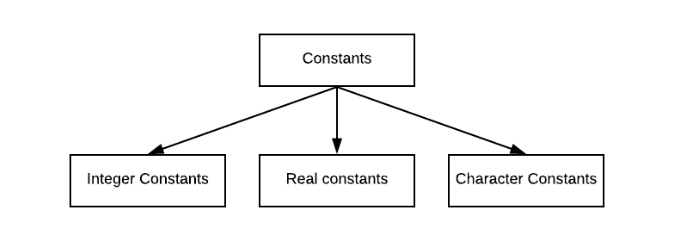
Example:
const int a = 50; // Integer constant
const float b = 33.25; // Real constant
const char c = 'C'; // Character constant
Typecasting
Type casting in C Language converts one type to another. In C language, we use the cast operator for type casting:
(type_name)value
Example:
- int to float:
int a = 13, b = 3; float f = (float) a/ b; printf("Float = %f\n", f); // Output Float = 4.333333 - int to double
int a = 20, b = 7;
double f = (double) a/ b;

printf("Double = %f\n", f);// Output: Double = 2.857143
Operators
Operators perform operations by taking one or more values, to give another value. These operations are performed on variables and values. The following are the operators in C Programming:
- Arithmetic Operators
- Assignment Operators
- Arithmetic Assignment Operators
- Relational/ Comparison Operators
- Logical Operators
- Unary Operators
- Conditional Operators
Decision Making Statements
Decision-making is needed when you want a set of instructions to be executed in a condition and other sets of instructions in another condition.
- if statement
if(condition true)
   statement gets executed;
- if-else statement
if(condition true) statement gets executed; else another statement gets executed; - if-else if-else statement
if(condition true) statement gets executed; else if() statement gets executed; else another statement gets executed; - switch statement
switch(expression) {
   case value1 :
      break;

   case value2 :
      break;

   case value3 :
      break;
    .
    .
    .

   default :
}
Loops
Loops are used when you need to repeat a part of the program. Here are the loops:
- while loop: Used when you want to repeat a part of the program a fixed number of times.
loop counter initialization; while (condition is true) { statement1; statement2; . . . loop counter increment; } - do-while loop: The do-while executes the statement first and then the condition is tested.
loop counter initialization; do { Statement1; Statement2; . . . loop counter increment; } while(condition is true) - for loop: Executes a specified number of times. Initialize, test, and increment loop counter in a single line:
for (initialize loop counter; test loop counter; loop counter increment)
{
   Statement1;
   Statement2;
   .
   .
   .
}
Arrays
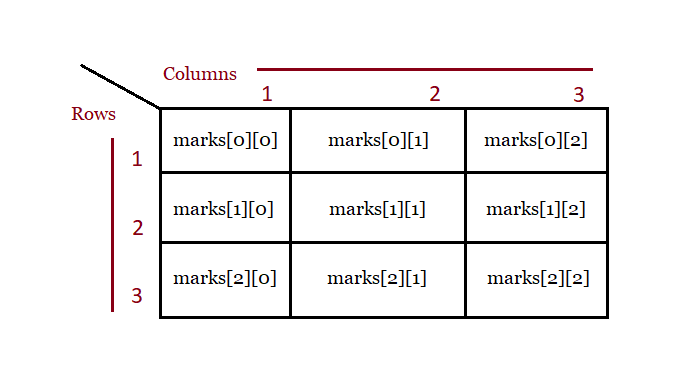
An array is a collection of elements, of fixed size and type, for example, a collection of 5 elements of type int:
- Declare an array:
int marks[3];
- Initialize an array:
int marks[3] = {90, 75, 88} ; - Two-Dimensional Arrays:
int marks[3][3];
Strings
An array of characters in C Language is called Strings. The null character also has a role in C language. A string is terminated by a null character i.e. \0:
- Create a String: We haven’t added the null character above, since the compiler adds it on its own. In addition, we haven’t added size, since it is optional.
char celeb[] = "Lionel";
- Create a String with size in square brackets:
char website[] = {'S', 't', 'u', 'd', 'y', 'o', 'p', 'e', 'd', 'i', 'a','\0'};
Functions
A function in C Language is an organized block of reusable code that avoids repeating the tasks again and again:
- Create a Function:
void demoFunction() { // write the code } - Call a Function:
demoFunction();
- Function Parameters:
void demoFunction(int rank) { } - Multiple Parameters:
void demoFunction(char player[], int rank, int points) { }
C – Recursion
When a function calls itself, it is called Recursion in C Language. In another sense, with Recursion, a defined function can call itself. Recursion is a programming approach, that makes code efficient and reduces LOC.
The following figure demonstrates how recursion works when we calculate Factorial in C with Recursion:

Structures
Structures in C allow you to store data of different types. You can easily store variables of types, such as int, float, char, etc:
- Define a Structure:
struct emp { char name[15]; int age; char zone[10]; float salary; }; - Declare a Structure while defining it:
struct emp { char name[15]; int age; char zone[10]; float salary; }; e1, e2, e3; - Declare a Structure with struct:
struct emp
{
    char name[15];
    int age;
    char zone[10];
    float salary;
};
Declare e1, e2, and e3 of type emp:
struct emp e1, e2;
- Access Structure Members:
e1.name
e1.age
e1.zone
e1.salary
Unions
Structures in C language allow you to store data of different types, whereas Unions allow storing different data types but in the same memory location:
- Create a Union:
union Demo { int a; float b; int c; char d[15]; }; - Access Union Members: Use the member access operator (.):
union Demo demo;

demo.a = 5;
demo.b = 15.6;
demo.c = 34.657;
Pointers
The C Pointer is a variable that is used to store the memory address as its value. However, to get the memory address of a variable, use the & operator:
- The Address Operator: Access the address of a variable. Defined by &, the ampersand sign.
- The Indirection Operator: Access the value of an address. Defined by *, the asterisk sign.
Create and Declare a Pointer:
int* a;
Example:
#include <stdio.h>

int main()
{
   // Integer variable a
   int a = 10;

   // A pointer variable b storing the address of the variable a
   int* b = &a;

   printf("Integer Value = %p",&a);
   printf("\nThe memory address of the variable %p",&a);
   printf("\nThe memory address of the variable a with the pointer = %p",b);

   return 0;
}
Output
Integer Value = 0x7ffcfc4e1d34
The memory address of the variable 0x7ffcfc4e1d34
The memory address of the variable a with the pointer = 0x7ffcfc4e1d34
Enums
Enums, stand for enumerations i.e., a group of constants. Use enums to name constants. In C, we use the enum keyword to create an enum:
- Syntax:
enum enum_name { enum_item1, enum_item2, enum_item3, . . . enum_itemn }; - Create an Enum:
enum Directions { NORTH, SOUTH, EAST, WEST } - Create an Enum Variable:
enum Directions d1;
- Assign a value to the enum variable:
// Create Enum variables
enum Directions d1, d2;

// Assign value to the Enum variable d1
d1 = NORTH;
printf("%d\n", d1); // Output: 0

// Assign value to the Enum variable d2
d2 = SOUTH;
printf("%d", d2); // Output: 1
The output depends on the following:

What next?
After completing C Programming, follow the below tutorials:
If you liked the tutorial, spread the word and share the link and our website Studyopedia with others.
For Videos, Join Our YouTube Channel: Join Now

No Comments