Tag Archives: security

Salt Recipe for Creating a MySQL User with Grants for Scalyr

Salt is a great tool for managing the configuration of many servers. And when you have many servers, you should also be monitoring them with a tool like Dataset (aka Scalyr). The scalyr agent can monitor many things, but in this example, I’m going to show you how to create a MySQL user for the scalyr agent with just the right amount of permissions.

Salt Formula

{% set scalyr_user = salt['pillar.get']('scalyr:mysql:user', 'scalyr-agent-monitor') %}
mysql_scalyr_user:
  mysql_user.present:
    # - host: localhost
    - name: {{ scalyr_user }}
    - password: {{ pillar['scalyr']['mysql']['password'] }}
  mysql_grants.present:
    - grant: 'process, replication client'
    - database: '*.*'
    # - host: localhost
    - user: {{ scalyr_user }}
    - require:
      - mysql_user: {{ scalyr_user }}

Salt uses yaml with jinja templating to define states. This template does the following:

  1. Creates a MySQL user for scalyr
  2. Grants permissions for that scalyr user to access MySQL process & replication metrics on all databases

You can view the full range of options for the mysql_user and mysql_grants states if you need to customize it more.

Pillar Configuration

The above salt recipe requires a corresponding pillar configuration that looks like this:

scalyr:
  mysql:
    user: scalyr-agent-monitor
    password: RANDOM_PASSWORD

Scalyr Agent Configuration

Then in your scalyr agent JSON, you can use a template like this:

{
  logs: [{
    path: "/var/log/mysql/error.log",
    attributes: {parser: "mysql_error"}
  }, {
    path: "/var/log/mysql/slow.log",
    attributes: {parser: "mysql_slow"}
  }],
  monitors: [{
    module: "scalyr_agent.builtin_monitors.mysql_monitor",
    database_username: "{{ salt['pillar.get']('scalyr:mysql:user') }}",
    database_password: "{{ salt['pillar.get']('scalyr:mysql:password') }}",
    database_socket: "/var/run/mysqld/mysqld.sock"
  }]
}

How to use it

If you’re already familiar with salt, then hopefully this all makes sense. Let’s say you named your state mysql_user in a scalyr state directory. Then you could apply it like this:

salt SERVER_ID state.sls scalyr.mysql_user

And now you have a MySQL user just for scalyr. This same idea can likely be applied to any other MySQL monitoring program.

If you’d like some help automating your server configuration and monitoring using tools and formulas like this, contact us at Streamhacker Technologies.
Dealing with SSH Bruteforce Attacks

Django IA: Registration-Activation

django-registration is a pluggable Django app that implements a common registration-activation flow. This flow is quite similar to the password reset flow, but slightly simpler with only 3 views:

  1. register
  2. registration_complete
  3. activate

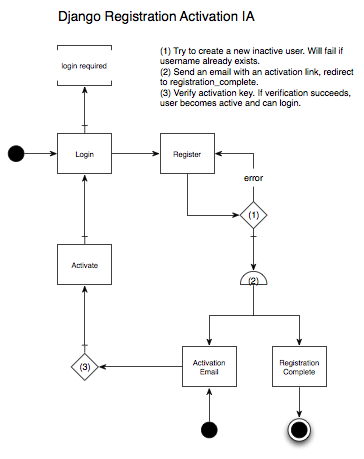
The basic idea is that an anonymous user can create a new account, but cannot login until they activate their account by clicking a link they’ll receive in an activation email. It’s a way to automatically verify that the new user has a valid email address, which is generally an acceptable proxy for proving that they’re human. Here’s an Information Architecture diagram, again using jjg’s visual vocabulary.

Django Registration IA

Here’s a more in-depth walk-thru with our fictional user named Bob:

  1. Bob encounters a section of the site that requires an account, and is redirected to the login page.
  2. But Bob does not have an account, so he goes to the registration page where he fills out a registration form.
  3. After submitting the registration form, Bob is taken to a page telling him that he needs to activate his account by clicking a link in an email that he should be receiving shortly.
  4. Bob checks his email, finds the activation email, and clicks the activation link.
  5. Bob is taken to a page that tells him his account is active, and he can now login.

As with password reset, I think the last step is unnecessary, and Bob should be automatically logged in when his account is activated. But to do that, you’ll have to write your own custom activate view. Luckily, this isn’t very hard. If you take a look at the code for registration.views.activate, the core code is actually quite simple:

[sourcecode language=”python”]
from registration.models import RegistrationProfile

def activate(request, activation_key):
user = RegistrationProfile.objects.activate_user(activation_key.lower())

if not user:
# handle invalid activation key
else:
# do stuff with the user, such as automatically login, then redirect
[/sourcecode]

The rest of the custom activate view is up to you.

Django IA: Auth Password Reset

Django comes with a lot of great built-in functionality. One of the most useful contrib apps is authentication, which (among other things) provides views for login, logout, and password reset. Login & logout are self-explanatory, but resetting a password is, by nature, somewhat complicated. Because it’s a really bad idea to store passwords as plaintext, you can’t just send a user their password when they forget it. Instead, you have to provide a secure mechanism for users to change their password themselves, even if they can’t remember their original password. Lucky for us, Django auth provides this functionality out of the box. All you need to do is create the templates and hook-up the views. The code you need to write to make this happen is pretty simple, but it can be a bit tricky to understand how it all works together. There’s actually 4 separate view functions that together provide a complete password reset mechanism. These view functions are

  1. password_reset
  2. password_reset_done
  3. password_reset_confirm
  4. password_reset_complete

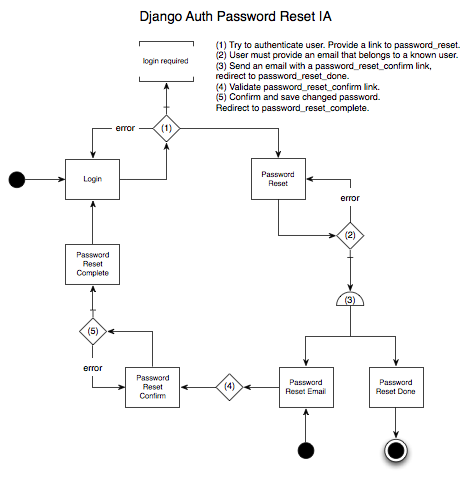
Here’s an Information Architecture diagram showing how these views fit together, using Jesse James Garrett’s Visual Vocabulary. The 2 black dots are starting points, and the circled black dot is an end point.

Django Auth Password Reset IA

Here’s a more in-depth walk-thru of what’s going on, with a fictional user named Bob:

  1. Bob tries to login and fails, probably a couple times. Bob clicks a “Forgot your password?” link, which takes him to the password_reset view.
  2. Bob enters his email address, which is then used to find his User account.
  3. If Bob’s User account is found, a password reset email is sent, and Bob is redirected to the password_reset_done view, which should tell him to check his email.
  4. Bob leaves the site to check his email. He finds the password reset email, and clicks the password reset link.
  5. Bob is taken to the password_reset_confirm view, which first validates that he can reset his password (this is handled with a hashed link token). If the token is valid, Bob is allowed to enter a new password. Once a new password is submitted, Bob is redirected to the password_reset_complete view.
  6. Bob can now login to your site with his new password.

This final step is the one minor issue I have with Django’s auth password reset. The user just changed their password, why do they have to enter it again to login? Why can’t we eliminate step 6 altogether, and automatically log the user in after they reset their password? In fact, you can eliminate step 6 with a bit of hacking on your own authentication backend, but that’s a topic for another post.