Tag Archives: python

NLTK Classifier Based Chunker Accuracy

The NLTK Book has been updated with an explanation of how to train a classifier based chunker, and I wanted to compare it’s accuracy versus my previous tagger based chunker.

Tag Chunker

I already covered how to train a tagger based chunker, with the the discovery that a UnigramBigram TagChunker is the narrow favorite. I’ll use this Unigram-Bigram Chunker as a baseline for comparison below.

Classifier Chunker

A Classifier based Chunker uses a classifier such as the MaxentClassifier to determine which IOB chunk tags to use. It’s very similar to the TagChunker in that the Chunker class is really a wrapper around a Classifier based part-of-speech tagger. And both are trainable alternatives to a regular expression parser. So first we need to create a ClassifierTagger, and then we can wrap it with a ClassifierChunker.

Classifier Tagger

The ClassifierTagger below is an abstracted version of what’s described in the Information Extraction chapter of the NLTK Book. It should theoretically work with any feature extractor and classifier class when created with the train classmethod. The kwargs are passed to the classifier constructor.

[sourcecode language=”python”]
from nltk.tag import TaggerI, untag

class ClassifierTagger(TaggerI):
”’Abstracted from "Training Classifier-Based Chunkers" section of
http://nltk.googlecode.com/svn/trunk/doc/book/ch07.html
”’
def __init__(self, feature_extractor, classifier):
self.feature_extractor = feature_extractor
self.classifier = classifier

def tag(self, sent):
history = []

for i, word in enumerate(sent):
featureset = self.feature_extractor(sent, i, history)
tag = self.classifier.classify(featureset)
history.append(tag)

return zip(sent, history)

@classmethod
def train(cls, train_sents, feature_extractor, classifier_cls, **kwargs):
train_set = []

for tagged_sent in train_sents:
untagged_sent = untag(tagged_sent)
history = []

for i, (word, tag) in enumerate(tagged_sent):
featureset = feature_extractor(untagged_sent, i, history)
train_set.append((featureset, tag))
history.append(tag)

classifier = classifier_cls.train(train_set, **kwargs)
return cls(feature_extractor, classifier)
[/sourcecode]

Classifier Chunker

The ClassifierChunker is a thin wrapper around the ClassifierTagger that converts between tagged tuples and parse trees. args and kwargs in __init__ are passed in to ClassifierTagger.train().

[sourcecode language=”python”]
from nltk.chunk import ChunkParserI, tree2conlltags, conlltags2tree

class ClassifierChunker(nltk.chunk.ChunkParserI):
def __init__(self, train_sents, *args, **kwargs):
tag_sents = [tree2conlltags(sent) for sent in train_sents]
train_chunks = [[((w,t),c) for (w,t,c) in sent] for sent in tag_sents]
self.tagger = ClassifierTagger.train(train_chunks, *args, **kwargs)

def parse(self, tagged_sent):
if not tagged_sent: return None
chunks = self.tagger.tag(tagged_sent)
return conlltags2tree([(w,t,c) for ((w,t),c) in chunks])
[/sourcecode]

Feature Extractors

Classifiers work on featuresets, which are created with feature extraction functions. Below are the feature extractors I evaluated, partly copied from the NLTK Book.

[sourcecode language=”python”]
def pos(sent, i, history):
word, pos = sent[i]
return {‘pos’: pos}

def pos_word(sent, i, history):
word, pos = sent[i]
return {‘pos’: pos, ‘word’: word}

def prev_pos(sent, i, history):
word, pos = sent[i]

if i == 0:
prevword, prevpos = ‘<START>’, ‘<START>’
else:
prevword, prevpos = sent[i-1]

return {‘pos’: pos, ‘prevpos’: prevpos}

def prev_pos_word(sent, i, history):
word, pos = sent[i]

if i == 0:
prevword, prevpos = ‘<START>’, ‘<START>’
else:
prevword, prevpos = sent[i-1]

return {‘pos’: pos, ‘prevpos’: prevpos, ‘word’: word}

def next_pos(sent, i, history):
word, pos = sent[i]

if i == len(sent) – 1:
nextword, nextpos = ‘<END>’, ‘<END>’
else:
nextword, nextpos = sent[i+1]

return {‘pos’: pos, ‘nextpos’: nextpos}

def next_pos_word(sent, i, history):
word, pos = sent[i]

if i == len(sent) – 1:
nextword, nextpos = ‘<END>’, ‘<END>’
else:
nextword, nextpos = sent[i+1]

return {‘pos’: pos, ‘nextpos’: nextpos, ‘word’: word}

def prev_next_pos(sent, i, history):
word, pos = sent[i]

if i == 0:
prevword, prevpos = ‘<START>’, ‘<START>’
else:
prevword, prevpos = sent[i-1]

if i == len(sent) – 1:
nextword, nextpos = ‘<END>’, ‘<END>’
else:
nextword, nextpos = sent[i+1]

return {‘pos’: pos, ‘nextpos’: nextpos, ‘prevpos’: prevpos}

def prev_next_pos_word(sent, i, history):
word, pos = sent[i]

if i == 0:
prevword, prevpos = ‘<START>’, ‘<START>’
else:
prevword, prevpos = sent[i-1]

if i == len(sent) – 1:
nextword, nextpos = ‘<END>’, ‘<END>’
else:
nextword, nextpos = sent[i+1]

return {‘pos’: pos, ‘nextpos’: nextpos, ‘word’: word, ‘prevpos’: prevpos}
[/sourcecode]

Training

Now that we have all the pieces, we can put them together with training.

NOTE: training the classifier takes a long time. If you want to reduce the time, you can increase min_lldelta or decrease max_iter, but you risk reducing the accuracy. Also note that the MaxentClassifier will sometimes produce nan for the log likelihood (I’m guessing this is a divide-by-zero error somewhere). If you hit Ctrl-C once at this point, you can stop the training and continue.

[sourcecode language=”python”]
from nltk.corpus import conll2000
from nltk.classify import MaxentClassifier

train_sents = conll2000.chunked_sents(‘train.txt’)
# featx is one of the feature extractors defined above
chunker = ClassifierChunker(train_sents, featx, MaxentClassifier,
min_lldelta=0.01, max_iter=10)
[/sourcecode]

Accuracy

I ran the above training code for each feature extractor defined above, and generated the charts below. ub still refers to the TagChunker, which is included to provide a comparison baseline. All the other labels on the X-Axis refer to a classifier trained with one of the above feature extraction functions, using the first letter of each part of the name (p refers to pos(), pnpw refers to prev_next_pos_word(), etc).

conll2000 chunk training accuracy
treebank chunk training accuracy

One of the most interesting results of this test is how including the word in the featureset affects the accuracy. The only time including the word improves the accuracy is if the previous part-of-speech tag is also included in the featureset. Otherwise, including the word decreases accuracy. And looking ahead with next_pos() and next_pos_word() produces the worst results of all, until the previous part-of-speech tag is included. So whatever else you have in a featureset, the most important features are the current & previous pos tags, which, not surprisingly, is exactly what the TagChunker trains on.

Custom Training Data

Not only can the ClassifierChunker be significantly more accurate than the TagChunker, it is also superior for custom training data. For my own custom chunk corpus, I was unable to get above 94% accuracy with the TagChunker. That may seem pretty good, but it means the chunker is unable to parse over 1000 known chunks! However, after training the ClassifierChunker with the prev_next_pos_word feature extractor, I was able to get 100% parsing accuracy on my own chunk corpus. This is a huge win, and means that the behavior of the ClassifierChunker is much more controllable thru manualation.
jQuery Validation with Django Forms

Django has everything you need to do server-side validation, but it’s also a good idea to do client-side validation. Here’s how you can integrate the jQuery Validation plugin with your Django Forms.

jQuery Validation Rules

jQuery validation works by assigning validation rules to each element in your form. These rules can be assigned a couple different ways:

  1. Class Rules
  2. Metadata Rules
  3. Rules Object

Django Form Class Rules

The simplest validation rules, such as required, can be assigned as classes on your form elements. To do this in Django, you can specify custom widget attributes.

[sourcecode language=”python”]
from django import forms
from django.forms import widgets

class MyForm(forms.Form):
title = forms.CharField(required=True, widget=widgets.TextInput(attrs={
‘class’: ‘required’
}))
[/sourcecode]

In Django 1.2, there’s support for a required css class, but you can still use the technique above to specify other validation rules.

Django Form Metadata Rules

For validation methods that require arguments, such minlength and maxlength, you can create metadata in the class attribute. You’ll have to include the jQuery metadata plugin for this style of rules.

[sourcecode language=”python”]
from django import forms
from django.forms import widgets

class MyForm(forms.Form):
title = forms.CharField(required=True, minlength=2, maxlength=100, widget=widgets.TextInput(attrs={
‘class’: ‘{required:true, minlength:2, maxlength:100}’
}))
[/sourcecode]

jQuery Validate Rules Object

If your validation requirements are more complex, or you don’t want to use the metadata plugin or class based rules, you can create a rules object to pass as an option to the validate method. This object can be generated in your template like so:

[sourcecode language=”html”]
<script type="text/javascript">
FORM_RULES = {
‘{{ form.title.name }}’: ‘required’
};

$(document).ready(function() {
$(‘form’).validate({
rules: FORM_RULES
});
});
</script>
[/sourcecode]

The reason I suggest generating the rules object in your template is to avoid hardcoding the field name in your javascript. A rules object can also be used in conjunction with class and metadata rules, so you could have some rules assigned in individual element classes or metadata, and other rules in your rules object.

Error Messages

If you want to keep the client-side validation error messages consistent with Django’s validation error messages, you’ll need to copy Django’s error messages and specify them in the metadata or in a messages object.

Metadata Messages

Messages must be specified per-field, and per-rule. Here’s an example where I specify the minlength message for the title field.

[sourcecode language=”python”]
from django import forms
from django.forms import widgets

class MyForm(forms.Form):
title = forms.CharField(minlength=2, widget=widgets.TextInput(attrs={
‘class’: ‘{minlength:2, messages:{minlength:"Ensure this value has at least 2 characters"}}’
}))
[/sourcecode]

Messages Object

Messages can also be specified in javascript object, like so:

[sourcecode language=”html”]
<script type="text/javascript">
FORM_RULES = {
‘{{ form.title.name }}’: ‘required’
};

FORM_MESSAGES = {
‘{{ form.title.name }}’: ‘This field is required’
};

$(document).ready(function() {
$(‘form’).validate({
rules: FORM_RULES,
messages: FORM_MESSAGES
});
});
</script>
[/sourcecode]

Just like with validation rules, messages in element metadata can be used in conjunction with a global messages object. Note: if an element has a title attribute, then the title will be used as the default error message, unless you specify ignoreTitle: false in the jQuery validate options.

Error Labels vs Errorlist

Django’s default error output is an error list, while the default for jQuery Validation errors is a label with class="error". So in order to unify your validation errors, there’s 2 options:

  1. make jQuery Validation output an error list
  2. output error labels instead of an error list in the template

Personally, I prefer the simple error labels produced by jQuery validation. To make Django generate those instead of an error list, you can do the following in your templates:

[sourcecode language=”html”]
{{ field }}
{% if field.errors %}
{# NOTE: must use id_NAME for jquery.validation to overwrite error label #}
<label class=’error’ for=’id_{{ field.name }}’ generated="true">{{ field.errors|join:". " }}</label>
{% endif %}
[/sourcecode]

You could also create your own error_class for outputting the error labels, but then you’d lose the ability to specify the for attribute.

If you want to try to make jQuery validation produce an error list, that’s a bit harder. You can specify a combination of jQuery validation options and get a list, but there’s not an obvious way to get the errorlist class on the ul.

[sourcecode language=”javascript”]
$(‘form’).validate({
errorElement: ‘li’,
wrapper: ‘ul’
});
[/sourcecode]

Other options you can look into are errorLabelContainer, errorContainer, and a highlight function.

Final Recommendations

I find it’s easiest to specify class and metadata rules in custom widget attributes 90% of the time, and use a rules object only when absolutely necessary. For example, if I want to require only the first elements in a formset, but not the rest, then I may use a rules object in addition to class and metadata rules. For error messages, I generally use a field template like the above example that I include for each field:

{% with form.title as field %}{% include "field.html" %}{% endwith %}

Or if the form is really simple, I do

{% for field in form %}{% include "field.html" %}{% endfor %}

Django Model Formsets

Django model formsets provide a way to edit multiple model instances within a single form. This is especially useful for editing related models inline. Below is some knowledge I’ve collected on some of the lesser documented and undocumented features of Django’s model formsets.

Model Formset Factory Methods

Django Model Formsets are generally created using a factory method. The default is modelformset_factory, which wraps formset_factory to create Model Forms. You can also create inline formsets to edit related objects, using inlineformset_factory. inlineformset_factory wraps modelformset_factory to restrict the queryset and set the initial data to the instance’s related objects.

Adding Fields to a Model Formset

Just like with a normal Django formset, you can add additional fields to a model formset by creating a base formset class with an add_fields method, then passing it in to the factory method. The only difference is the class you inherit from. For inlineformset_factory, you should inherit from BaseInlineFormSet.

If you’re using modelformset_factory, then you should import and inherit from BaseModelFormSet instead. Also remember that form.instance may be used to set initial data for the fields you’re adding. Just check to make sure form.instance is not None before you try to access any properties.

[sourcecode language=”python”]
from django.forms.models import BaseInlineFormSet, inlineformset_factory

class BaseFormSet(BaseInlineFormSet):
def add_fields(self, form, index):
super(BasePlanItemFormSet, self).add_fields(form, index)
# add fields to the form

FormSet = inlineformset_factory(MyModel, MyRelatedModel, formset=BaseFormSet)
[/sourcecode]

Changing the Default Form Field

If you’d like to customize one or more of the form fields within your model formset, you can create a formfield_callback function and pass it to the formset factory. For example, if you want to set required=False on all fields, you can do the following.

[sourcecode language=”python”]
def custom_field_callback(field):
return field.formfield(required=False)

FormSet = modelformset_factory(model, formfield_callback=custom_field_callback)
[/sourcecode]

field.formfield() will create the default form field with whatever arguments you pass in. You can also create different fields, and use field.name to do field specific customization. Here’s a more advanced example.

[sourcecode language=”python”]
def custom_field_callback(field):
if field.name == ‘optional’:
return field.formfield(required=False)
elif field.name == ‘text’:
return field.formfield(widget=Textarea)
elif field.name == ‘integer’:
return IntegerField()
else:
return field.formfield()
[/sourcecode]

Deleting Models in a Formset

Pass can_delete=True to your factory method, and you’ll be able to delete the models in your formsets. Note that inlineformset_factory defaults to can_delete=True, while modelformset_factory defaults to can_delete=False.

Creating New Models with Extra Forms

As with normal formsets, you can pass an extra argument to your formset factory to create extra empty forms. These empty forms can then be used to create new models. Note that when you have extra empty forms in the formset, you’ll get an equal number of None results when you call formset.save(), so you may need to filter those out if you’re doing any post-processing on the saved objects.

If you want to set an upper limit on the number of extra forms, you can use the max_num argument to restrict the maximum number of forms. For example, if you want up to 6 forms in the formset, do the following:

[sourcecode language=”python”]
MyFormSet = inlineformset_factory(MyModel, MyRelatedModel, extra=6, max_num=6)
[/sourcecode]

Saving Django Model Formsets

Model formsets have a save method, just like with model forms, but in this case, you’ll get a list of all modified instances instead of a single instance. Unmodified instances will not be returned. As mentioned above, if you have any extra empty forms, then those list elements will be None.

If you want to create custom save behavior, you can override 2 methods in your BaseFormSet class: save_new and save_existing. These methods look like this:

[sourcecode language=”python”]
from django.forms.models import BaseInlineFormSet

class BaseFormSet(BaseInlineFormSet):
def save_new(self, form, commit=True):
# custom save behavior for new objects, form is a ModelForm
return super(BaseFormSet, self).save_new(form, commit=commit)

def save_existing(self, form, instance, commit=True):
# custom save behavior for existing objects
# instance is the existing object, and form has the updated data
return super(BaseFormSet, self).save_existing(form, instance, commit=commit)
[/sourcecode]

Inline Model Admin

Django’s Admin Site includes the ability to specify InlineModelAdmin objects. Subclasses of InlineModelAdmin can use all the arguments of inlineformset_factory, plus some admin specific arguments. Everything mentioned above applies equally to InlineModelAdmin arguments: you can specify the number of extra forms, the maximum number of inline forms, and even your own formset with custom save behavior.

Mnesia Records to MongoDB Documents

I recently migrated about 50k records from mnesia to MongoDB using my fork of emongo, which adds supervisors with transparent connection restarting, for reasons I’ll explain below.

Why Mongo instead of Mnesia

mnesia is great for a number of reasons, but here’s why I decided to move weotta’s place data into MongoDB:

Converting Records to Docs and vice versa

First, I needed to convert records to documents. In erlang, mongo documents are basically proplists. Keys going into emongo can be atoms, strings, or binaries, but keys coming out will always by binaries. Here’s a simple example of record to document conversion:

[sourcecode language=”erlang”]
record_to_doc(Record, Attrs) ->
% tl will drop record name
lists:zip(Attrs, tl(tuple_to_list(Record))).
[/sourcecode]

This would be called like record_to_doc(MyRecord, record_info(fields, my_record)). If you have nested dicts then you’ll have to flatten them using dict:to_list. Also note that list values are coming out of emongo are treated like yaws JSON arrays, i.e. [{key, {array, [val]}}]. For more examples, check out the emongo docs.

Heavy Write Load

To do the migration, I used etable:foreach to insert each document. Bulk insertion would probably be more efficient, but etable makes single record iteration very easy.

I started using the original emongo with a pool size of 10, but it was crashy when I dumped records as fast as possible. So initially I slowed it down with timer:sleep(200), but after adding supervised connections, I was able to dump with no delay. I’m not exactly sure what I fixed in this case, but I think the lesson is that using supervised gen_servers will give you reliability with little effort.

Read Performance

Now that I had data in mongo to play with, I compared the read performance to mnesia. Using timer:tc, I found that mnesia:dirty_read takes about 21 microseconds, whereas emongo:find_one can take anywhere from 600 to 1200 microseconds, querying on an indexed field. Without an index, read performance ranged from 900 to 2000 microseconds. I also tested only requesting specific fields, as recommended on the MongoDB Optimiziation page, but with small documents (<10 fields) that did not seem to have any effect. So while mongodb queries are pretty fast at 1ms, mnesia is about 50 times faster. Further inspection with fprof showed that nearly half of the cpu time of emongo:find is taken by BSON decoding.

Heavy Read Load

Under heavy read load (thousands of find_one calls in less than second), emongo_conn would get into a locked state. Somehow the process had accumulated unparsable data and wouldn’t reply. This problem went away when I increased the size of the pool size to 100, but that’s a ridiculous number of connections to keep open permanently. So instead I added some code to kill the connection on timeout and retry the find call. This was the main reason I added supervision. Now, every pool is locally registered as a simple_one_for_one supervisor that supervises every emongo_server connection. This pool is in turn supervised by emongo_sup, with dynamically added child specs. All this supervision allowed me to lower the pool size back to 10, and made it easy to kill and restart emongo_server connections as needed.

Why you may want to stick with Mnesia

Now that I have experience with both MongoDB and mnesia, here’s some reasons you may want to stick with mnesia:

Despite all that, I’m very happy with MongoDB. Installation and setup were a breeze, and schema-less data storage is very nice when you have variable fields and a high probability of adding and/or removing fields in the future. It’s simple, scalable, and as mentioned above, it’s very easy to access from many different languages. emongo isn’t perfect, but it’s open source and will hopefully benefit from more exposure.

Scalable Database Links

Redis:
Cassandra:
Performance Tradeoffs:
Other:

Django IA: Registration-Activation

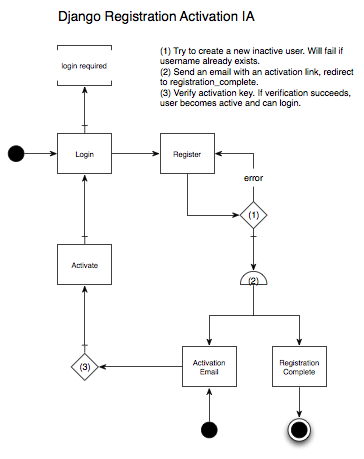
django-registration is a pluggable Django app that implements a common registration-activation flow. This flow is quite similar to the password reset flow, but slightly simpler with only 3 views:

  1. register
  2. registration_complete
  3. activate

The basic idea is that an anonymous user can create a new account, but cannot login until they activate their account by clicking a link they’ll receive in an activation email. It’s a way to automatically verify that the new user has a valid email address, which is generally an acceptable proxy for proving that they’re human. Here’s an Information Architecture diagram, again using jjg’s visual vocabulary.

Django Registration IA

Here’s a more in-depth walk-thru with our fictional user named Bob:

  1. Bob encounters a section of the site that requires an account, and is redirected to the login page.
  2. But Bob does not have an account, so he goes to the registration page where he fills out a registration form.
  3. After submitting the registration form, Bob is taken to a page telling him that he needs to activate his account by clicking a link in an email that he should be receiving shortly.
  4. Bob checks his email, finds the activation email, and clicks the activation link.
  5. Bob is taken to a page that tells him his account is active, and he can now login.

As with password reset, I think the last step is unnecessary, and Bob should be automatically logged in when his account is activated. But to do that, you’ll have to write your own custom activate view. Luckily, this isn’t very hard. If you take a look at the code for registration.views.activate, the core code is actually quite simple:

[sourcecode language=”python”]
from registration.models import RegistrationProfile

def activate(request, activation_key):
user = RegistrationProfile.objects.activate_user(activation_key.lower())

if not user:
# handle invalid activation key
else:
# do stuff with the user, such as automatically login, then redirect
[/sourcecode]

The rest of the custom activate view is up to you.

Django IA: Auth Password Reset

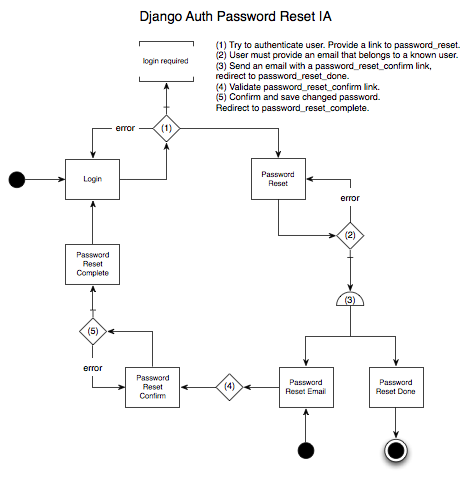
Django comes with a lot of great built-in functionality. One of the most useful contrib apps is authentication, which (among other things) provides views for login, logout, and password reset. Login & logout are self-explanatory, but resetting a password is, by nature, somewhat complicated. Because it’s a really bad idea to store passwords as plaintext, you can’t just send a user their password when they forget it. Instead, you have to provide a secure mechanism for users to change their password themselves, even if they can’t remember their original password. Lucky for us, Django auth provides this functionality out of the box. All you need to do is create the templates and hook-up the views. The code you need to write to make this happen is pretty simple, but it can be a bit tricky to understand how it all works together. There’s actually 4 separate view functions that together provide a complete password reset mechanism. These view functions are

  1. password_reset
  2. password_reset_done
  3. password_reset_confirm
  4. password_reset_complete

Here’s an Information Architecture diagram showing how these views fit together, using Jesse James Garrett’s Visual Vocabulary. The 2 black dots are starting points, and the circled black dot is an end point.

Django Auth Password Reset IA

Here’s a more in-depth walk-thru of what’s going on, with a fictional user named Bob:

  1. Bob tries to login and fails, probably a couple times. Bob clicks a “Forgot your password?” link, which takes him to the password_reset view.
  2. Bob enters his email address, which is then used to find his User account.
  3. If Bob’s User account is found, a password reset email is sent, and Bob is redirected to the password_reset_done view, which should tell him to check his email.
  4. Bob leaves the site to check his email. He finds the password reset email, and clicks the password reset link.
  5. Bob is taken to the password_reset_confirm view, which first validates that he can reset his password (this is handled with a hashed link token). If the token is valid, Bob is allowed to enter a new password. Once a new password is submitted, Bob is redirected to the password_reset_complete view.
  6. Bob can now login to your site with his new password.

This final step is the one minor issue I have with Django’s auth password reset. The user just changed their password, why do they have to enter it again to login? Why can’t we eliminate step 6 altogether, and automatically log the user in after they reset their password? In fact, you can eliminate step 6 with a bit of hacking on your own authentication backend, but that’s a topic for another post.

Cloud Computing Links

Amazon Web Services:
Python Libraries:
GlusterFS:

Django Forms, Utilities, OAuth, and OpenID Links

Form Customization
Utility Apps
OAuth and OpenID

A Few Database Links