
Typebar
Every key you press lights up on an on-screen keyboard, and each shortcut is named as you press it.
Visit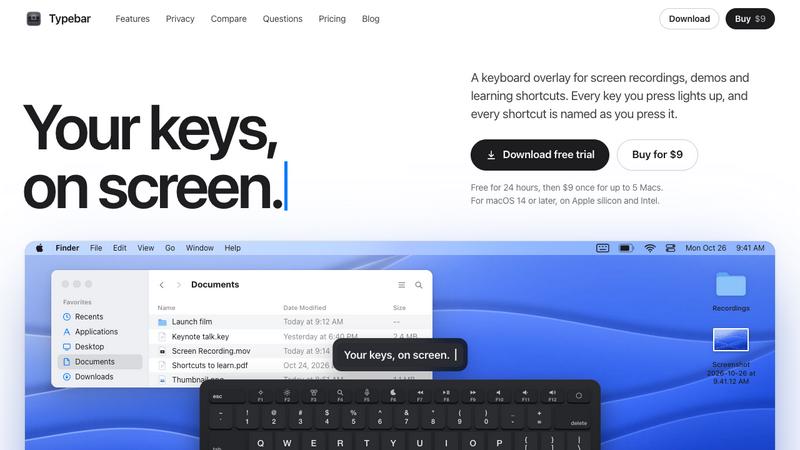
About Typebar
Typebar is a keyboard overlay for the Mac, made for screen recordings, demos and learning shortcuts. Every key you press lights up on an on-screen keyboard, and a pill names each shortcut from the app's own menus, like Screenshot Selection for Shift Command 4.
Hold a modifier and the keys show what they do in the app in front. There are cheatsheets for every app, 20 hand-made packs and your own keybindings from 11 apps. Click ripples, a cursor halo, Spotlight, six switch sounds and 40 themes with a theme editor are built in.
Password fields stay private, and nothing you type is saved or sent anywhere. Typebar can show itself when a recording starts and hide when it stops.
Free for 24 hours, then $9 once for up to 5 Macs. macOS 14 or later, on Apple silicon and Intel.
Explore more in this category:
Similar to Typebar


PlayBrandy
PlayBrandy is a SaaS platform designed to simplify branding and digital marketing workflows for businesses and creators.

Leadmatically
Never Miss a Freelance Opportunity.


MyGenogramMaker
Free browser-based genogram maker with family symbols, relationship lines, and templates.

ZeraBooks
Accounting software that does your books for you, starting from the bank statements you already have.

Cardify
Cardify turns Markdown into polished knowledge cards in real time - 30+ themes, custom sizes and fonts, batch export to PNG, SVG or PDF.

Fiund
Licensed real-world audio, video and text data for AI training teams