
ekstrakt
ekstrakt generates instant AI summaries of any YouTube video, cutting hours of watching down to seconds with up to 90% time savings.
VisitPublished on:
July 18, 2026
Pricing:
About ekstrakt
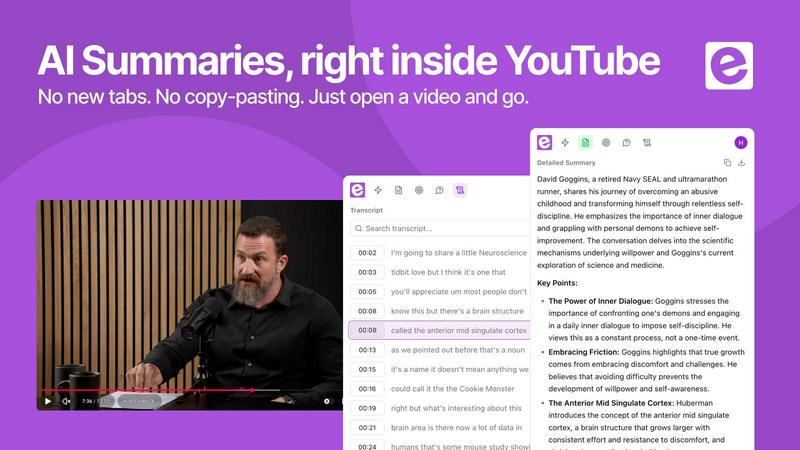
ekstrakt is an AI-powered productivity tool designed to eliminate the inefficiency of watching long-form video content. It transforms any YouTube video into concise, readable summaries in seconds, effectively compressing hours of viewing into minutes of reading. The core value proposition is time optimization: users can extract the essence of a 2-hour lecture, a 3-hour podcast, or a 40-minute tutorial in under 60 seconds. The product is built for students, professionals, researchers, and lifelong learners who consume video content for information but lack the time to watch everything in full. Unlike traditional video summarizers that deliver a single, rigid output, ekstrakt offers four distinct summary modes: Short for a quick gist, Detailed for a comprehensive breakdown, Straight-to-Answer for skipping directly to conclusions, and Ask-a-Question for querying the video's actual content. This flexibility allows users to control the depth of their information intake based on their immediate needs. ekstrakt is available as a Chrome extension that integrates directly into the YouTube watch page and as a web app for paste-and-summarize functionality. It supports 22 languages for both input and output, making it a global solution for overcoming language barriers in video content. The product operates on a freemium model with 5 free summaries available without requiring a credit card, allowing users to validate its accuracy and efficiency before committing. By turning passive video watching into active, targeted information retrieval, ekstrakt addresses the modern problem of content overload and helps users reclaim significant amounts of time.
Features of ekstrakt
Four Distinct Summary Depths
Unlike single-output summarizers, ekstrakt provides four tailored summary types that adapt to the user's context. The Short mode delivers the core gist in a glance, ideal for quick scanning of familiar topics. The Detailed mode produces a full breakdown of every key point, suitable for thorough research or study sessions. Straight-to-Answer mode bypasses all filler and preamble to deliver the direct conclusion or answer, perfect for troubleshooting or fact-checking. Ask-a-Question mode allows users to query the video's transcript and receive answers grounded in the actual spoken content, complete with timestamps for verification. This multi-depth approach ensures users never waste time reading a summary that is either too shallow or too verbose for their current task.
Real-Time Generation and Streaming
Summaries are not pre-generated or cached. ekstrakt processes each video request in real time, streaming the summary directly to the user's screen as it is generated. This means the output is always fresh and contextually relevant, even for newly uploaded videos. The real-time processing eliminates the latency typically associated with AI summarization tools, delivering the first key points within seconds of the request. For longer videos, the streaming effect allows users to start reading the summary while the AI continues processing the remaining content, further reducing perceived wait time and accelerating the information retrieval process.
Multi-Platform Accessibility
ekstrakt is available across three primary platforms to match user habits. The Chrome extension integrates seamlessly into the YouTube watch page, placing a summary button directly next to the video player for one-click access without leaving the browser tab. The web app provides a full-featured summarization experience from any browser or device, including support for searching through the full transcript and saving summaries for later reference. Mobile apps for iOS and Android are in development, promising on-the-go summarization capabilities. This cross-platform strategy ensures that whether a user is on a desktop, laptop, or mobile device, ekstrakt is accessible at the point of need.
Multi-Language Support
ekstrakt supports 22 languages for both input and output, effectively removing language barriers from video content. Users can input a video in any supported language and receive summaries in their preferred language, regardless of the original audio. This feature is particularly valuable for accessing global content such as international conferences, foreign language tutorials, or non-English research presentations. The language support extends across all four summary types, ensuring that users get the same depth and accuracy whether they are summarizing a Mandarin lecture or a Spanish podcast. This capability transforms ekstrakt from a simple time-saver into a cross-cultural knowledge access tool.
Use Cases of ekstrakt
Academic Lecture Compression
Students and researchers frequently face 2-hour recorded lectures that contain 30 minutes of substantive content. ekstrakt reduces this to a 2-minute detailed summary, allowing users to identify the key concepts, theories, and data points without watching the entire recording. The Detailed mode is particularly effective here, as it captures the logical flow of arguments and supporting evidence. Users can then decide which segments warrant full attention based on the summary's highlights. This approach can reduce a week's worth of lecture viewing from 10 hours to under 30 minutes of reading, enabling more efficient study sessions and better retention of core material.
Podcast Episode Screening
With thousands of podcast episodes published daily, professionals need a way to determine which episodes are worth their time. ekstrakt's Short mode provides a one-paragraph gist of a 3-hour podcast in under 30 seconds. This allows users to screen multiple episodes per minute, identifying those that contain actionable insights or relevant discussions. The Straight-to-Answer mode is particularly useful for podcasts with clickbait titles, as it can extract the host's or guest's actual conclusion on a topic, bypassing the typical 20-minute preamble. This screening process can reduce podcast consumption time by 90% while maintaining information quality.
Technical Tutorial Navigation
Software developers, designers, and engineers often watch 40-minute tutorials that contain only 5 minutes of relevant code or configuration steps. ekstrakt's Straight-to-Answer mode allows users to input a specific question, such as "How do I configure the database connection?" and receive the exact answer with timestamps. This eliminates the need to scrub through filler content, dead ends, and repeated explanations. For multi-part tutorial series, the Detailed mode can produce a consolidated summary of the entire series, highlighting the progression of skills and key technical decisions. This approach can compress a 6-hour tutorial series into a 10-minute reading session.
Watch Later Library Cleanup
The average user accumulates hundreds of saved videos in their "Watch Later" playlist, many of which will never be viewed. ekstrakt enables bulk summary generation for these backlogged videos, allowing users to skim the Short summaries and decide which videos contain genuinely valuable content. Videos that are no longer relevant, outdated, or too low-quality can be removed from the list guilt-free. This cleanup process can reduce a 200-video backlog to a manageable 20-video priority list in under 15 minutes. The Ask-a-Question mode can also be used to verify specific claims from saved videos without watching them, confirming their relevance before committing time.
Frequently Asked Questions
What is ekstrakt and how does it work?
ekstrakt is an AI-powered summarization tool specifically designed for YouTube videos. It processes the video's audio transcript using advanced natural language processing models to extract key points, arguments, and conclusions. The tool does not watch the video or analyze visual content; it focuses entirely on the spoken word. Users can choose from four summary types, each optimized for different information needs. The AI generates the summary in real time and streams it to the user's screen, typically completing a 1-hour video summary in under 30 seconds. The tool supports 22 languages and can handle videos of any length, from 1-minute clips to 8-hour-long podcasts.
How accurate are the AI summaries?
Accuracy depends on the quality of the video's audio and the clarity of the speaker. For videos with clear audio, minimal background noise, and well-structured speech, ekstrakt achieves approximately 95% accuracy in capturing key points and factual claims. For videos with heavy accents, overlapping dialogue, or poor audio quality, accuracy may decrease to around 80%. The Detailed and Ask-a-Question modes tend to be more accurate than the Short mode because they have more context to work with. Users can always cross-reference the summary against the full searchable transcript, which is provided alongside the summary. The AI is continuously trained on new data and improved based on user feedback.
How do I get started? Is there a free trial?
Getting started requires no credit card and no commitment. New users receive 5 free summaries to test the tool across different video types and summary modes. To begin, you can either install the Chrome extension from the Chrome Web Store or visit the ekstrakt web app and paste a YouTube video link. The extension automatically adds a summary button to every YouTube watch page, while the web app provides a dedicated interface for pasting links and managing summaries. After using the 5 free summaries, users can choose a paid plan to continue accessing the service. There is no time limit on the free trial, so users can take as long as they need to evaluate the tool.
Can I summarize private or unlisted videos?
ekstrakt can summarize unlisted YouTube videos as long as the user has the direct link to the video. The tool processes the video's transcript from the link provided, so any video with a shareable URL is accessible. However, ekstrakt cannot summarize truly private videos that are not accessible via a direct link, as the tool requires the same access privileges as a standard viewer. For enterprise or educational users who need to summarize internal training videos, ekstrakt recommends uploading the video to YouTube as an unlisted video first. This ensures the video remains hidden from search results while still being accessible for summarization.
Similar to ekstrakt

Bolts
AI employees with a brain and their own cloud computer. They think, remember your business and work 24/7.

PlayBrandy
PlayBrandy is a SaaS platform designed to simplify branding and digital marketing workflows for businesses and creators.

TestOptim AI
AI QA agent that explores your web app, writes end-to-end tests and reports bugs with screenshots. No test code.

Leadmatically
Never Miss a Freelance Opportunity.


MyGenogramMaker
Free browser-based genogram maker with family symbols, relationship lines, and templates.

ZeraBooks
Accounting software that does your books for you, starting from the bank statements you already have.

Cardify
Cardify turns Markdown into polished knowledge cards in real time - 30+ themes, custom sizes and fonts, batch export to PNG, SVG or PDF.