

Description
VW Floating Chat adds a lightweight, accessible contact launcher to any WordPress site. Offer visitors a curated collection of chat and social links inside a draggable widget that sits on the left or right edge of the screen—similar to Chaty—without sacrificing performance or privacy.
Highlights
- Choose the default side (left or right) and fine-tune the widget offsets.
- Allow visitors to drag the widget anywhere; positions are stored in localStorage per browser.
- Toggle more than twenty contact and social channels with custom labels and destinations.
- Present official icons on the front-end with adjustable desktop and mobile sizing + spacing.
- Optional contextual tooltips and subtle attention effects keep the UI accessible yet lively.
- Enjoy a compact, card-based settings screen that keeps desktop and mobile controls side by side.
- Clean front-end CSS and vanilla JS with no external dependencies.
- Built following WordPress.org security, i18n, and accessibility guidelines.
Privacy
VW Floating Chat does not send any data to external servers. If you enable WhatsApp, email, or call options, ensure your site’s privacy policy discloses that clicking those buttons opens third-party services (WhatsApp, email client, phone dialer). Drag positions are saved in the visitor’s browser using localStorage and can be cleared by removing browser data.
Screenshots

Floating contact widget with WhatsApp, Email, and Call buttons on desktop. 
Mobile view showing the resized widget and spacing options. 
Card-based admin settings screen with grouped desktop and mobile controls. 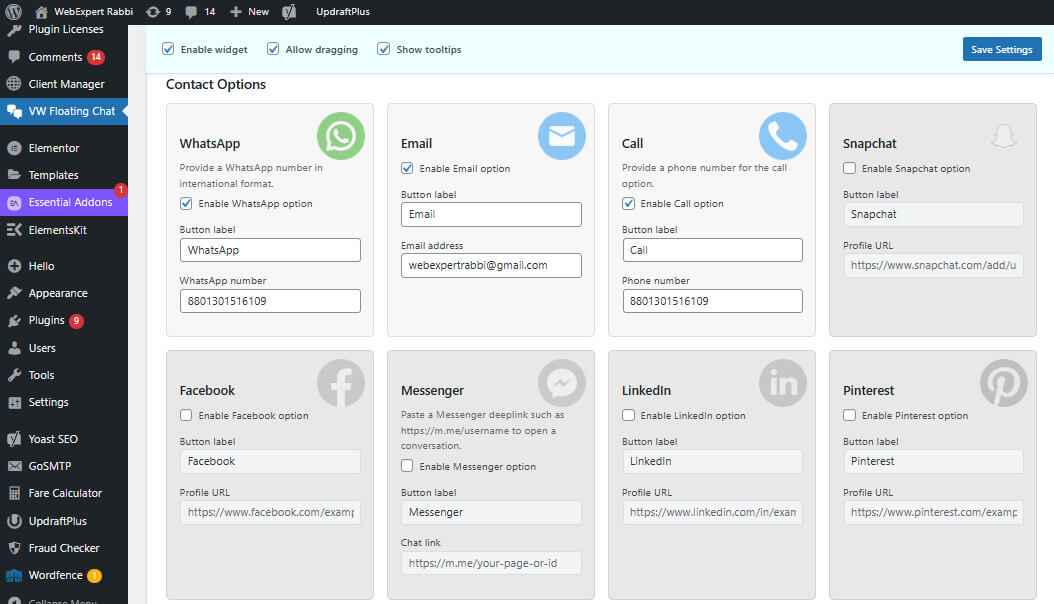
Installation
- Upload the
vw-floating-chatfolder to the/wp-content/plugins/directory or install via the Plugins screen. - Activate the plugin through the “Plugins” menu in WordPress.
- Navigate to Settings VW Floating Chat to configure channels, positions, and labels.
- Enable the widget and save your changes.
FAQ
-
Does the widget collect analytics or send data externally?
-
No. The plugin only stores the visitor’s drag position in their browser’s localStorage. No data leaves the site.
-
Will it work with caching or optimisation plugins?
-
Yes. Assets are small and versioned, and the widget loads in the footer using standard WordPress hooks.
-
Can I add more channels?
-
The plugin ships with 20+ ready-made channels. Developers can still hook into the
vwfc_channelsfilter to register additional links or customise URLs.
Reviews

Contributors & Developers
“VW Floating Chat” is open source software. The following people have contributed to this plugin.
Contributors

Translate “VW Floating Chat” into your language.
Interested in development?
Browse the code, check out the SVN repository, or subscribe to the development log by RSS.
Changelog
1.2.0
- Added Facebook Messenger channel with smart app/web detection.
- Improved WhatsApp deep-linking: auto-detects mobile/desktop and opens app directly without confirmation dialog.
- Fixed Call (tel:) links to work properly on all devices and browsers.
- Enhanced admin UI with channel icon watermarks for easy visual identification.
- Added smart URL normalization: automatically builds correct links from @handles, usernames, or partial URLs.
- Expanded mobile icon size range (15-150px) for better flexibility on small screens.
- Reduced mobile drag icon minimum to 15px for ultra-compact layouts.
- Updated default mobile offsets to 15px for tighter edge positioning.
- Added visual distinction between active/disabled channels with grayscale filters.
- Improved settings labels with min/max/default value indicators for all numeric fields.
- Fixed critical PHP 8+ compatibility issue with percent sign escaping in admin labels.
- Enhanced channel card styling with improved hover states and transitions.
- Added CSS variable support for flexible icon watermark positioning.
- Optimized frontend URL escaping to preserve tel: and mailto: protocols.
- All channels now support flexible input: full URLs, @handles, or plain usernames.
- Added sticky admin header with Save button and quick-access checkboxes for improved UX.
- Fixed icon opacity hover behavior to increase visibility on interaction.
- Ensured all mobile validation ranges are consistent across settings labels and sanitization.
1.1.0
- Added 20+ premium-ready channels (WhatsApp, Messenger, Discord, etc.) with custom labels.
- Introduced optional tooltips that surface channel names on hover/focus.
- Added optional attention effects with 15 animation styles and reduced-motion support.
- Improved admin UI: four-column contact grid, clearer toggles, responsive controls.
- Refined CSS for consistent spacing, hover states, and mobile orientation handling.
1.0.0
- Initial release with WhatsApp, Email, and Call integration.