AI Security and Safety Ecosystem

The field of artificial intelligence (AI) has seen explosive growth over the past two years, with its potential for future advancements appearing virtually limitless. However, with this rapid expansion comes a growing wave of challenges and risks. From AI-generated scams to deepfakes and data breaches, many people have either directly experienced or heard about the darker side of AI technology. This blog delves into the critical aspects of AI security and safety, exploring the threats posed by AI and the mechanisms we can use to prevent and mitigate them.

This blog will cover the the following AI aspects:

  • AI Security and Safety and their relationship
  • Technology landscape
  • Key trends for the future 
  • Regulations

Security and Safety

AI security focuses on protecting AI systems from external attacks. For example, a hacker might use a prompt injection attack to manipulate the model into producing inappropriate outputs or leaking sensitive personal information (PII). On the other hand, AI safety addresses the prevention of harmful uses of AI systems. An example of a safety concern is a bad actor using AI to create deepfakes for fraudulent purposes.

AI security and safety are closely interconnected, with one often influencing the other. For instance, an AI security breach such as data poisoning—where malicious actors inject harmful data into a model—can undermine the safety of an application using that model. Conversely, an AI safety issue, such as inherent bias in a model, can be exploited by hackers to carry out attacks (e.g., using the model’s bias to impersonate or favor certain groups), thereby creating security vulnerabilities.

AI security summary

AI security builds upon existing cybersecurity practices, with specific enhancements tailored for AI systems. It can be categorized into three fundamental layers:

  1. Usage Security: This layer focuses on securing the interaction between users and AI systems. A common example is a jailbreak attack using prompt injection, where hackers craft malicious prompts to manipulate the model into generating inappropriate outputs or revealing sensitive data.
  2. Application Security: This layer addresses the security of AI applications, including the models themselves. Examples include indirect prompt injections or vulnerabilities in plugins that can compromise application integrity.
  3. Platform Security: This layer involves securing the underlying infrastructure of AI systems. For instance, in a data poisoning attack, malicious actors alter training data to manipulate model outputs. Other examples include model theft, where the intellectual property of AI models is stolen.

AI safety summary

While the prospect of AI surpassing human control is still a distant reality, there are several immediate AI safety concerns that must be addressed to ensure AI is used constructively rather than destructively. AI safety, like AI security, can be categorized into three layers:

  1. Usage Safety: This layer focuses on how AI systems are utilized by end users. Examples include deepfakes, plagiarism, and copyright violations. The proliferation of deepfakes, powered by advanced technologies like Generative Adversarial Networks (GANs), has made it increasingly difficult to distinguish between real and fabricated content, contributing to a negative perception of AI.
  2. Application Safety: This layer addresses safety risks associated with AI applications. Key examples include privacy infringement and bias in AI models, which can lead to discriminatory outcomes and ethical concerns.
  3. Platform Safety: This layer pertains to broader systemic and governance issues in AI deployment. Examples include the absence of regulatory oversight and the risk of cascade failures, where interconnected AI systems amplify small errors into significant failures.

Technologies used for AI security and safety

This is an evolving space that must adapt rapidly to keep pace with the latest AI trends.

  • Usage: For AI security, techniques like input validation and filtering can help ensure that only sanitized data is fed into AI systems. For AI safety, approaches such as moderated outputs, bias auditing, explainable AI, and human-in-the-loop systems play a crucial role in ensuring responsible use.
  • Application: Model watermarking is a valuable AI security measure to prevent model theft. For AI safety, techniques like differential privacy for safeguarding sensitive data and reinforcement learning with human feedback to align AI behavior with ethical standards are widely used.
  • Platform: For AI security, leveraging technologies like blockchain, homomorphic encryption, and trusted execution environments (TEEs) enhances the integrity and confidentiality of AI systems. For AI safety, establishing robust governance frameworks and compliance tools is essential to mitigate risks and ensure ethical deployment.

AI systems require comprehensive monitoring and analysis to remain secure and reliable. Machine Learning Detection and Response (MLDR) uses machine learning to identify real-time threats and provide automated responses, enabling proactive and efficient risk management.

AI Security landscape

The companies provided are not an exhaustive list, it’s just a sample list.

AI safety landscape

The companies provided are not an exhaustive list, it’s just a sample list.

Key Trends for the Future

AI Watermarking


Watermarking is a critical technique for protecting content creators by ensuring ownership of their digital creations and mitigating issues like deep fakes. In the context of AI, two primary techniques are used for watermarking:

  1. Statistical Watermarking:
    This method involves adding imperceptible data to AI-generated content, which can later be detected by specialized tools.
    • Example: For text-based models, specific word substitutions are made based on their probability. In images, certain pixel values are adjusted according to spatial or frequency domain rules.
    • Audio Example: Frequencies beyond human perception are added to sound files.
  2. Machine Learning Watermarking:
    Here, the AI model itself is modified to embed unique markers in its outputs, enabling easy identification of model-generated content.
    • Examples: Neural network-based watermarking, adversarial watermarking.

Challenges include resistance to tampering, ease of detection, and maintaining content quality.
Example in Action: Google SynthID embeds imperceptible watermarks into images produced by its AI models, and Gemini applies this to all GenAI outputs. Huggingface also offers open-source AI watermarking tools.circumvented by users or because users won’t prefer using chatgpt in that case.  

Data Provenance

Data provenance involves tracking the origin and modifications of data. By embedding metadata into content or storing it externally on an immutable ledger like blockchain, we can ensure the integrity of data used in AI training and generation.

  • Applications:
    • Ethical AI training through verified datasets.
    • Preventing copyright violations by ensuring proper attribution.
  • Examples:
    • Adobe Content Credentials and CAI: Adobe products attach provenance metadata to creations, and the CAI open standard enables cross-platform use.
    • Initiatives like C2PA and Data Provenance Initiative aim to standardize these practices.

Explainable AI(XAI)

AI often functions as a “black box,” making it hard to verify if outputs are accurate or hallucinated. XAI bridges this gap by providing transparency and fostering trust.

  • Key Techniques:
    • Interpretable AI Models: Linking AI outputs to specific inputs and reasoning.
    • LIME (Local Interpretable Model-Agnostic Explanations): Offers localized approximations for complex models.
    • SHAP (Shapley Additive Explanations): Uses game theory to assess the contribution of model parameters.

Homomorphic encryption

Homomorphic encryption enables computations on encrypted data without needing decryption, ensuring privacy while processing sensitive information.

  • Examples of Use: Medical data analysis, financial forecasting.
  • Popular Libraries: Microsoft SEAL and Zama’s Concrete.
  • Challenges: Performance overhead and complexity. Innovations are underway to make this technology more efficient.

Additionally, Zero Knowledge Proofs (ZKP) offer privacy-preserving mechanisms, such as proving ownership of a license without revealing personal details like age or ID number.

Blockchain and AI

Blockchain, with its decentralized and immutable ledger, offers transformative benefits for AI in several key areas:

Data Provenance: Blockchain enables the transparent tracing of data inputs used in model training, ensuring the integrity and security of the data. By maintaining a complete history of data modifications on the blockchain, it prevents tampering and builds trust in AI systems. Additionally, contributors of data can be rewarded through smart contracts, fostering ethical and transparent data sharing.

Example: Ocean Protocol facilitates data traceability and monetization in a decentralized manner.

Decentralized and Federated Learning: By distributing data and training processes across multiple nodes, blockchain supports decentralized or federated learning, which enhances data privacy and reduces risks associated with centralized storage.

Example: SingularityNET enables decentralized AI model training while maintaining data security and privacy.

Content Verification and Deep Fake Prevention: Blockchain can be used to track AI-generated content and the data that contributed to it. This traceability ensures accountability and helps combat issues like deep fakes by verifying content authenticity.

Example: Numbers Protocol and Adobe’s Content Authenticity Initiative (CAI) provide solutions for tracking and verifying AI-generated content.

Differential privacy

Differential privacy ensures that AI systems use input data without exposing individual details. By adding noise to data, it minimizes the risk of re-identification.

Adding/removing a single data point does not significantly affect model outputs.

Examples:

Google TensorFlow Privacy incorporates noise to protect sensitive information.

Human in the loop training(HILT) and Reinforced learning with human feedback(RLHF)

HILT integrates human oversight during both training and inference, ensuring models align with user needs.
RLHF fine-tunes models by using human feedback to develop reward systems, enhancing their performance and alignment with human values.

Examples: ChatGPT’s alignment process leverages RLHF for improving responses.

Regulations

AI regulations are still in their early stages, but they are essential for ensuring both the security and safety of AI systems. Effective regulations must strike a delicate balance—minimizing the potential harms of AI while fostering innovation. Different regions have adopted varying approaches to AI governance. For example, the European Union has implemented strict regulatory measures, while countries like the United States and the United Kingdom have opted for a more lenient or flexible approach. To ensure that AI development remains responsible and beneficial, a collaborative effort is required across nations, industries, and organizations. This global cooperation will help establish standardized guidelines and best practices, ensuring AI is developed and deployed safely, ethically, and effectively.

NIST AI risk management framework

The National Institute of Standards and Technology (NIST) has developed an AI Risk Management Framework to guide the design, development, and deployment of trustworthy AI systems. This framework focuses on accuracy, reliability, robustness, privacy, and security of AI systems.

EU AI act

This act classifies AI applications into unacceptable risk, high risk, limited risk, and minimal risk. For example, health care applications have a much higher risk and it has much higher AI regulations. 

References

Industry Insights with Anthos

Myself and my colleague Reju Pillai did a webinar on Anthos and how it can solve industry challenges in the hybrid and multi cloud area. This webinar was done in close collaboration with Google cloud marketing team. We covered the relevance of Anthos and application modernisation to industries in Retail, Digital Natives, Banking and Manufacturing space. Hope that you will find this useful.

GKE Tip series

Kubernetes is the defacto Container orchestration platform today and GKE is a managed Kubernetes distribution from GCP. In addition to being best-in-class Kubernetes distribution, GKE adds all the goodness of GCP to GKE and is also integrated well with the cloud native ecosystem. GKE has been in general availability for the last 5+ years and we have seen customers adopting GKE for many different use cases. Myself and my colleague Reju Pillai decided to do a “GKE Tips series” where our goal is to provide practical tips to GCP practitioners using GKE. Each chapter in the series will cover a specific topic that includes both theoretical aspect and a hands-on demo associated with the topic. We will also provide the steps for you to try this by yourself.

Following are the ones that we have already released. Please feel free to leave feedback on the content as well as topics that you will be interested to see from us.

Right sizing pod memory with GKE Vertical Pod Autoscalar

Secure access to GKE Private clusters

How to choose between GKE Standard, Autopilot and Cloud Run

GKE Usage Metering

Kubernetes Container Runtimes

I had a recent discussion with my colleagues about Container runtimes supported by Kubernetes, I realized that this topic is pretty complicated with many different technologies and layers of abstractions. As a Kubernetes user, we don’t need to worry about the container runtime used below Kubernetes for most practical purposes but as an engineer, its always good to know what’s happening under the hood.

Following picture shows the relationship between how Kubernetes and Containers are tied together through Container Runtime Interface(CRI)

Following are some notes around this:

  • Container runtime is a software that implements and manages containers.
  • OCI(Open container initiative) has released a standard for building container images and for running containers. runc is an implementation of OCI container runtime specification.
  • CRI layer allows Kubernetes to talk to any Container runtime including Docker, Rkt.
  • GKE supports Docker, Containerd as Container runtimes. Docker is an abstraction on top of Containerd.
  • GVisor project allows for running secure containers by providing and additional layer of kernel abstraction.
  • CRI-O is an CNCF project that leverages OCI standards for runtime, images and networking.

Kubernetes and GKE learning series

I recently did a 4 week Kubernetes and GKE learning series in Google cloud. The goal here was to take some of the fundamental Kubernetes and GKE concepts and run them through with specific Qwiklabs to illustrate the concepts. Qwiklabs is a GCP sandbox environment to try out GCP technologies. The nice thing with Qwiklabs is that there is no need to even signup for a GCP account. Another good thing with Qwiklabs is that the same instructions can be tried out in your personal GCP account as well.

Following are the recordings to the series:

Migrating an application from Virtual machine to Containers and run it in GKE

Securing Access in Kubernetes/GKE

Troubleshooting with GKE

Running Serverless applications on GKE

Please provide your feedback and also let me know if there are any further topics that you will be interested.

Tech Agility conference

I recently delivered a session on “Best practises for using Kubernetes in production” in Technical Agility conference. Considering that it’s COVID time, the conference itself was virtual. The conference was well organised and I enjoyed the Q&A session. Following is an abstract of my topic:

Kubernetes has become the de facto Container orchestration platform over the last few years. For all the power and the scale that Kubernetes provides, it’s still a complex platform to configure and manage. Managed Kubernetes service like GKE takes a lot of the pain out in managing Kubernetes. When we are using Kubernetes in production, it makes sense to follow the best practises around distributed system development targeted towards Kubernetes. In this session, I will talk about Kubernetes and GKE best practices around infrastructure, security and applications with specific focus on day-2 operations.

Following is the link to the presentation:

Recording:

Techgig Kubernetes Webinar

Recently, I did a webinar with Techgig on “Kubernetes design principles, patterns and ecosystem”. In this webinar, I covered the following topics:

  • Key design principles behind Kubernetes
  • Common design patterns with pods
  • Day-2 Kubernetes best practises
  • Kubernetes ecosystem

Following link has the recording to the webinar. I have also added a link to the slides below.

Kubernetes and GKE – Day 2 operations

For many folks working with Containers and Kubernetes, the journey begins with trying few sample container applications and then deploying applications into production in a managed kubernetes service like GKE. GKE or any managed kubernetes services provides lot of features and controls and it is upto the user to leverage them the right way. Based on my experience, what I see is that the best practises are not typically followed which results in post-production issues. There are some parameters that cannot be changed post cluster creation and this makes the problem even more difficult to handle. In this blog, I will share a set of resources that cover the best practises around Kubernetes and GKE. If these are evaluated before cluster creation and a proper design is done before-hand, it will prevent a lot of post-production issues.

This link talks about best practises with building containers and this link talks about best practises with operating containers. This will create a strong foundation around Containers.

Following collection of links talk about the following best practises with Kubernetes. These are useful both from developer and operator perspective.

  • Building small container images
  • Organizing with namespaces
  • Using healthchecks
  • Setting up resource limits for containers
  • Handling termination requests gracefully
  • Talking to external services outside Kubernetes
  • Upgrading clusters with zero downtime

Once we understand best practises around Docker and Kubernetes, we need to understand the best practises around GKE. Following set of links cover these well:

If you are looking for GKE samples to try, this is a good collection of GKE samples. These are useful to play around kubernetes without writing a bunch of yaml..

GCP provides qwiklabs to try out a particular GCP concept/feature in a sandboxed environment. Following qwiklabs quests around Kubernetes and GKE are very useful to get hands-on experience. Each quest below has a set of labs associated with that topic.

For folks looking for free Kubernetes books to learn, I found the following 3 books to be extremely useful. The best part about them is they are free to download.

Following is a good course in Coursera for getting started in GKE.

Please feel free to ping me if you find other useful resources around getting your containers to production.

Kubernetes DR

Recently, we had a customer issue where a production GKE cluster was deleted accidentally which caused some outage till the cluster recovery was completed. Recovering the cluster was not straightforward as the customer did not have any automated backup/restore mechanism and also the presence of stateful workloads complicated this further. I started looking at some of the ways in which a cluster can be restored to a previous state and this blog is a result of that work.

Following are some of the reasons why we need DR for Kubernetes cluster:

  • Cluster is deleted accidentally.
  • Cluster master node has gotten into a weird state. Having redundant masters would avoid this problem.
  • Need to move from 1 cluster type to another. For example, GKE legacy network to VPC native network migration.
  • Move to different kubernetes distribution. This can include moving from onprem to cloud. 

The focus of this blog is more from a cold DR perspective and to not have multiple clusters working together to provide high availability. I will talk about multiple clusters and hot DR in a later blog.

There are 4 kinds of data to backup in a kubernetes cluster:

  1. Cluster configuration. These are parameters like node configuration, networking and security constructs for the cluster etc.
  2. Common kubernetes configurations. Examples are namespaces, rbac policies, pod security policies, quotas, etc.
  3. Application manifests. This is based on the specific application that is getting deployed to the cluster.
  4. Stateful configurations. These are persistent volumes that is attached to pods.

For item 1, we can use any infrastructure automation tools like Terraform or in the case of GCP, we can use deployment manager. The focus of this blog is on items 2, 3 and 4.

Following are some of the options possible for 2, 3 and 4:

  1. Use a Kubernetes backup tool like Velero. This takes care of backing up both kubernetes resources as well as persistent volumes. This covers items 2, 3 and 4, so its pretty complete from a feature perspective. Velero is covered in detail in this blog.
  2. Use GCP “Config sync” feature. This can cover 2 and 3. This approach is more native with Kubernetes declarative approach and the config sync approach tries to recreate the cluster state from stored manifest files. Config sync approach is covered in detail in this blog.
  3. Use CI/CD pipeline. This can cover 2 and 3. The CI/CD pipeline typically does whole bunch of other stuff in the pipeline and it is a roundabout approach to do DR. An alternative could be to create a separate DR pipeline in CI/CD.
  4. Kubernetes volume snapshot and restore feature was introduced in beta in 1.17 release. This is targeted towards item 4. This will get integrated into kubernetes distributions soon. This approach will use kubernetes api itself to do the volume snapshot and restore.
  5. Manual approach can be taken to backup and restore snapshots as described here. This is targeted towards item 4. The example described here for GCP talks about using cloud provider tool to take a volume snapshot , create a disk from the volume and then manually create a PV and attach the disk to the PV. The kubernetes deployment can use the new PV.
  6. Use backup and restore tool like Stash. This is targeted towards item 4. Stash is a pretty comprehensive tool to backup Kubernetes stateful resources. Stash provides a kubernetes operator on top of restic. Stash provides add-ons to backup common kubernetes stateful databases like postgres, mysql, mongo etc.

I will focus on Velero and Config sync in this blog.

Following is the structure of the content below. The examples are tried on GKE cluster.

Velero

Velero was previously Heptio Ark. Velero provides following functionalities:

  • Manual as well as periodic backups can be scheduled. Velero can backup and restore both kubernetes resources as well as persistent volumes.
  • Integrated natively with Amazon EBS Volumes, Azure Managed Disks, Google Persistent Disks using plugins. For some storage systems like Portworx, there is a community supported provider. Velero also integrates with Restic open source project that allows integration with any provider. This link provides complete list of supported providers.
  • Can handle snapshot consistency problem by providing pre and post hooks to flush the data before snapshot is taken.
  • Backups can be done for the complete cluster or part of the cluster like at individual namespace level.

Velero follows a client, server model. The server needs to be installed in the GKE cluster. The client can be installed as a standalone binary. Following are the installation steps for the server:

  1. Create Storage bucket
  2. Create Service account. The storage account needs to have enough permissions to create snapshots and also needs to have access to storage bucket
  3. Install velero server

Velero Installation

For the client component, I installed it in mac using brew.

brew install velero

For the server component, I followed the steps here.

Create GKE cluster

gcloud beta container --project "sreemakam-test" clusters create "prodcluster" --zone "us-central1-c" --enable-ip-alias

Create storage bucket

BUCKET=sreemakam-test-velero-backup
gsutil mb gs://$BUCKET/

Create service account with right permissions

gcloud iam service-accounts create velero \
    --display-name "Velero service account"
SERVICE_ACCOUNT_EMAIL=$(gcloud iam service-accounts list \
  --filter="displayName:Velero service account" \
  --format 'value(email)')
ROLE_PERMISSIONS=(
    compute.disks.get
    compute.disks.create
    compute.disks.createSnapshot
    compute.snapshots.get
    compute.snapshots.create
    compute.snapshots.useReadOnly
    compute.snapshots.delete
    compute.zones.get
)

gcloud iam roles create velero.server \
    --project $PROJECT_ID \
    --title "Velero Server" \
    --permissions "$(IFS=","; echo "${ROLE_PERMISSIONS[*]}")"

gcloud projects add-iam-policy-binding $PROJECT_ID \
    --member serviceAccount:$SERVICE_ACCOUNT_EMAIL \
    --role projects/$PROJECT_ID/roles/velero.server

Download service account locally
This service account is needed for the installation of Velero server.

gcloud iam service-accounts keys create credentials-velero \
    --iam-account $SERVICE_ACCOUNT_EMAIL

Set appropriate bucket permission

gsutil iam ch serviceAccount:$SERVICE_ACCOUNT_EMAIL:objectAdmin gs://${BUCKET}

Install Velero server
This has to be done after setting the right Kubernetes context.

velero install \
    --provider gcp \
    --plugins velero/velero-plugin-for-gcp:v1.0.1 \
    --bucket $BUCKET \
    --secret-file ./credentials-velero

After this, we can check that Velero is successfully installed:

$ velero version
Client:
	Version: v1.3.1
	Git commit: -
Server:
	Version: v1.3.1

Install application

To test the backup and restore feature, I have installed 2 Kubernetes application, the first is a hello go based stateless application and the second is stateful wordpress application. I have forked the GKE examples repository and made some changes for this use case.

Install hello application

kubectl create ns myapp
kubetcl apply -f hello-app/manifests -n myapp

Install wordpress application

First, we need to create sql secrets and then we can apply k8s manifests

SQL_PASSWORD=$(openssl rand -base64 18)
kubectl create secret generic mysql -n myapp \
    --from-literal password=$SQL_PASSWORD

kubectl apply -f wordpress-persistent-disks -n myapp

This application has 2 stateful resource, 1 for mysql persistent disk and another for wordpress. To validate the backup, open the wordpress page, complete the basic installation and create a test blog. This can be validated as part of restore.

Resources created

$ kubectl get secrets -n myapp
NAME                  TYPE                                  DATA   AGE
default-token-cghvt   kubernetes.io/service-account-token   3      22h
mysql                 Opaque                                1      22h

$ kubectl get deployments -n myapp
NAME        READY   UP-TO-DATE   AVAILABLE   AGE
helloweb    1/1     1            1           22h
mysql       1/1     1            1           21h
wordpress   1/1     1            1           21h

$ kubectl get services -n myapp
NAME               TYPE           CLUSTER-IP    EXTERNAL-IP      PORT(S)          AGE
helloweb           LoadBalancer   10.44.6.6     34.68.231.47     80:31198/TCP     22h
helloweb-backend   NodePort       10.44.4.178   <none>           8080:31221/TCP   22h
mysql              ClusterIP      10.44.15.55   <none>           3306/TCP         21h
wordpress          LoadBalancer   10.44.2.154   35.232.197.168   80:31095/TCP     21h

$ kubectl get ingress -n myapp
NAME       HOSTS   ADDRESS        PORTS   AGE
helloweb   *       34.96.67.172   80      22h

$ kubectl get pvc -n myapp
NAME                    STATUS   VOLUME                                     CAPACITY   ACCESS MODES   STORAGECLASS   AGE
mysql-volumeclaim       Bound    pvc-3ebf86a0-8162-11ea-9370-42010a800047   200Gi      RWO            standard       21h
wordpress-volumeclaim   Bound    pvc-4017a2ab-8162-11ea-9370-42010a800047   200Gi      RWO            standard       21h

$ kubectl get pv -n myapp
kNAME                                       CAPACITY   ACCESS MODES   RECLAIM POLICY   STATUS   CLAIM                         STORAGECLASS   REASON   AGE
pvc-3ebf86a0-8162-11ea-9370-42010a800047   200Gi      RWO            Delete           Bound    myapp/mysql-volumeclaim       standard                21h
pvc-4017a2ab-8162-11ea-9370-42010a800047   200Gi      RWO            Delete           Bound    myapp/wordpress-volumeclaim   standard

Backup kubernetes cluster

The backup can be done at the complete cluster level or for individual namespaces. I will create a namespace backup now.

$ velero backup create myapp-ns-backup --include-namespaces myapp
Backup request "myapp-ns-backup" submitted successfully.
Run `velero backup describe myapp-ns-backup` or `velero backup logs myapp-ns-backup` for more details.

We can look at different commands like “velero backup describe”, “velero backup logs”, “velero get backup” to get the status of the backup. The following output shows that the backup is completed.

$ velero get backup
NAME              STATUS      CREATED                         EXPIRES   STORAGE LOCATION   SELECTOR
myapp-ns-backup   Completed   2020-04-19 14:35:51 +0530 IST   29d       default            <none>

Let’s look at the snapshots created in GCP.

$ gcloud compute snapshots list
NAME                                                             DISK_SIZE_GB  SRC_DISK                                                                             STATUS
gke-prodcluster-96c83f-pvc-7a72c7dc-74ff-4301-b64d-0551b7d98db3  200           us-central1-c/disks/gke-prodcluster-96c83f-pvc-3ebf86a0-8162-11ea-9370-42010a800047  READY
gke-prodcluster-96c83f-pvc-c9c93573-666b-44d8-98d9-129ecc9ace50  200           us-central1-c/disks/gke-prodcluster-96c83f-pvc-4017a2ab-8162-11ea-9370-42010a800047  READY

Let’s look at the contents of velero storage bucket:

gsutil ls gs://sreemakam-test-velero-backup/backups/
gs://sreemakam-test-velero-backup/backups/myapp-ns-backup/

When creating snapshots, it is necessary that the snapshots are created in a consistent state when the writes are in the fly. The way Velero achieves this is by using backup hooks and sidecar container. The backup hook freezes the filesystem when backup is running and then unfreezes the filesystem after backup is completed.

Restore Kubernetes cluster

For this example, we will create a new cluster and restore the contents of namespace “myapp” to this cluster. We expect that both the kubernetes manifests as well as persistent volumes are restored.

Create new cluster

$ gcloud beta container --project "sreemakam-test” clusters create "prodcluster-backup" --zone "us-central1-c" --enable-ip-alias

Install Velero

velero install \
    --provider gcp \
    --plugins velero/velero-plugin-for-gcp:v1.0.1 \
    --bucket $BUCKET \
    --secret-file ./credentials-velero \
    --restore-only

I noticed a bug that even though we have done the installation with “restore-only” flag, the storage bucket is mounted as read-write. Ideally, it should be only “read-only” so that both clusters don’t write to the same backup location.

$ velero backup-location get
NAME      PROVIDER   BUCKET/PREFIX                  ACCESS MODE
default   gcp        sreemakam-test-velero-backup   ReadWrite

Let’s look at the backups available in this bucket:

$ velero get backup
NAME              STATUS      CREATED                         EXPIRES   STORAGE LOCATION   SELECTOR
myapp-ns-backup   Completed   2020-04-19 14:35:51 +0530 IST   29d       default            <none>

Now, let’s restore this backup in the current cluster. This cluster is new and does not have any kubernetes manifests or PVs.

$ velero restore create --from-backup myapp-ns-backup
Restore request "myapp-ns-backup-20200419151242" submitted successfully.
Run `velero restore describe myapp-ns-backup-20200419151242` or `velero restore logs myapp-ns-backup-20200419151242` for more details.

Let’s make sure that the restore is completed successfully:

$ velero restore get
NAME                             BACKUP            STATUS      WARNINGS   ERRORS   CREATED                         SELECTOR
myapp-ns-backup-20200419151242   myapp-ns-backup   Completed   1          0        2020-04-19 15:12:44 +0530 IST   <none>

The restore command above would create all the manifests including namespaces, deployments and services. It will also create PVs and attach to the appropriate pods.

Let’s look at the some of the resources created:

$ kubectl get services -n myapp
NAME               TYPE           CLUSTER-IP     EXTERNAL-IP       PORT(S)          AGE
helloweb           LoadBalancer   10.95.13.226   162.222.177.146   80:30693/TCP     95s
helloweb-backend   NodePort       10.95.13.175   <none>            8080:31555/TCP   95s
mysql              ClusterIP      10.95.13.129   <none>            3306/TCP         95s
wordpress          LoadBalancer   10.95.7.154    34.70.240.159     80:30127/TCP     95s

$ kubectl get pv -n myapp
NAME                                       CAPACITY   ACCESS MODES   RECLAIM POLICY   STATUS   CLAIM                         STORAGECLASS   REASON   AGE
pvc-3ebf86a0-8162-11ea-9370-42010a800047   200Gi      RWO            Delete           Bound    myapp/mysql-volumeclaim       standard                5m18s
pvc-4017a2ab-8162-11ea-9370-42010a800047   200Gi      RWO            Delete           Bound    myapp/wordpress-volumeclaim   standard                5m17s

We can access the “hello” application service and “wordpress” and it should work fine. We can also check that the test blog created earlier is restored fine.

Config sync

GCP “Config sync” feature provides gitops functionality to kubernetes manifests. “Config sync” feature is installed as Kubernetes operator. When Config sync operator is installed in Kubernetes cluster, it points to a repository that holds the kubernetes manifests. The config sync operator makes sure that the state of the cluster reflects what is mentioned in the repository. Any changes to the local cluster or to the repository will trigger reconfiguration in the cluster to sync from the repository. “Config sync” feature is a subset of Anthos config management(ACM) feature in Anthos and it can be used without Anthos license. ACM provides uniform configuration and security policies across multiple kubernetes clusters. In addition to providing config sync functionality, ACM also includes policy controller piece that is based on opensource gatekeeper project.

Config sync feature can be used for 2 purposes:

  1. Maintain security policies of a k8s cluster. The application manifests can be maintained through a CI/CD system.
  2. Maintain all k8s manifests including security policies and application manifests. This approach allows us to restore cluster configuration in a DR scenario. The application manifests can still be maintained through a CI/CD system, but using CI/CD for DR might be time consuming.

In this example, we will use “Config sync” for DR purposes. Following are the components of “Config sync” feature:

  1. “nomos” CLI to manage configuration sync. It is possible that this can be integrated with kubectl later.
  2. “Config sync” operator installed in the kubernetes cluster.

Following are the features that “Config sync” provides:

  1. Config sync works with GCP CSR(code source repository), bitbucket, github, gitlab
  2. With namespace inheritance, common features can be put in abstract namespace that applies to multiple namespaces. This is useful if we want to share some kubernetes manifests across multiple clusters.
  3. Configs for specific clusters can be specified using cluster selector
  4. Default sync period is 15 seconds and it can be changed.

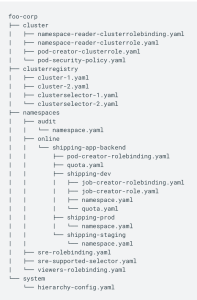
The repository follows the structure as below. The example below shows a sample repo with the following folders(cluster->cluster resources like quotas, rbac, security policy etc, clusterregistry->policies specific to each cluster, namespaces->application manifest under each namespace, system->operator related configs)

Repository structure(from this link)

Following are the steps that we will do below:

  1. Install “nomos” CLI
  2. Checkin configs to a repository. We will use github for this example.
  3. Create GKE cluster, make current user cluster admin. To access private git repo, we can setup kubernetes secrets. For this example, we will use public repository.
  4. Install config management CRD in the cluster
  5. Check nomos status using “nomos status” to validate that the cluster has synced to the repository.
  6. Apply kubernetes configuration changes to the repo as well as to cluster and check that the sync feature is working. This step is optional.

Installation

I installed nomos using the steps mentioned here in my mac.

Following commands download and install the operator in the GKE cluster. I have used the same cluster created in the “Velero” example.

gsutil cp gs://config-management-release/released/latest/config-sync-operator.yaml config-sync-operator.yaml
kubectl apply -f config-sync-operator.yaml

To verify that “Config sync” is running correctly, please check the following output. We should see that the pod is running successfully.

$ kubectl -n kube-system get pods | grep config-management
config-management-operator-5d4864869d-mfrd6                 1/1     Running   0          60s

Let’s check the nomos status now. As we can see below, we have not setup the repo sync yet.

$ nomos status --contexts gke_sreemakam-test_us-central1-c_prodcluster
Connecting to clusters...
Failed to retrieve syncBranch for "gke_sreemakam-test_us-central1-c_prodcluster": configmanagements.configmanagement.gke.io "config-management" not found
Failed to retrieve repos for "gke_sreemakam-test_us-central1-c_prodcluster": the server could not find the requested resource (get repos.configmanagement.gke.io)
Current   Context                                        Status           Last Synced Token   Sync Branch
-------   -------                                        ------           -----------------   -----------
*         gke_sreemakam-test_us-central1-c_prodcluster   NOT CONFIGURED                          


Config Management Errors:
gke_sreemakam-test_us-central1-c_prodcluster   ConfigManagement resource is missing

Repository

I have used the repository here and plan to syncup the “gohellorepo” folder. Following is the structure of the “gohellorepo” folder.

$ tree .
.
├── namespaces
│   └── go-hello
│       ├── helloweb-deployment.yaml
│       ├── helloweb-ingress.yaml
│       ├── helloweb-service.yaml
│       └── namespace.yaml
└── system
    └── repo.yaml

The repository describes a namespace “go-hello” and the “go-hello” directory contains kubernetes manifests for a go application.

The repository also has the “config-management.yaml” file that describes the repo that we want to sync to. Following is the content fo the file:

# config-management.yaml

apiVersion: configmanagement.gke.io/v1
kind: ConfigManagement
metadata:
  name: config-management
spec:
  # clusterName is required and must be unique among all managed clusters
  clusterName: my-cluster
  git:
    syncRepo: https://github.com/smakam/csp-config-management.git
    syncBranch: 1.0.0
    secretType: none
    policyDir: "gohellorepo"

As we can see, we want to sync to the “gohellorepo” folder in git repo “https://github.com/smakam/csp-config-management.git&#8221;

Syncing to the repo

Following command syncs the cluster to the github repository:

kubectl apply -f config-management.yaml

Now, we can look at “nomos status” to check if the sync is successful. As we can see from “SYNCED” status, the sync is successful.

$ nomos status --contexts gke_sreemakam-test_us-central1-c_prodcluster
Connecting to clusters...
Current   Context                                        Status           Last Synced Token   Sync Branch
-------   -------                                        ------           -----------------   -----------
*         gke_sreemakam-test_us-central1-c_prodcluster   SYNCED           020ab642            1.0.0 

Let’s look at the kubernetes resources to make sure that the sync is successful. As we can see below, the namespace and the appropriate resources got created in the namespace “go-hello”

$ kubectl get ns
NAME                       STATUS   AGE
config-management-system   Active   23m
default                    Active   27h
go-hello                   Active   6m26s

$ kubectl get services -n go-hello
NAME               TYPE           CLUSTER-IP     EXTERNAL-IP   PORT(S)          AGE
helloweb           LoadBalancer   10.44.6.41     34.69.102.8   80:32509/TCP     3m25s
helloweb-backend   NodePort       10.44.13.224   <none>        8080:31731/TCP   3m25s

$ kubectl get deployments -n go-hello
NAME       READY   UP-TO-DATE   AVAILABLE   AGE
helloweb   1/1     1            1           7m

As a next step, we can make changes to the repo and check that the changes are pushed to the cluster. If we make any manual changes. to the cluster, config sync operator will check with the repo and push the changes back to the cluster. For example, if we delete namespace “go-hello” manually in the cluster, we will see that after 30 seconds or so, the namespace configuration is pushed back and recreated in the cluster.

References