

Опис
Scribble out your content with a squiggly line instead of a boring strikethrough. You can easily customize your scribble settings via your WordPress admin > Settings > Scribble.
How to Use
There are two ways to define a scribble:
Credits
Thanks to Jean-Christophe Nicolas who made the original jQuery plugin.
Снимци екрана

Scribble in action 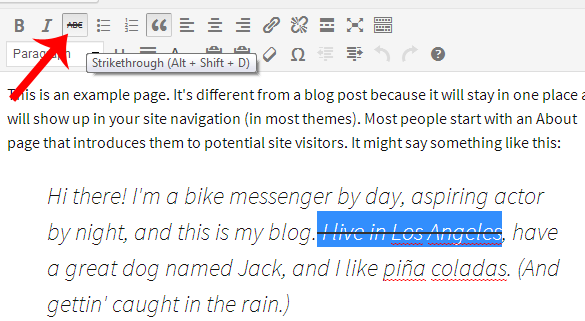
To set a scribble: Use the strikethrough icon in the WYSIWYG visual editor. 
You can also define a scribble by adding class „scribble“ to html element. 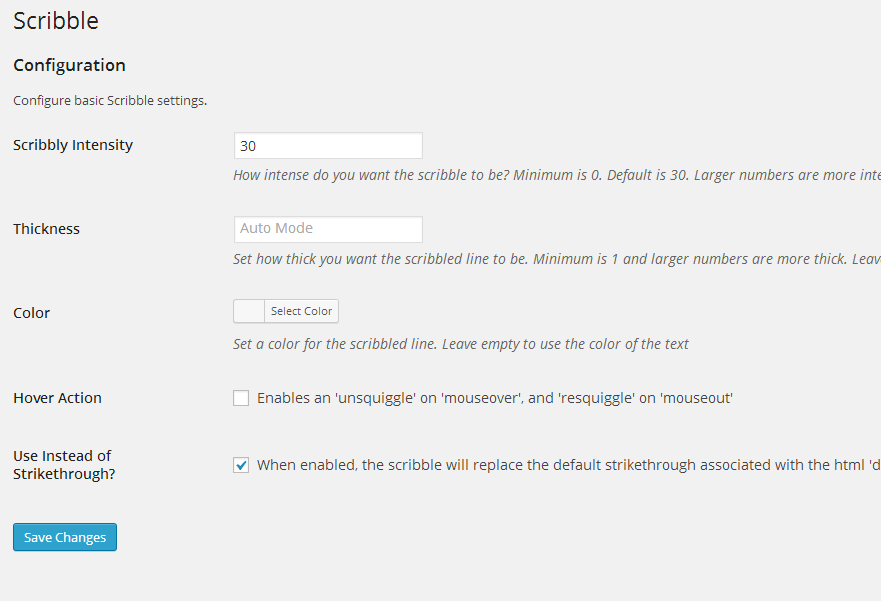
You can easily customize scribble settings in Settings > Scribble
Постављање
- From WP admin > Plugins > Add New
- Search „Scribble“ under search and hit Enter
- Click „Install Now“
- Click the Activate Plugin link
ЧПП
- How do I add a scribble?
-
There are two ways to define a scribble. You can add scribbles via the strikethrough icon in the WYSIWYG visual editor(see screenshot). You can also add class „scribble“ to the target html element (see screenshot).
- What if I want to keep my strikethroughs and just add scribbles seperarely?
-
Uncheck the box at Settings > Scribble > Use Instead of Strikethrough. You will now have to add class „scribble“ to the target html scribble element (as the strikethrough icon in WYSIWYG visual editor will result in a normal strikethrough.)
- What other Scribble settings can I customize via Settings > Scribble?
-
Scribble intensity, thickness, color, and hover action.
Прегледи
Нема рецензија за овај додатак.
Сарадници и градитељи
„Scribble“ је софтвер отвореног кода. Следећи људи су допринели овом додатку.
Сарадници
Преведите „Scribble“ на свој језик.
Заинтересовани сте за градњу?
Прегледајте код, проверите SVN складиште или се пријавите на белешку градње преко RSS-а.
Белешка о изменама
1.0
- Initial version