

Опис
Provide Support Live Chat is a powerful tool for customer support. It allows offering your customers instant assistance via live chat, monitor and navigate them through your website, and receive their messages even when you are offline.
Provide Support Live Chat can be easily integrated with WordPress websites with help of live chat plugin for WordPress. Integration process will take a couple of minutes and will require minimum efforts. It’s a simple matter of installing, activating and connecting with your live chat account.
You’ll be able to create a new live chat account straight from the plugin or connect the plugin to your existing account.
Provide Support plugin for WordPress allows you to…
- Show you chat button at a fixed position in a browser window, according to your live chat account settings
- Use custom images hosted on your server as your chat icon
- Show a text live chat link instead of a graphics one
- Choose which pages and posts the live chat button should be displayed at
- Monitor your whole website and proactively invite visitors to join live chat session, no matter how many pages contain the live chat button
How will you benefit from using Provide Support Live Chat software
- No additional implementation costs on your WordPress website
- Live chat is an effective marketing solution for boosting sales
- Live chat increases your customers’ trust and loyalty
- Ability of multitasking for your agents will cut down customer support costs
- Live chat increases website integrity and customer engagement
Check our video tutorials to get more information about our system and live chat plugin installation:
About Provide Support
Provide Support has been offering cutting edge communication technology since 2003 and has proven to be the one of the most reliable Live Chat vendors on the market. Provide Support’s team is striving to offer you most intuitive and easy-to-use customer support software. And our own support team is at your service 24/7.
Снимци екрана

Either embedded or popup chat window opened by your clients to chat with you 
Live chat window customizations and functions – color, size, position, toolbar buttons, media files preview, etc. 
Chat window localization, customizable pre-chat survey and offline form 
Live chat operator apps for Windows, macOS, Linux, iOS, Android, any web browser – the tool to communicate with your website visitors 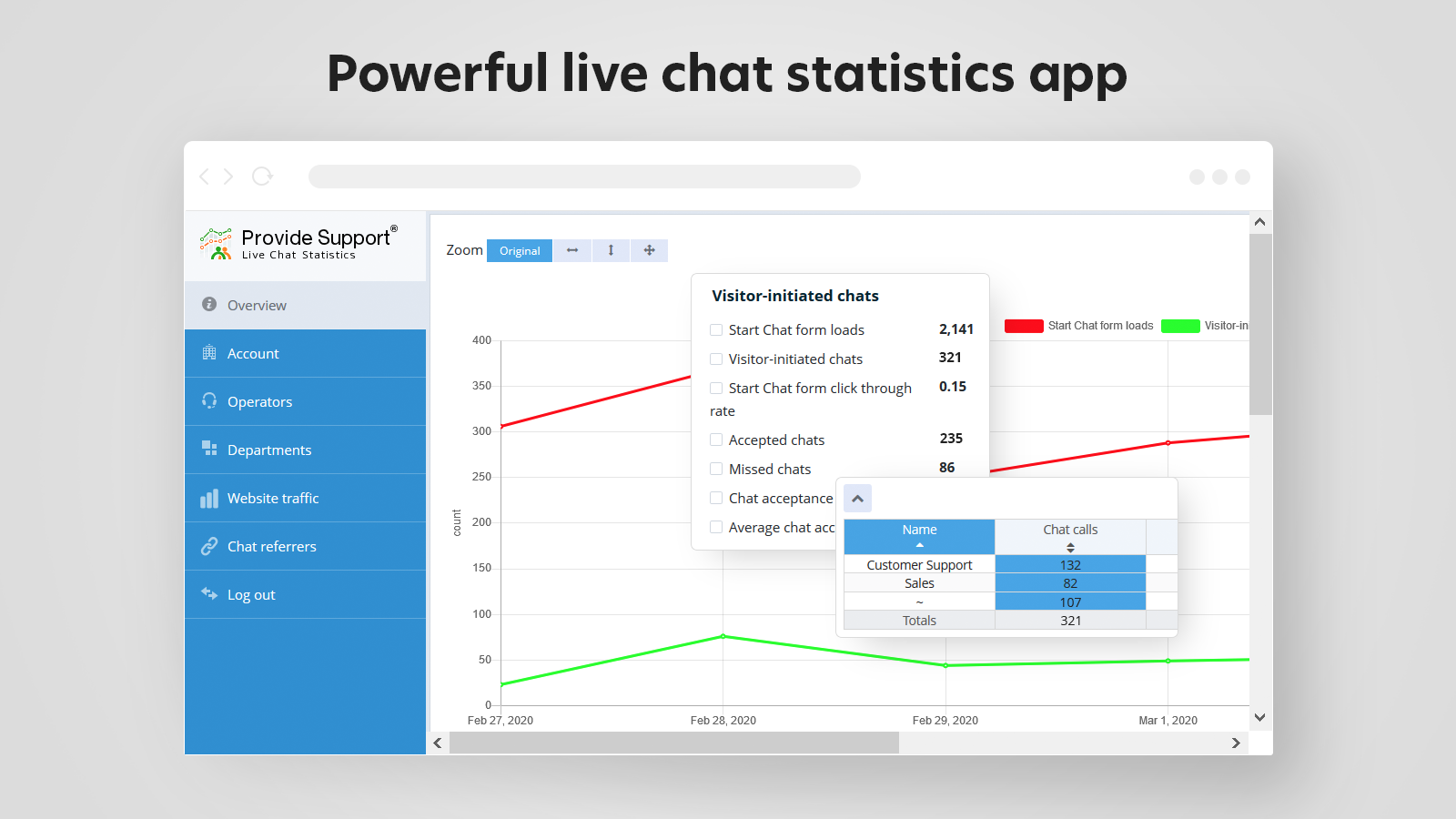
Live chat Statistics app – the tool to monitor your support team performance and customer support demand 
Provide Support Live Chat for WordPress settings after the plugin installation. You will need to connect to your existing Provide Support account, or create a new one 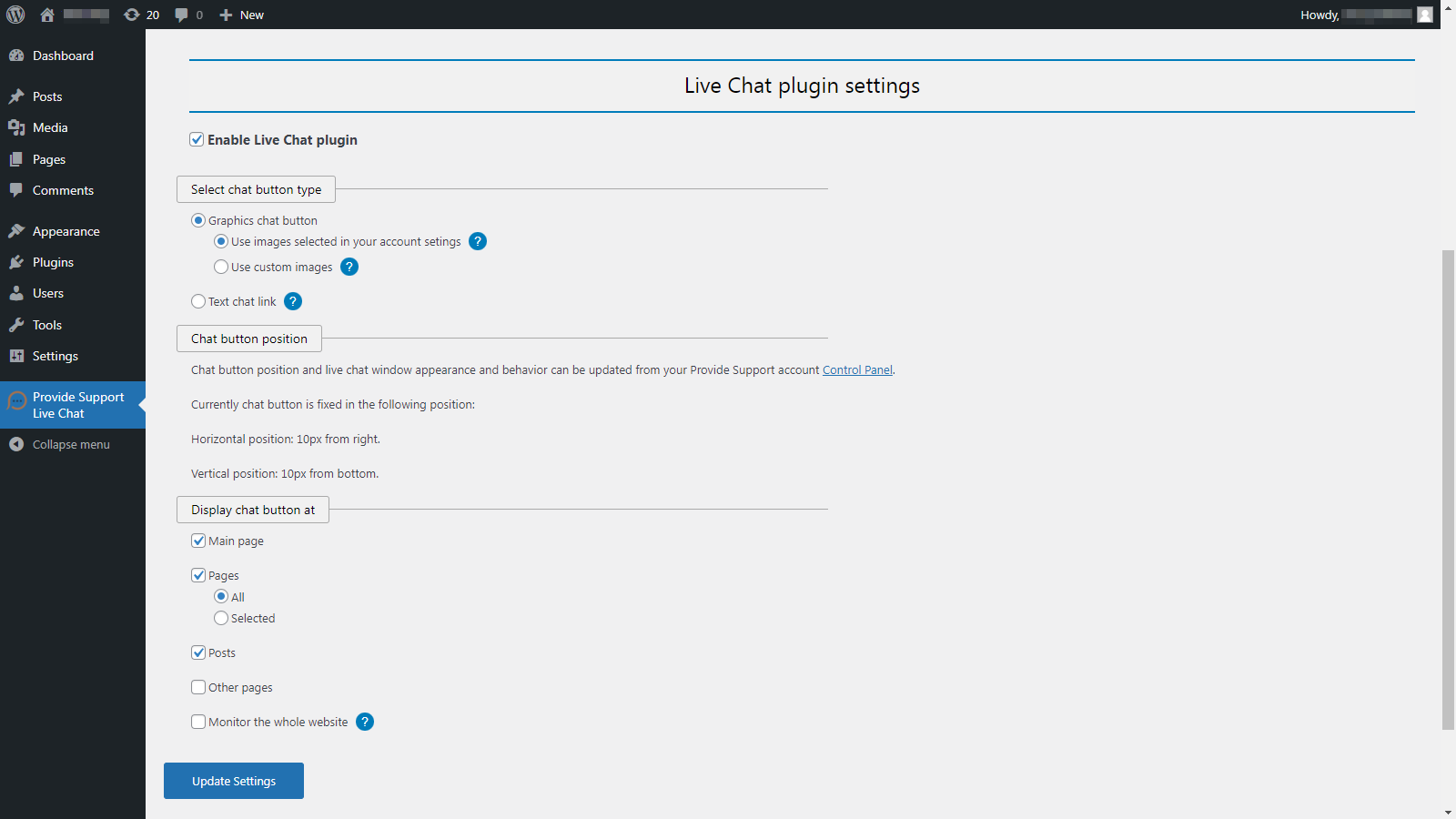
Default Live Chat plugin settings after connecting to the live chat account – check the chat button position, choose how to display it, setup your website monitoring
Постављање
Using Provide Support Live Chat plugin you’ll be able to easily add your live chat button to your WordPress based website. Please do the following:
- Log into your WordPress website admin panel and navigate to ‘Plugins’ menu
- Click ‘Add New’ and either search for ‘Provide Support Live Chat’ in the plugin directory, or upload the .zip plugin file you have downloaded from WordPress.org
- Activate the plugin after installation has been completed
- Navigate to ‘Provide Support Live Chat’ menu
- Enter your Provide Support account credentials and click ‘Connect to Account’ on ‘Existing Account’ tab to connect to your account. If you don’t have an account yet, use ‘New Account’ tab to create it
- Click ‘Enable live chat plugin’ checkbox to see the default plugin settings. If needed, update the settings to change the default chat button appearance and behavior
- Save changes by clicking ‘Update Settings’ button. After this, your chat button will be added to your website, according to the account and plugin settings
ЧПП
-
Is Provide Support Live Chat for WordPress free?
-
Our live chat plugin for WordPress is free. But it can only be used as a part of Provide Support Live Chat system which is offered on a subscription basis. We offer free fully functional 10-day trial to check if the system fits your requirements. If you like the system, you are welcome to purchase a subscription. Please have a look at our pricing.
-
My chat is Offline. Why?
-
Your live chat will switch to Online automatically once you login into your Operator Console.
The Operator Console is available for downloading at https://www.providesupport.com/live-chat-apps,
its web-based version is available at https://op.providesupport.com. -
Where can I get my login details for Operator Console?
-
Your operator login credentials are available in your account Control Panel, Operators and Departments page.
-
Any special technical requirements for the plugin?
-
PHP 7.4 or higher is required starting from the plugin version 5.0.1.
PHP 5.6 or higher is required starting from the plugin version 3.0.0.
PHP 5.3.1 or higher is required starting from the plugin version 2.1.1.
WordPress 3.9 or higher is required starting from the plugin version 2.1.1.
Plugin version 2.0.3 supports older PHP and WordPress versions and can be downloaded here. -
Where can I get more information about your live chat system?
-
Please check Live Chat Features page on our website.
-
Is there a user manual I can check?
-
Sure. Our user manual is available at https://www.providesupport.com/manual/.
Please also check our FAQ and our video tutorial. -
Can I use this live chat system on any website or on a WordPress-based only?
-
The system can be used on any website. The only difference is that you will need to add the chat button code to your website source manually, not using a plugin.
-
Do you have any reviews from your customers I could check?
-
Sure. Please check Customer Reviews our clients sent us.
-
I haven’t found information I need on your website. Do you provide any live support along with your system?
-
Sure, our customer support chat is online 24/7. It’s available on our website https://www.providesupport.com
Прегледи


Сарадници и градитељи
„Provide Support Live Chat“ је софтвер отвореног кода. Следећи људи су допринели овом додатку.
Сарадници
Преведите „Provide Support Live Chat“ на свој језик.
Заинтересовани сте за градњу?
Прегледајте код, проверите SVN складиште или се пријавите на белешку градње преко RSS-а.
Белешка о изменама
5.0.1
- Compatibility tested with WordPress 6.9
- Compatibility tested with PHP 8.2
- Deprecated jQuery usage fixed
- Minor JavaScript stability improvements
5.0.0
- New chat button code generator used. The chat button will now load after the page load is complete and won’t impact the page loading speed
- Unnecessary API calls removed
- Issues related to new widgets implementation solved
4.1.0
- Unused module removed
- Plugin settings appearance updated
4.0.0
- Internal refactoring
- Important! Please reconnect the plugin with your live chat account after upgrade.
3.0.5
- Random authentication issue fixed
- Important! Please reconnect the plugin with your live chat account after upgrade.
3.0.4
- Improved modern chat window positioning for mobile devices
3.0.3
- Minor fixes for better compatibility
3.0.2
- Minor fixes
3.0.0
- Compatibility with WordPress 5.x added
- Modern embedded chat window support added
- Stability and compatibility improvements
2.1.6
- Better compatibility with WordPress 4.7.x
- jQuery conflict fixed
2.1.5
- PHP version conflict fixed
2.1.4
- Compatibility with ReduxFramework added
2.1.3
- jQuery compatibility issue for some themes fixed
- Shortcode mode improvements
2.1.1
- Compatibility issues fixed. Note! The plugin requires PHP 5.3.1 or higher and WordPress 3.9 or higher now. Please don’t upgrade if you are not sure. Use live chat plugin version 2.0.3 if your PHP/WordPress doesn’t meet the new version requirements.
- Stability improvements
- Widget mode improvements
- Minor bug fixes
- Plugin settings redesigned
- Plugin settings moved to the main menu
2.0.3
- Reporting module improvements
2.0.2
- Old PHP compatibility fix
2.0
- Compatibility issues fixed
- Critical errors reporting added
1.3
- Improved Chat Invitation functionality
- FAQ updated
1.2
- Minor fixes
- New default chat button used for accounts created via plugin
1.1
- Improved usability
- FAQ added
- New screenshots added
1.0
- First public plugin release