
Опис
Using shortcodes you can easily add HTML codes such as ad codes, javascript, video embedding, etc in your pages, posts or custom posts.
No limit for the Free version
The Free version of the OS HTML5 Shortcodes plugin is not limited.
феатурес
- Admin interface to manage OS HTML5 Shortcodes.
- HTML codes such as ad codes, javascript, video embedding etc.
- Very easy to use ( through shortcodes ).
- HTML5 support.
- Use through TinyMCE buttons.
- OS HTML5 Shortcodes Widget.
Podrška
So that others can share in the answer, please submit your support requests through the WordPress forums for OS HTML5 Shortcodes(https://wordpress.org/support/plugin/os-html5-shortcodes).
Снимци екрана

OS HTML5 Shortcodes admin listing 
OS HTML5 Shortcodes tinyMCE buttons 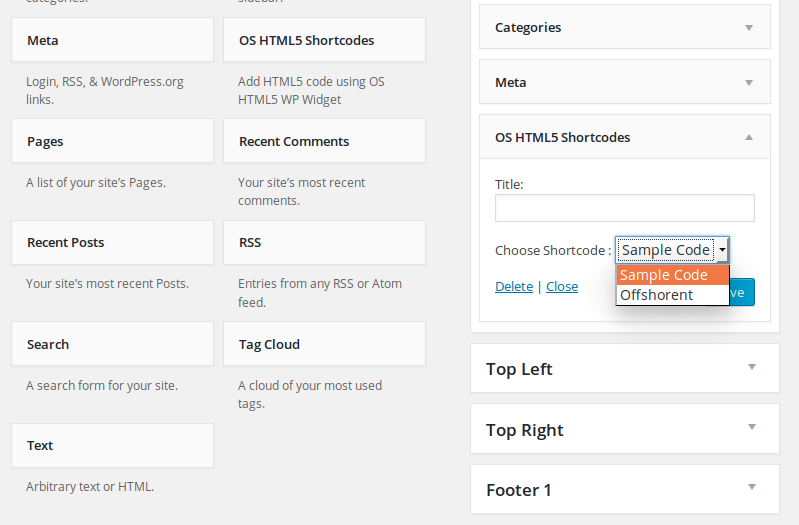
OS HTML5 Shortcodes widget area
Постављање
Minimum requirements:
WordPress 4.3+
PHP 5.4x
MySQL 5.2x+
Installation from within backend:
- In plugin manager, click „Add New“.
- Search for „os-pricing-tables“.
- Click „install“.
- Activate the plugin once it is installed.
- Click on „Design Setting“ sub menu under WooCommerce menu, finish the installation and manage shop page appearance.
FTP upload installation method:
1. Upload the „os-pricing-tables“ folder to the „/wp-content/plugins/“ directory using your FTP client.
2. Activate the plugin through the „Plugins“ menu.
3. Go to the „Design Setting“ sub menu under WooCommerce menu, finish the installation and manage shop page appearance.
Zip upload installation method (make sure uploads up to 5MB are allowed for your hosting):
- Login to your WordPress site administrator panel and head over the „Plugins“ menu.
- Click „Add New“.
- Choose the „Upload“ option.
- Click Choose file (Browse) and select the os-pricing-tables.*.zip file.
- Click Install Now button.
- Once it is complete, activate the plugin.
- Go to the „Design Setting“ sub menu under WooCommerce menu, finish the installation and manage shop page appearance.
ЧПП
- Installation Instructions
-
Minimum requirements:
WordPress 4.3+
PHP 5.4x
MySQL 5.2x+Installation from within backend:
- In plugin manager, click „Add New“.
- Search for „os-pricing-tables“.
- Click „install“.
- Activate the plugin once it is installed.
- Click on „Design Setting“ sub menu under WooCommerce menu, finish the installation and manage shop page appearance.
FTP upload installation method:
1. Upload the „os-pricing-tables“ folder to the „/wp-content/plugins/“ directory using your FTP client.
2. Activate the plugin through the „Plugins“ menu.
3. Go to the „Design Setting“ sub menu under WooCommerce menu, finish the installation and manage shop page appearance.Zip upload installation method (make sure uploads up to 5MB are allowed for your hosting):
- Login to your WordPress site administrator panel and head over the „Plugins“ menu.
- Click „Add New“.
- Choose the „Upload“ option.
- Click Choose file (Browse) and select the os-pricing-tables.*.zip file.
- Click Install Now button.
- Once it is complete, activate the plugin.
- Go to the „Design Setting“ sub menu under WooCommerce menu, finish the installation and manage shop page appearance.
- A question that someone might have
-
An answer to that question.
Прегледи
Нема рецензија за овај додатак.
Сарадници и градитељи
„OS HTML5 Shortcodes“ је софтвер отвореног кода. Следећи људи су допринели овом додатку.
Сарадници
Преведите „OS HTML5 Shortcodes“ на свој језик.
Заинтересовани сте за градњу?
Прегледајте код, проверите SVN складиште или се пријавите на белешку градње преко RSS-а.
Белешка о изменама
1.2
- Почетно издање
1.2
- Fixed the errors
1.3
- Updated with new functions