
Опис
The Menu Maker plugin helps in creating a menu for your site. Usually this can be used for creating a navigation menu. Check for updates at Troidus.com.
Instructions
Mostly, it is self-explanatory. But for posts and pages, you need to enter the ID. And for home, the link field should be blank.
What’s new in version 0.6?
The possible choices are the home page, a single post or page, an external link or a category.
You can specify the active class, and a home navigation item.
Upcoming in next version
Multiple lists. A revamped interface. (I usually get very little time to work on this, so if you really want these features, drop me a line and I’ll work faster, or donate to the cause!! 😛 )
Снимци екрана
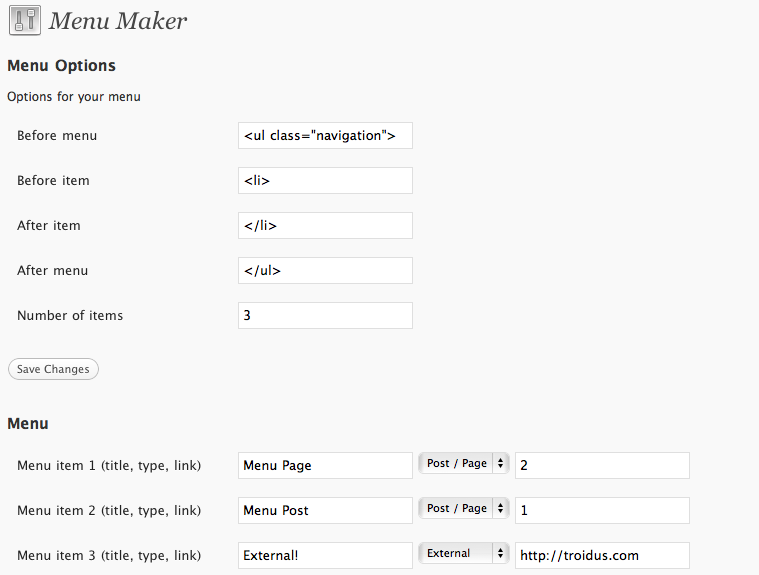
The options page.
Постављање
- Upload the
menumakerdirectory to the/wp-content/plugins/directory - Activate the plugin through the ‘Plugins’ menu in WordPress
- Go to Options > Menu Maker and change options and add menus
- Place
<?php id_menu_maker(); ?>in your templates
Uninstalling
Deactivate the plugin, then uninstall it from the WP Admin interface. This performs a thorough uninstallation of the plugin, removing any DB rows created.
ЧПП
- How do I add posts/pages
-
To add a post or page, insert the ID of the post/page into the last field of the menu maker. That will automatically create a link to the post/page.
- Can it take external links
-
Yup, it currently supports external links, posts, and pages.
Прегледи
Нема рецензија за овај додатак.
Сарадници и градитељи

Преведите „Menu Maker“ на свој језик.
Заинтересовани сте за градњу?
Прегледајте код, проверите SVN складиште или се пријавите на белешку градње преко RSS-а.
Белешка о изменама
0.6 – Now adds Categories to the menu option! Go ahead and enjoy..
0.5.2 – Uninstalls gracefully.
0.5 – Home page link type, and Active menu item.
0.4.4 – Removed the removal of all data on deactivation of plugin.
0.4.2 – Initial release.