

Опис
Add Analytics tracking code the smart way and conforming to Google standards for fast page loads and seo. By default logged in users are not tracked. Enable tracking for logged in users and users with admins rights separately via the plugin options.
Снимци екрана
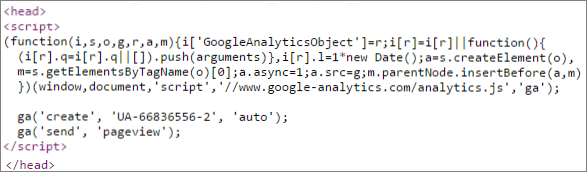
Analytics tracking script inline in head. 
Plugin options page for visibility options and adding your tracking code.
Постављање
Download the plugin code iq-inhead-analytics.zip.
Upload zip file with the standard WordPress plugin installer.
Activate the plugin via the plugins menu.
Go to the settings via Settings and the IQ Analytics sub menu.
Paste your Analytics tracking code in the text area Your tracking code.
ЧПП
- Are there not enough plugins for this already?
-
Not that are simple and straight forward for adding the Analytics tracking code to the html head section.
- What’s so smart about this plugin?
-
That it are not but does the job correctly unlike the majority of similar plugins: adds to the head, takes 1 minute to install and configure and no bonus bulky overhead.

Сарадници и градитељи
„IQ Analytics Tracking Code In Head“ је софтвер отвореног кода. Следећи људи су допринели овом додатку.
Сарадници

Преведите „IQ Analytics Tracking Code In Head“ на свој језик.
Заинтересовани сте за градњу?
Прегледајте код, проверите SVN складиште или се пријавите на белешку градње преко RSS-а.
Белешка о изменама
0.2.1
- Firste beta bug fix. Placed in namespace.
0.2
- Firste beta release
0.1
- First test release