
Опис
This plugin will help you to add a post/custom post list to any of the page using block editor.
You will also get all the filters like. number of posts to display, order by, list from specific taxonomy or terms, filter by date or range, show featured image, pagination, exclude posts, etc…
You can also modify the ttemplate just by coping the file: „templates/all-post-list-template.php“ to your theme’s root directory.
Arbitrary section
You may provide arbitrary sections, in the same format as the ones above. This may be of use for extremely complicated
plugins where more information needs to be conveyed that doesn’t fit into the categories of „description“ or
„installation.“ Arbitrary sections will be shown below the built-in sections outlined above.
Снимци екрана

This screen shot description corresponds to screenshot-1.(png|jpg|jpeg|gif). Note that the screenshot is taken from the /assets directory or the directory that contains the stable readme.txt (tags or trunk). Screenshots in the /assets directory take precedence. For example, /assets/screenshot-1.pngwould win over/tags/4.3/screenshot-1.png(or jpg, jpeg, gif).
This is the second screen shot 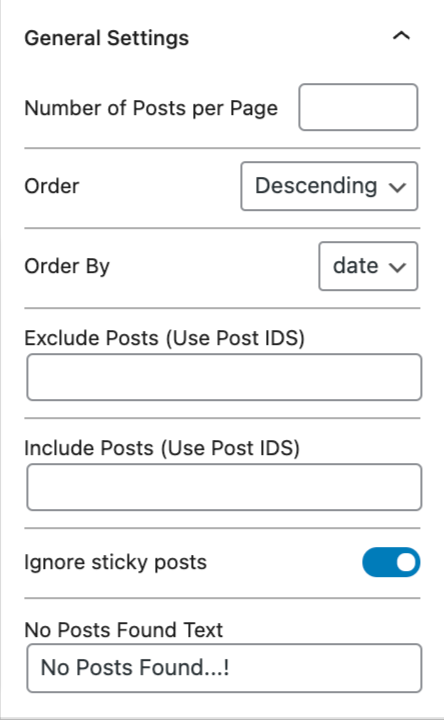


Блокови
Овај додатак пружа 1 блок.
- All Post Listing Block Example block written with ESNext standard and JSX support – build step required.
Постављање
- Upload the plugin files to the
/wp-content/plugins/all-post-list-blockdirectory, or install the plugin through the WordPress plugins screen directly. - Activate the plugin through the ‘Plugins’ screen in WordPress
- Now edit any page and search for the „All Posts List Block“ in the add block section.
- Choose settings as per your requirement.
ЧПП
-
How to add block on page or post?
-
Please open page or post editor and search for ‘All posts list block.’.
-
How to create new template?
-
Copy the plugin/templates/all-post-list-template.php file and add it to the root of the theme directory. So now plugin will look for that file first.
Прегледи
Нема рецензија за овај додатак.
Сарадници и градитељи
„All Post Listing Block“ је софтвер отвореног кода. Следећи људи су допринели овом додатку.
Сарадници
Преведите „All Post Listing Block“ на свој језик.
Заинтересовани сте за градњу?
Прегледајте код, проверите SVN складиште или се пријавите на белешку градње преко RSS-а.
Белешка о изменама
1.0.0
- Release
- Compitible with WP 6.6.2
- Removed deprecated warnings.