SQL Server 2012 RTM Cumulative Update 1

Microsoft has released SQL Server 2012 RTM Cumulative Update 1, which is Build 11.0.2316.0. I count 55 fixes in the public fix list, which is a pretty high number of fixes. This is a good thing, to see the first CU come out so quickly after RTM, with a lot of issues being fixed. My theory (which is unsupported by any inside information), is that there was probably a code freeze quite some time ago as SQL Server 2012 was approaching final RTM status, unless a truly show-stopping issue was discovered. After the final RTM build was blessed, developers at Microsoft were free to start addressing issues that had accumulated from people in the TAP program, and from more people using the RC builds late in the development cycle.

Even if you are one of those people or organizations who does not like to deploy Cumulative Updates (waiting for Service Packs instead), I would consider making an exception for this CU, especially if you are getting ready to do an initial production deployment of SQL Server 2012.


image


image

Posted in SQL Server 2012 | Tagged | 2 Comments

Building an Intel Ivy Bridge Desktop System, Part 1

I stopped by my local Micro Center on April 9, 2012, and I noticed that they had just received their first shipment of ASUS Z77-based motherboards. They were still on the warehouse cart, not even on the shelves yet. There were a number of Micro Center sales people reading the specifications on the boxes, so it was a little geek love fest going on! As you may know, the new Intel Z77 chipset is designed to support the upcoming Intel 22nm Ivy Bridge processor family (it will also support the 32nm Sandy Bridge processor family). If you have an older Intel Z68, P67, or H67 chipset motherboard, it may support an Ivy Bridge processor with a BIOS update, so you should check with your motherboard vendor.  Anandtech has a pretty decent preview of several Z77 motherboards from several different vendors.

Unfortunately, the actual Ivy Bridge processors are not available until probably the last week of April. Normally, this would cause me to hold off on buying the components for a new system until then, but I gave in and went back to Micro Center on Tuesday, (dragging my very patient girlfriend with me), and bought some of the parts for the system so I could start putting it together in a leisurely fashion. I ended up getting an ASUS SABERTOOTH Z77 LGA 1155 Z77 ATX Intel Motherboard , an Antec 302 case, a Seasonic X-Series SS-400FL fan-less power supply, an an OEM LG 22X DVD burner.

I still need to get an Ivy Bridge processor (probably a Core i7-3770K), some DDR3 RAM, and a 180GB Intel 520 SSD. I am planning on running off of the Intel HD4000 integrated graphics, which have much better performance than the HD3000 integrated graphics in the Sandy Bridge processors. This is because I want to build a fast, quiet system that uses the least amount of power possible. Using integrated graphics saves both power and noise (unless you get a lower-end, fan-less discrete video card).

I really like the looks of the ASUS Sabertooth Z77, with the plastic Thermal Armor that looks like military non-skid plating, and it comes with dust covers for all of the PCI-E slots. More importantly, it has four SATA-III ports, a USB 3.0 header that works with the front USB 3.0 ports on the Antec 302 case, and an Intel Gigabit Ethernet port (instead of some other brand).  The Antec 302 is a decent, no-nonsense case with front panel USB 3.0 ports, and a well thought out interior with six 3.5” drive bays that makes good cable routing pretty easy. It does not have any silly gaming features, like LED illuminated fans, clear side windows, etc.

I have built several systems in the past with the Seasonic X-Series SS-400FL power supply. It has an 80 Plus Gold efficiency rating, is modular, and is fan-less (so it is completely quiet). I purposely picked this 400 watt power supply instead of a larger 600-1000 watt power supply for several reasons. First, with the components I will be using, 400 watts is more than enough for the peak usage of the system. Power supplies are much less efficient when they are only putting out a very small fraction of their rated output, so getting a 600+ watt power supply is actually counter productive unless you really need that much power. I expect this system to draw less than 30 watts at idle, perhaps closer to 20 watts. It is modular, so I would not have the extra cable clutter you get from a cheaper non-modular power supply. Finally, it is a Seasonic power supply. Seasonic probably makes the best power supplies, in my opinion, and a number of hard-core hardware review sites seem to share this opinion.

I installed the motherboard in the case last night, along with the power supply, and all of the wiring that I could do until I get the rest of the parts. Once I get the entire system assembled, I will have couple more blog posts, with a number of benchmarks and some power usage data.


gallery_left

Figure 1: ASUS Sabertooth Z77 Motherboard

Posted in Computer Hardware, Intel, Ivy Bridge, Processors | Tagged | 1 Comment

A Tale of Four Laptops

With the release of the 22nm Ivy Bridge microarchitecture less than three weeks away, at the end of April 2012, I thought it might be a good time to do my little part to stimulate the world economy by giving people some reasons to consider upgrading to a shiny new Intel Ivy Bridge laptop once they are available. I currently have four laptops available at my house to play with, so I thought I would run a few quick benchmarks on them. These are all fairly recent vintage machines, as you can see in Table 1.

You might be wondering why I have four laptops, which is a good question! The HP Envy 15 is sort of a white elephant, that I paid way too much for when it came out in late 2009. I really wanted a good quality Core i7 laptop for the PASS 2009 Summit, so I bought the HP Envy at Micro Center, and soon discovered that it ran very hot, with pretty dismal battery life (about two hours). It now sits on my hobby desk in the basement, relegated to playing music and web surfing. That is sometimes the price of being an early adopter!

After almost literally getting burned by the old HP Envy, I picked up the Toshiba R705-P25 from Best Buy (since it was a loss-leader OEM model), and originally used it for teaching and presentations, and now for astronomy. It is very light, and has good battery life. About a year later, I picked up a very similar Toshiba R835-P55X from the Microsoft Store in Park Meadows Mall (it was also a loss-leader OEM model). I use it mainly when I speak at big events like the PASS Summit or SQL Connections. Finally, the Dell Precision M4600 is my work laptop from Avalara, which I will have to be sending back in a few weeks. It is a wonderful machine, that is a little heavy compared to the Toshiba Portege.

I case you are wondering what a loss-leader OEM model is, it is simply a specially configured model that a system vendor will make for a large retailer, that the retailer sells for less than a similarly configured model directly from the system vendor. The retailer makes a large purchase of this model, and sells it at a low cost, hoping to make money on accessories, extended warranties, and other silly things like Geek Squad services.

I talked about these systems in a little more detail when I acquired each one, as linked below:

HP Envy 15 1050nr

Toshiba Portege R705-P25

Toshiba Portege R835-P55X

Dell Precision M4600

System Purchase Date Processor RAM
HP Envy 15 1050nr Nov 2009 1.6GHz Core i7 720QM 12GB
Toshiba Portege R705-P25 Jul 2010 2.27GHz Core i3 350M 8GB
Toshiba Portege R835-P55X Jun 2011 2.30GHz Core i5-2410M 16GB
Dell Precision M4600 Aug 2011 2.30GHz Core i7-2820QM 16GB

Table 1: System Specifications


Here is a little more detail about the processors in these four laptops in Table 2.

Processor Code Name Cores TDP Process
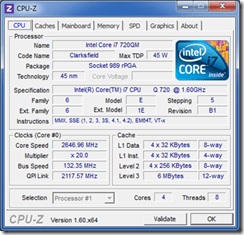
Core i7 720QM Clarksfield 4 + HT 45 watts 45nm
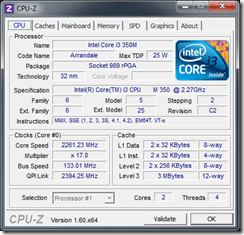
Core i3 350M Arrandale 2 + HT 25 watts 32nm
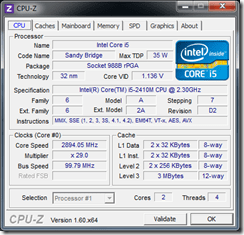
Core i5-2410M Sandy Bridge 2 + HT 35 watts 32nm
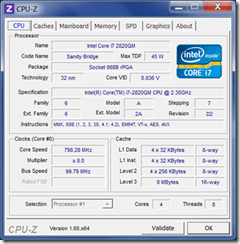
Core i7-2820QM Sandy Bridge 4 + HT 45 watts 32nm

Table 2: Processor Specifications


Table 3 shows the relative performance of these four systems as they are configured right now (after I have done things like adding more RAM or upgrading to a hybrid drive or an SSD). The two Toshiba Portege systems have Intel integrated graphics, which works well enough for daily business use. The Envy 15 has the stock 500GB 7200rpm hard drive, the Portege R705 has a 500GB Seagate Momentus XT hybrid drive, the Portege R835 has a 180GB Intel 520 SSD, while the Precision M4600 has a 256GB Plextor SSD.

System Processor Memory Graphics Gaming Graphics Disk
Envy 15 6.9 7.1 6.8 6.8 5.9
Portege R705 6.3 6.3 4.6 5.2 5.9
Portege R835 6.9 7.4 5.9 6.2 7.8
Precision M4600 7.5 7.8 6.9 6.9 7.7

Table 3: Windows Experience Index Scores


Table 4 shows the Geekbench 2.3.0 scores for these four systems. Even the slowest one of the bunch has more CPU and RAM performance than many older production database servers, which shows you the power of Moore’s Law!  You might try using an argument along that line when you are trying to convince your boss that it is time to upgrade your database server. You can ask “How come our mission critical database server has less CPU horsepower than Glenn Berry’s two year old, 3 pound Toshiba laptop?”

System Geekbench 2.3.0 Score
HP Envy 15 1050nr 4938
Toshiba Portege R705-P25 3953
Toshiba Portege R835-P55X 5778
Dell Precision M4600 9615

Table 4: Geekbench 2.3.0 Scores


So what is the moral of this story? First, we have seen very significant performance increases, with less heat and much better battery life as Intel has rolled out new processor architectures using smaller manufacturing processes over the past two-three years. I suspect that many people reading this have even older hardware than any of my machines, with pretty ancient 90nm and 65nm processors that really ready to be retired.

The 22nm Intel Ivy Bridge is a Tick Release that should give about a 10-15% CPU performance increase compared to the 32nm Sandy Bridge. The integrated graphics are supposed to show more like a 50-75% performance increase compared to Sandy Bridge. You will also see better battery life compared to Sandy Bridge. If you gave anything older than Sandy Bridge, then Ivy Bridge is a pretty compelling upgrade!

If you do decide to get an Ivy Bridge system, you really should bite the bullet and get a fast SATA III SSD. Once you have a good SSD, you will never want to use a conventional hard drive again.

Here is CPU-Z for these four systems:
image

Figure 1: Intel Core i7 720QM (Clarksfield)
 

image

Figure 2: Intel Core i3 350M (Arrandale)
 

image

Figure 3: Intel Core i5-2410M (Sandy Bridge)
 

image

Figure 4: Intel Core i7-2820QM (Sandy Bridge)

Posted in Computer Hardware, Laptops, Processors | Tagged , | 2 Comments

Onward and Upward!

As you may have heard by now, I am joining the wonderful team at SQLskills as a Principal Consultant starting on May 1, 2012. I am very excited by this opportunity, since I will have the chance to work with a small group of amazing people that I truly like and respect. Hopefully, some of their greatness will rub off on me… 

First is Kimberly Tripp (blog|twitter), who I have known and looked up to for years. Long before I was a speaker or author, I can remember seeing Kimberly presenting at Microsoft TechEd, and being inspired to learn more about SQL Server. I also had the opportunity to take a one week immersion class from her back in 2006, which was extremely useful for my day-to-day work at NewsGator over the years after that.  I originally met Paul Randal (blog|twitter) in early 2007, while he was still at Microsoft. Paul spent nearly nine years at Microsoft working on the Storage Engine Team, rewriting DBCC CHECKDB, and becoming an expert on the internals of SQL Server. I have gotten to know him much better over the past five years, and I have been very impressed with his knowledge and straight-forward attitude.

I became aware of Jonathan Kehayias (blog|twitter) back in 2007/2008, when I noticed how many questions he was answering on the MSDN SQL Server Engine Forums, which was extremely impressive. Since then, he has become a Microsoft Certified Master in SQL Server 2008, a SQL Server MVP, written an excellent book (Troubleshooting SQL Server – A Guide for the Accidental DBA) , and has become probably the world’s foremost expert on SQL Server Extended Events. I first learned about Joe Sack (blog|twitter) when I bought one of his books (SQL Server 2008 Transact-SQL Recipes), which I have used many times over the years! Of course, he has written a number of other books, and he did his time in the trenches as a Premier Field Engineer (PFE) at Microsoft.  More recently, he helped get the SQL Server MCM program reorganized and more accessible to non-Microsoft employees.

All in all, it is a great group of well respected people and SQL Server experts that I am really looking forward to being a part of!

Posted in SQL Server 2008, SQL Server 2008 R2, SQL Server 2012, Teaching | Tagged | 16 Comments

More Fun with my NEST Thermostat

NEST has rolled out a nice software update for their NEST thermostat that gives you a 10 day history of your energy usage, that you can drill into in order to graphically display some pretty granular information. Below, you can see the orange bands showing exactly when my furnace was running over the past four days. Here in Parker, it was in the mid eighties outside on Sunday, and then we had a 40 degree temperature drop on Monday, and a small snow storm on Tuesday. On Wednesday, we had increasing temperatures by mid-morning, into the afternoon. You can easily see the effect the weather had on the furnace usage over time. I think that is pretty neat!

Another improvement in this update is the ability for NEST to shut off your air conditioner a few minutes before you reach your target temperature, while still running the fan to distribute the chilled air in the system into the house.


image


I have had my NEST for nearly six months now, and I have been very happy with it. I installed it myself (which was easy), and I think it looks pretty cool. It has a motion sensor that lights up the display when you walk by (and also detects if nobody is at home). It uses your Wi-Fi connection to connect to the Internet for weather information and to send and receive usage and control information. There is a free Android application (and one for iPhone/iPad) that lets you monitor and control your NEST remotely. You can also use a browser to monitor and control it.

Posted in Computer Hardware, Hobbies | Tagged , | 3 Comments

Second TPC-E Benchmark Result Published For SQL Server 2012

NEC has submitted the second TPC-E OLTP benchmark result for SQL Server 2012, running on an Express5800/A1080a-E system, which is a new record of 4614.22 TpsE. This is for an eight socket system with 2.4GHz Intel Xeon E7-8870 processors, 2048GB of RAM, and 472 spindles (including 396 SSDs).

About a month ago, IBM submitted the first TPC-E OLTP benchmark result for SQL Server 2012 on a System x3650 M4, with a score of 1863.23 TpsE. This is for a two socket system with 2.9GHz Intel Xeon E5-2690 processors, 512GB of RAM, and 92 spindles.

System Score CPU Processors Cores
NEC Express5800/A1080a-E 4614.22 E7-8870 8 80
IBM System x3650 M4 1863.23 E5-2690 2 16

If you divide the TpsE score by the number of physical cores in each system, you get a result of 57.68 for the Xeon E7-8870 system, and 116.45 for the Xeon E5-2690 system. This shows that the Xeon E5-2690 is capable of about twice the TpsE performance per physical core compared to the Xeon E7-8870. This is very significant for the new SQL Server 2012 core-based licensing, where you are paying five times the SQL Server license cost to get 2.47 times the TpsE score in this case. This is yet more evidence that the Xeon E5-2690 does extremely well on OLTP workloads!

Posted in Computer Hardware, Microsoft, Processors, SQL Server 2012 | Tagged | 3 Comments

Intel Sandy Bridge-EP Processor Recap

On March 6, 2012, Intel finally released the Xeon E5 processor family, (aka the Sandy Bridge-EP). Sandy Bridge is a Tock release for Intel, and as such, it represents a huge jump in both performance and power efficiency over the previous 32nm Westmere-EP (which was no slouch). It is initially available for two socket servers (the E5-2600 series), but it will also be available for four socket servers in the future (the E5-4600 series).  Sometime in 2013, we will see the 22nm Ivy Bridge-EP, which will be a Tick release that will be socket compatible with Sandy Bridge-EP.

Make no mistake, Sandy Bridge-EP is the processor that you want for the vast majority of SQL Server workloads. The main exception would be a case where you really need more than six PCI-E 3.0 slots, and you need more than 24 memory slots (with either 384GB or 768GB of RAM, with 16GB or 32GB DIMMs, respectively).

Here are a number of relevant articles and reviews about the Sandy Bridge-EP:

Intel® Xeon® Processor E5-2690 (Intel specification sheet for Xeon E5-2690)

The Xeon E5-2600: Dual Sandy Bridge for Servers (Anandtech review of Xeon E5-2690)

Intel rolls out Xeon E5-1600 and E5-2600 CPUs (CPU-World news story about Xeon E5 release)

Sandy Bridge-EP Review (David Kanter review of Sandy Bridge-EP)

Sandy Bridge-EP Launches (David Kanter article about Sandy Bridge-EP launch)

Sandy Bridge for Servers (David Kanter article about Sandy Bridge-EP architecture)

Intel Xeon E5-2690 Sandy Bridge-EP Performance Revealed (Tom’s Hardware article about Sandy Bridge-EP)

IBM System x3650 M4  (First Xeon E5-2690 TPC-E Benchmark Submission)

Posted in Computer Hardware, Processors, SQL Server 2008 R2, SQL Server 2012 | Tagged | Leave a comment

Toshiba Satellite C655-S5503 Review

If you are “in computers” according to your family and friends, you are typically expected to provide lifetime, free tech support for all computer related issues for everyone you know. Since you are “in computers”, you must automatically know everything there is to know about computers, whether it is hardware or software related. Trying to explain to them that you are a database administrator, not a desktop support technician usually does not make much difference in their minds…  Anyone who is in an I.T. related field is likely to be pretty familiar with this scenario. Even though it might sound like I am complaining, I actually like helping people figure out their computer related problems. I actually feel bad when I discover someone using an ancient, painfully slow machine on a daily basis, so I feel somewhat obligated to improve the situation.

So, as I was minding my own business last week, I got a call from my Mom, because her main desktop computer was refusing to boot. After some initial troubleshooting, I discovered that she was still using a Gateway machine running Windows Vista that I had bought for her about five years ago. This machine had a relatively humble 65nm Core2 Duo processor, 4GB of RAM and a 7200rpm hard drive, which was good enough back in 2007. Rather than messing around too much with that old machine, I figured it would be much better to get her a brand new laptop, which she quickly agreed with. I did a little shopping over the weekend, and decided to get a Toshiba Satellite C655-S5503 from Best Buy.  This machine has pretty decent specifications for $399.99, primarily a 32nm Intel Core i3-2350M Sandy Bridge processor. Most of the other machines in that price range have a much slower Pentium B960 processor or a low-end AMD processor. On the downside, it only has 4GB of RAM, a 5400rpm hard drive, only two USB 2.0 ports, and a screen resolution of 1366 x 768 on a pretty mediocre TN display. It also came loaded with a ton of “crap-ware”, that really slows it down.

Well, if you are a hardware geek like me, that is easy enough to fix!  I went to Micro Center and bought two 4GB sticks of DDR3 RAM for $45.00. Next, I yanked out the 5400rpm Toshiba hard drive, and replaced it with a 128GB Crucial C300 SATA III SSD that I happened to have on hand. Next, I installed a fresh copy of x64 Windows 7, and installed a few necessary drivers from Toshiba’s web site. Then I installed Windows 7 Service Pack 1, and all of the updates that Windows Update and Microsoft Update wanted. I also installed Microsoft Security Essentials 2.0, which is free, and works quite well. Finally, I installed Office 2010, and got it fully patched.

After this work, this humble Toshiba is actually quite fast now. Having a decent SSD, 8GB of RAM, and a clean install of Windows 7 makes a huge difference in boot time, shutdown time, and application startup time. The 2.3GHz Sandy Bridge Core i3-2350M is a very nice little processor that will be more than capable of handling anything my Mom is likely to throw at it. The Geekbench score of this system is 5004, which is about the same as the quad-socket Dell PowerEdge 6800 database server that cost about $30K in 2007 (and used to run most of NewsGator.com).   If I was a little more crazy, I could have upgraded this little machine to 16GB of RAM, and I could have put in a much faster Intel 520 SSD. But honestly, I did not think my Mom needed 16GB of RAM for web surfing…


clip_image002

Figure 1: Stock Windows Experience Index numbers for Toshiba Satellite C655-S5503


clip_image002[5]

Figure 2: Modified Windows Experience Index numbers for Toshiba Satellite C655-S5503


clip_image001

Figure 3: CPU-Z for Intel Core i3-2350M


clip_image002[7]

Figure 4: Geekbench 2.2.7 results for modified Toshiba Satellite C655-S5503

Posted in Computer Hardware, Processors | Tagged | 9 Comments

Three Sessions at Spring 2012 Connections Conference

I will be a busy little beaver today, presenting three sessions at the Spring 2012 Connections Conference, the first one at 8AM! Hopefully enough people will be able to get up by then and join me. It should be a lot of fun!

SQL301: Scaling SQL Server 2012
Glenn Berry
How can you scale SQL Server 2012? Scaling up is relatively easy (but can be expensive), while scaling out requires significant engineering time and effort. If you suggest hardware upgrades you may be accused of simply “throwing hardware at the problem,” and if you try to scale out, you may be thwarted by a lack of development resources or 3rd party software restrictions. As your database server nears its load capacity, what can you do? This session gives you concrete, practical advice on how to deal with this situation. Starting with your present workload, configuration and hardware, we will explore how to find and alleviate bottlenecks, whether they are workload related, configuration related, or hardware related. Next, we will cover how you can decide whether you should scale up or scale out your data tier. Once that decision is made, you will learn how to scale up properly, with nearly zero down-time. If you decide to scale out, you will learn about practical, production-ready techniques such as vertical partitioning, horizontal partitioning, and data dependent routing. We will also cover how to use middle-tier caching and other application techniques to increase your overall scalability.

The deck for Scaling SQL Server is here.

SQL303: Hardware 301: Diving Deeper into Database Hardware
Glenn Berry
Making the right hardware selection decisions is extremely important for database scalability. Having properly sized and configured hardware can both increase application performance and reduce capital expenses dramatically. Unfortunately, there are so many different choices and options available when it comes to selecting hardware and storage subsystems, it is very easy to make bad choices based on outmoded conventional wisdom. This session will give you a framework for how to pick the right hardware and storage subsystem for your workload type. You will learn how to evaluate and compare key hardware components, such as processors, chipsets, and memory. You will also learn how to evaluate and compare different types of storage subsystems for different database workload types. This session will give you the knowledge you need to make sure you get the best performance and scalability possible from your hardware budget!

The deck for Hardware 301 is here.

SQL302: DMV Emergency Room!
Glenn Berry
If you have ever been responsible for a mission critical database, you have probably been faced with a high stress, emergency situation where a database issue is causing unacceptable application performance, resulting in angry users and hovering managers and executives. If this hasn’t happened to you yet, thank your lucky stars, but start getting prepared for your time in the hot seat. This session will show you how to use DMV queries to quickly detect and diagnose the problem, starting at the server and instance level, and then progressing down to the database and object level. Based on the initial assessment of the problem, different types of DMV queries will help you narrow down and identify the problem. This session will show you how to assemble and use an emergency DMV toolkit that you can use to save the day the next time a sick database shows up on your watch in the database ER!

The deck for DMV Emergency Room is here.

The script for DMV Emergency Room is here.

Posted in Computer Hardware, Microsoft Training, SQL Server 2008, SQL Server 2008 R2, SQL Server 2012, Storage Subsystems | Tagged | 9 Comments

SQL Server 2008 Diagnostic Information Queries (April 2012)

Since it is nearly April, I will go ahead and jump the gun again and post an updated version of my SQL Server 2008 Diagnostic Information Queries. This version works on SQL Server 2008 and SQL Server 2008 R2. There are a few queries that only work with SQL Server 2008 R2 SP1, but they are noted in the comments.

Many of these are DMV queries that require VIEW SERVER STATE permission. You really should run these queries one at a time, and take a few moments to look at each set of results, rather than running them in a single batch.

I have fixed a few minor issues with this version, and added a couple of new queries. Please let me know what you think!

Posted in SQL Server 2008, SQL Server 2008 R2 | Tagged | 11 Comments