
Përshkrim
Most of the “related posts” plugins out there while they provide some kind of control on how to create related posts, they all rely on an algorithm
and the results are automatic. With CPR you get total control as you can manually select the posts that you want to relate.
Foto ekrani
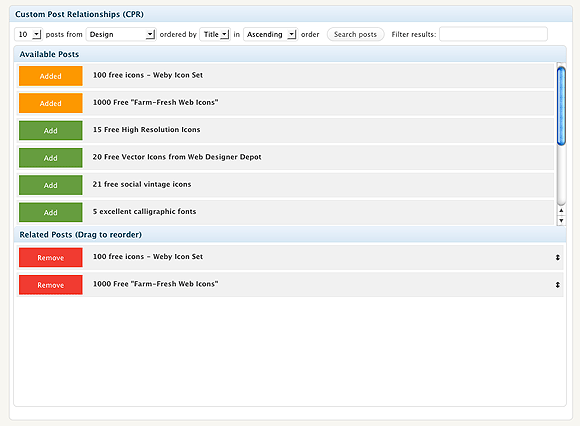
The Custom related posts (CPR) screen. Search, select, relate, done.
Instalim
- Upload the folder to the
/wp-content/plugins/directory - Activate the plugin through the ‘Plugins’ menu in WordPress
- In the Posts page you will see the main screen of the plugin.
PBR
- How do i display the related posts then?
-
Check http://webtoolkit4.me/2010/06/10/wordpress-plugin-custom-post-relationships-cpr-v1-0/ for info on how to display your related posts.
Have in mind that you can display anything you want, even custom fields.
Shqyrtime
Për këtë shtojcë s’ka shqyrtime.
Kontribues & Zhvillues
“Custom Post Relationships (CPR)” është software me burim të hapur. Në këtë shtojcë kanë dhënë ndihmesë personat vijues.
Kontribues
Përkthejeni “Custom Post Relationships (CPR)” në gjuhën tuaj.
Ju intereson zhvillimi?
Shfletoni kodin, shkarkoni depon SVN, ose pajtohuni përmes RSS-je te regjistri i zhvillimeve.
Regjistër ndryshimesh
1.0.1
- “All categories” option added.
1.0
- Initial Release