
Vidyst
Vidyst is a Mac studio for multistreaming, 4K recording, browser-based guests, and simultaneous horizontal and vertical video.
Visit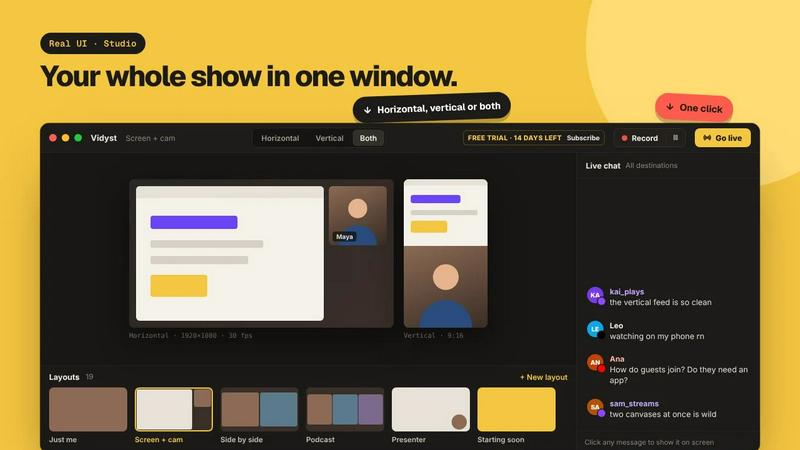
About Vidyst
Vidyst combines live production and local recording for Apple silicon Mac users. The studio can stream to multiple destinations and create landscape and vertical canvases from the same take. That may simplify a show that needs a standard 16:9 stream alongside a 9:16 version for mobile-first channels, without making separate takes.
The app supports guests joining through a browser link, merged chat across destinations, and layouts for switching between camera and screen. It records in 4K in MP4, MOV, or MKV. The hardware and operating-system requirement is narrow: Apple silicon and macOS 14.2 or later. Capacity is also tiered. Basic lists two concurrent destinations and two guests, while Creator lists seven destinations and ten guests. Anyone planning a panel or broad distribution should compare those limits with the show format before subscribing.
Features of Vidyst
- Streams to multiple platforms or RTMP destinations.
- Creates landscape and vertical output simultaneously.
- Invites guests through browser links and combines destination chat.
- Records in 4K using MP4, MOV, or MKV.
Use Cases of Vidyst
- Produce one live event for horizontal and vertical viewing.
- Run a remote interview with guests joining through a browser.
- Record a high-resolution copy while streaming to several destinations.
Frequently Asked Questions
Does Vidyst work on Intel Macs?
The supplied evidence specifies Apple silicon Macs, so Intel Mac support is not established here.
How are guests brought into a show?
The host sends a browser link; guests need no app or account.
How many destinations can I stream to?
Basic supports two simultaneously and Creator supports seven, according to the supplied plan details.
Pricing of Vidyst
After a 14-day free trial, Basic is $10 per month or $100 billed yearly; Creator is $35 per month or $350 billed yearly. Prices are in US dollars.
Similar to Vidyst

FoxyLab
FoxyLab turns plain-language chat requests into product videos and banner sets, with website context and multiple output sizes.


Flux3Max.io
Flux3Max.io creates short videos with sound from text, photos, or up to 10 keyframes, with 720p and 1080p options.

LobbyClip
LobbyClip makes short two-subject AI videos from separate photos, with people and pet scenes and flexible output formats.

Tiny Desk AI
Make a shareable Outstanding Tiny Desk meme with your photos, friends, and a short AI-generated soundtrack.

Tip Toeing in My Jordans AI
Personalize the Rumpelstiltskin tiptoe meme with photos and generate a 12-second clip in vertical or widescreen format.

ScreenOtter
ScreenOtter is a native Mac app for recording, editing, captioning and sharing screen videos, with automatic zooms and screenshot tools.
VD6S.online
VD6S.online prepares YouTube downloads in a browser, with temporary links and no stored account history for users seeking a quick, low-friction save.