
QSharpener
QSharpener helps users restore and decode blurry or damaged QR codes, then rebuilds a clean QR image for scanning.
Visit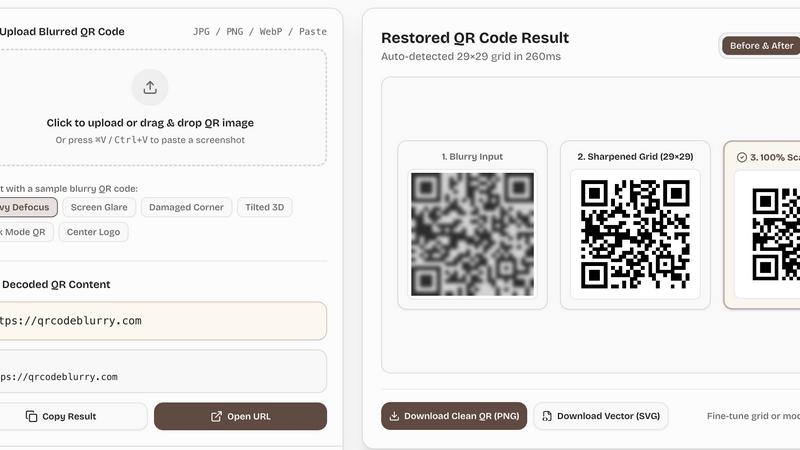
About QSharpener
QSharpener is an online tool for restoring QR codes that a phone camera or standard scanner cannot read. Users upload or paste a JPG, PNG, or WebP image; the tool attempts to deblur, decode, and rebuild a clean QR code. Its examples cover defocus, screen glare, damaged corners, and tilted images. A Pro Mode is available for adjusting the grid or modules.
The service distinguishes direct scans from high-degradation restoration: intact or mildly softened codes can be viewed and downloaded as PNG for free, while some deeper reconstructions require credits. The pricing page says an unlocked code can later be downloaded as a high-resolution PNG or vector SVG from My Codes. Physical damage can limit recovery, so users should check that the decoded result matches the intended destination before relying on a restored code.
Features of QSharpener
- Upload or paste JPG, PNG, or WebP QR images
- Auto mode and Pro Mode for grid or module adjustments
- Rebuilds a clean QR image and decodes its content
- High-resolution PNG and SVG downloads for unlocked codes
Use Cases of QSharpener
- Recover a code from a blurred photo or screen glare
- Try to restore QR codes with tilted perspective or a damaged corner
- Decode a code that a phone camera fails to scan
- Export a restored code as PNG or SVG
Frequently Asked Questions
Which image formats can I upload?
The page lists JPG, PNG, and WebP, and also supports pasting an image.
Are all restorations free?
Direct scans of intact or mildly softened codes are free. High-degradation restoration may consume credits.
Can it recover a physically damaged code?
The site presents damaged-corner examples, but recovery depends on the remaining image data and is not guaranteed.
Explore more in this category:
Similar to QSharpener

Kivloo
Kivloo helps teams complete and search daily workplace safety checks on a phone, with photos, readings and records across sites.

PosterSize
PosterSize combines a poster size catalogue with an AI generator for early designs across print, social, and presentation formats.

Drawcil
Drawcil guides paper drawing with four illustrated stages from a reference photo, with a free sample lesson to start.

ScreenOtter
ScreenOtter is a native Mac app for recording, editing, captioning and sharing screen videos, with automatic zooms and screenshot tools.

Leadmatically
Leadmatically helps small businesses spot buying signals across social platforms and manage first contact and replies from one inbox.

GigUp
GigUp scores new Upwork listings against your profile and preferences, helping freelancers understand why a job may fit before deciding to apply.
Greatooly
Greatooly is a directory of iPhone app picks, with topic and tag filters, recent sorting, and official-source discovery.

Rhinobird
Rhinobird creates product advertisement images and videos, with tools for listing visuals, packaging concepts, and video cloning.