
Sharraxaad
Adds aMember account info in your WP/WPMU/WPMS dashboard. Users will be able to have some of their payment account info in their dashboard.
Features:
- Full XHTML compliancy
- Listing of members’ subscribed products (hyperlinked)
Future plans:
- More account info: registration date, expire date, next recurring payment date.
Sawir-shaashado

This is the way the dashboard widget looks. 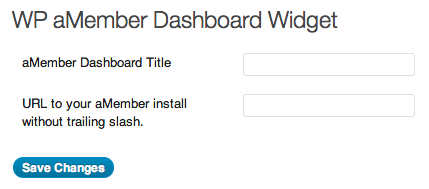
Option to enter url where aMember is installed.
Rakibaad
Installation:
- If you are using WPMU/WPMS, activate the plugin sitewide.
- If you are using the single user WordPress, then you would
upload the whole folder into your plugins directory: wp-content/plugins. - Visit Settings > aMember Dashboard to enter the dashboard title and url to where aMember is installed. The dashboard will not appear until you’ve filled out both settings.
Dibu-eegisyo
Ma jiraan wax dibu-eegis ah oo ku saabsan kaabahan.
Ka-qaybgalayaasha & Horumariyayaasha
“WP aMember Dashboard Widget” waa softiweer il furan. Dadka soo socda ayaa wax ku biiriyay kaabahan.
Ka-qaybgalayaasha
Ku tarjun “WP aMember Dashboard Widget” luqaddaada.
Ma xiisaynaysaa horumarinta?
Baadh koodka, fiiri bakhaarka SVN, ama iska qor diiwaanka horumarinta adigoo adeegsanaya RSS.
Isbeddellada
0.2.2 (2011-07-28)
- Update a function that was mis-named
- Added better multisite support
0.2.1 (2011-07-27)
- Forgot to include the .po file
0.2 (2011-07-27)
- Replaced deprecated code
- Added options page for widget title and url of aMember install
- Added .po file for internationalization
0.1 (2010-05-19)
- Initial Release