

Sharraxaad
MH-Accessibility is a professional accessibility solution for WordPress websites.
It provides a fully customizable accessibility toolbar designed to improve usability, visual accessibility, and compliance with WCAG 2.1 / 2.2 and international standards like ADA and BFSG.
Built for modern businesses, agencies, and organizations, MH-Accessibility combines design flexibility, powerful user tools, and compliance-oriented features.
Key Features in the Free Version:
- Widget Design – Customize the appearance, size, colors, text color, and border radius of the accessibility widget. Choose between light and dark themes and decide whether to display the branding.
- Trigger Design – Configure the widget trigger’s appearance: icon, size, style, and horizontal and vertical positioning on the page.
- Content Modules – Control text size, line height, letter spacing, legible fonts, link highlighting, text alignment, large cursor, focus outline, autoplay stop, heading highlighting, text-to-speech, cursor reading aid, intelligent spacing, and dyslexia-friendly fonts.
- Visual Modules – Color modes and contrast settings such as dark mode, high contrast, monochrome, invert colors, colorblind filters, intelligent contrast, and saturation.
- Orientation & Navigation – Reading aids, focus tools, and animation settings: reading line, reading mask, stop animations, hide images, and keyboard navigation.
Pro Features (Premium Version)
For even more control and compliance, MH-Accessibility offers the following in the Pro version:
- Accessibility Statement Generator – Automatically create a complete, legally compliant accessibility statement for your website.
- Accessibility Checker – Analyze your content directly in the browser for WCAG and BFSG compliance.
- Profiles – Predefined user profiles for various needs: epilepsy protection, ADHD mode, cognitive/autism support, visual enhancement, dyslexia optimization, motor support.
No technical knowledge required – simply install, configure, and make your WordPress website more inclusive. MH-Accessibility brings accessibility to your website – easy, fast, and reliable.
Features
Widget Design & Appearance Customization
MH-Accessibility gives you full control over the visual appearance of your accessibility widget. Seamlessly integrate it into your website’s branding and design system without touching a single line of code.
Customize every detail of your widget:
- Widget Style – Choose between different visual layouts for a modern or classic appearance
- Widget Size – Scale the entire widget panel for optimal usability on any screen size
- Primary Color – Match the widget to your brand identity with a custom accent color
- Text Color – Define readable and high-contrast text colors inside the widget
- Border Radius – Adjust corner rounding to fit your website’s design language
- Light / Dark Mode – Select a light or dark widget theme to blend perfectly with your site
Designed for flexibility, the widget adapts visually to your theme while maintaining clarity and usability.
Trigger Design & Positioning
Customize how the accessibility trigger appears and where it is placed on your website. Ensure maximum visibility without interfering with your layout or user experience.
Full control over the widget trigger:
- Horizontal Position – Place the trigger on the left or right side of the screen
- Vertical Position – Define its vertical placement for optimal accessibility
- Trigger Icon Selection – Choose from multiple icons to match your design style
- Icon Size Adjustment – Scale the trigger icon for better visibility and usability
- Icon Style Options – Customize the visual appearance of the trigger for a modern, minimal, or bold look
The flexible trigger design ensures that your accessibility widget remains easy to find while blending seamlessly into your website’s visual identity.
Accessibility Profiles (Pro)
MH-Accessibility includes predefined accessibility profiles that instantly adapt your website to different user needs. With one click, visitors can activate a tailored experience optimized for their specific challenges.
Available accessibility profiles:
- Epilepsy Safe Mode – Reduces flickering effects and minimizes potentially harmful visual stimuli (Pro)
- ADHD Mode – Minimizes distractions and enhances focus for improved concentration (Pro)
- Cognitive / Autism Mode – Applies a calmer layout structure to improve clarity and orientation (Pro)
- Vision Impairment Mode – Enhances visibility through optimized contrast and readability adjustments (Pro)
- Dyslexia Mode – Adjusts typography and spacing to support users with reading difficulties (Pro)
- Motor Impairment Mode – Improves usability and interaction for users with limited motor control (Pro)
Each profile intelligently combines multiple accessibility features to create a more inclusive browsing experience — instantly and without complex configuration.
Content & Readability Modules
MH-Accessibility provides powerful content and readability tools that allow users to personalize text presentation and navigation for maximum clarity and comfort.
Typography & Text Controls:
- Font Size Adjustment – Increase or decrease text size for improved readability
- Line Height Control – Adjust vertical spacing between lines
- Letter Spacing – Modify character spacing for better reading flow
- Readable Font Mode – Replace complex fonts with clean, easy-to-read typography
- Dyslexia-Friendly Fonts – Optimized typefaces designed to support users with reading difficulties (Pro)
- Intelligent Spacing – Automatically harmonizes spacing between text elements (Pro)
- Highlight Links – Clearly mark clickable elements for easier navigation
- Text Alignment Control – Adjust text alignment for improved readability
- Large Cursor Mode – Enlarge the mouse pointer for better visibility
- Focus Outline Indicator – Adds a visible border around focused elements for keyboard navigation
- Stop Autoplay – Prevent automatic playback of videos and audio
- Highlight Headings – Emphasize headings to improve page structure clarity
- Text-to-Speech – Read selected text aloud for improved accessibility (Pro)
- Cursor Reading Guide – Magnifies text near the mouse pointer for easier tracking (Pro)
These modules empower users to customize the reading experience according to their individual needs — enhancing usability, comfort, and accessibility across your entire website.
Visual Modules
Adjust color modes and contrast settings to improve visibility and accessibility for all users.
Color & Contrast Options:
- Dark Mode – Enable a dark color scheme for reduced eye strain
- High Contrast – Increase color contrast for better readability
- Monochrome – Switch the site to black-and-white
- Invert Colors – Invert the website’s colors for easier viewing
- Color Vision Filters – Adjust colors for users with color vision deficiencies (Pro)
- Smart Contrast – Automatically optimize contrast for maximum clarity (Pro)
- Saturation – Adjust color saturation to suit individual preferences (Pro)
These visual modules allow users to customize the website’s color presentation, improving accessibility and comfort for people with visual impairments.
Orientation & Navigation
Reading aids, focus tools, and animation settings to help users navigate content more easily.
Navigation & Focus Features:
- Reading Line – Horizontal guide to help track lines of text
- Reading Mask – Highlight only the focused reading area
- Stop Animations – Pause all animations for a static view
- Hide Images – Hide images on the page to reduce distractions
- Keyboard Navigation – Navigate the site entirely via keyboard
These tools improve orientation and usability for users with cognitive, visual, or motor challenges.
Multilingual Support
- Supports multiple languages for a global audience.
Disclaimer
MH-Accessibility is a powerful tool designed to enhance the accessibility of your website and assist you in your accessibility efforts.
While it provides a wide range of features to improve usability and inclusivity, it cannot guarantee full legal compliance with WCAG, ADA, EAA, or other accessibility standards.
Achieving full compliance may still require a professional accessibility audit and additional remediation.
Consider this plugin as a helpful resource to support an accessible user experience, but always consult accessibility and legal experts for official compliance guidance.
License
MH-Accessibility is licensed under the GPLv2 or later.
Acknowledgements
Special thanks to the accessibility community and users who helped shape the direction and usability focus of this plugin.
Sawir-shaashado

Admin dashboard overview 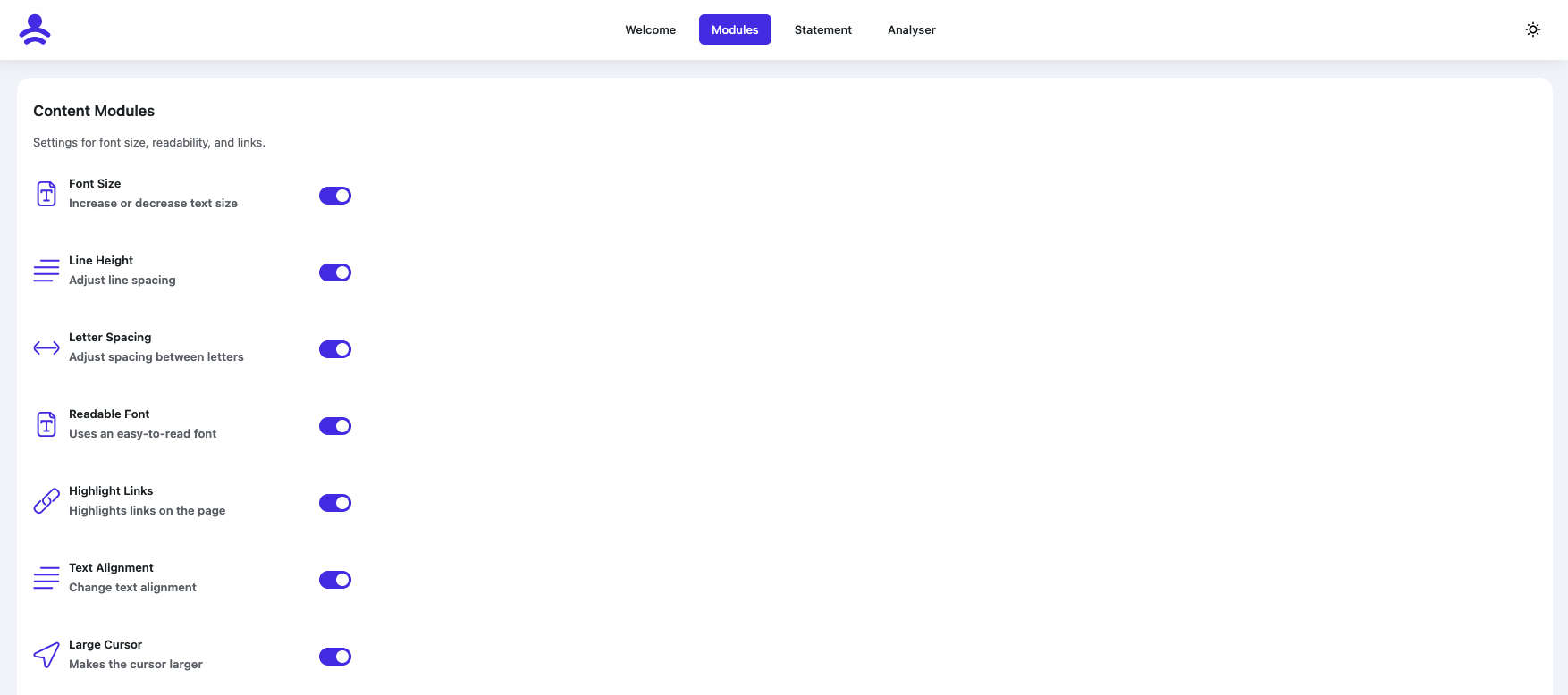
Accessibility settings panel 
Frontend widget (grid view) 
Frontend widget (list view) 
Keyboard-Navigation
Rakibaad
- Upload the Plugin folder to the
/wp-content/plugins/directory. - Activate the plugin through the *Plugins- **screen in WordPress.
- Navigate to *Settings MH-Accessibility- **to configure widget settings.
SBI
-
How do I install the plugin?
-
Download MH-Accessibility from the WordPress plugin directory, install it and activate it. That’s it. No technical knowledge required.
-
Is the plugin compatible with multilingual sites?
-
Yes — the plugin supports language detection and displays appropriate localized controls where configured.
-
Can the widget appearance be fully customized?
-
Yes — you can customize widget style, colors, position, icons, and more to match your site’s design.
-
Does the plugin work with my theme?
-
Yes, MH-Accessibility is compatible with all modern WordPress themes. It also works with page builders such as Elementor and Divi without any problems.
-
Is the plugin GDPR compliant?
-
Yes, MH-Accessibility is fully GDPR compliant. It does not store any personal data and respects the privacy of your users.
-
Which accessibility standards are met?
-
The plugin helps you meet WCAG 2.1 AA standards.
-
How quick is the installation?
-
The installation takes less than a minute. Search for the plugin in the WordPress directory, click on Install and activate it.
-
Do I need technical knowledge?
-
No, not at all. The plugin is designed for beginners. All settings are self-explanatory and intuitive.
Dibu-eegisyo

Ka-qaybgalayaasha & Horumariyayaasha
“MH-Accessibility” waa softiweer il furan. Dadka soo socda ayaa wax ku biiriyay kaabahan.
Ka-qaybgalayaasha
Ku tarjun “MH-Accessibility” luqaddaada.
Ma xiisaynaysaa horumarinta?
Baadh koodka, fiiri bakhaarka SVN, ama iska qor diiwaanka horumarinta adigoo adeegsanaya RSS.
Isbeddellada
1.6.4 (Feb 17, 2026)
- Add Bionic Reading
- ADD Page structure
1.6.3 (Feb 13, 2026)
- Add German Language
- Added animation for activating keyboard navigation
1.6.2 (Feb 12, 2026)
- Add dark/night mode
1.6.1 (Feb 11, 2026)
- bugfixing Keyboard Navigation
1.6.0 (Feb 10, 2026)
- add Keyboard Navigation
1.5.9 (Feb 06, 2026)
- new routing
1.5.8 (Jan 29, 2026)
- Redesign Analyser
- Translations Analyser
1.5.7 (Jan 27, 2026)
- Backend Redesign
- Pro function list view added
- Translations
- JavaScript and CSS reduced and minimised
- Load JavaScript in defer mode
1.5.6 (Jan 23, 2026)
- Revision of font size, line height and letter spacing, widget styling fixed
- Dyslexia font added
1.5.5 (Dec 14, 2025)
- SVG animations are now also stopped
- Colour blindness filter revised
- Saturation filter revised
- Contrast filter revised
- Text focus frame revised
- Text colour cursor
- Reading aid revised
1.5.4 (Dec 13, 2025)
- New icons added
1.5.0 (Dec 12, 2025)
- Hello World!