
Sharraxaad
Most of the “related posts” plugins out there while they provide some kind of control on how to create related posts, they all rely on an algorithm
and the results are automatic. With CPR you get total control as you can manually select the posts that you want to relate.
Sawir-shaashado
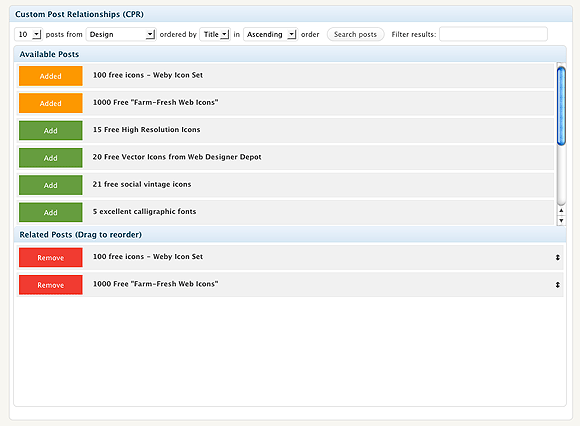
The Custom related posts (CPR) screen. Search, select, relate, done.
Rakibaad
- Upload the folder to the
/wp-content/plugins/directory - Activate the plugin through the ‘Plugins’ menu in WordPress
- In the Posts page you will see the main screen of the plugin.
SBI
- How do i display the related posts then?
-
Check http://webtoolkit4.me/2010/06/10/wordpress-plugin-custom-post-relationships-cpr-v1-0/ for info on how to display your related posts.
Have in mind that you can display anything you want, even custom fields.
Dibu-eegisyo
Ma jiraan wax dibu-eegis ah oo ku saabsan kaabahan.
Ka-qaybgalayaasha & Horumariyayaasha
“Custom Post Relationships (CPR)” waa softiweer il furan. Dadka soo socda ayaa wax ku biiriyay kaabahan.
Ka-qaybgalayaasha
Ku tarjun “Custom Post Relationships (CPR)” luqaddaada.
Ma xiisaynaysaa horumarinta?
Baadh koodka, fiiri bakhaarka SVN, ama iska qor diiwaanka horumarinta adigoo adeegsanaya RSS.
Isbeddellada
1.0.1
- “All categories” option added.
1.0
- Initial Release