

Sharraxaad
Bye Bye Passwords brings modern passwordless authentication to WordPress using WebAuthn/Passkeys technology. Say goodbye to weak passwords and hello to secure, convenient login with biometrics, security keys, or platform authenticators.
Key Features
- Passwordless Login – Sign in using Touch ID, Face ID, Windows Hello, or security keys
- Multiple Passkeys – Register multiple devices for convenient access anywhere
- Recovery Codes – Generate one-time backup codes for emergency access
- Enhanced Security – Eliminate password-based attacks completely
- User-Friendly – Simple setup with no technical knowledge required
- Privacy-Focused – Your authentication data stays on your server
- WordPress Integration – Seamlessly integrated into WordPress admin and login
How It Works
- Register a passkey from your WordPress admin profile
- Use your device’s built-in authentication (fingerprint, face, PIN)
- Sign in instantly without typing passwords
Requirements
- SSL/HTTPS enabled website (required for WebAuthn)
- Modern browser with WebAuthn support
- PHP 7.2 or higher
- WordPress 5.0 or higher
External Services
This plugin may connect to the FIDO Alliance Metadata Service (MDS) to download root certificates for authenticator validation.
FIDO Alliance Metadata Service
- URL: https://mds.fidoalliance.org/
- Purpose: Downloads attestation root certificates to verify the authenticity of security keys and passkey devices
- When: Only when attestation verification is enabled and the plugin needs to update its certificate store (not during normal authentication)
- Data sent: No personal or user data is transmitted – only a standard HTTP GET request
- Service provider: FIDO Alliance
- Terms of Use: https://fidoalliance.org/metadata/
- Privacy Policy: https://fidoalliance.org/privacy-policy/
No user data, credentials, or personal information is ever sent to external services. All authentication happens locally on your server.
Sawir-shaashado

Login page with both password and “Sign in with Passkey” options 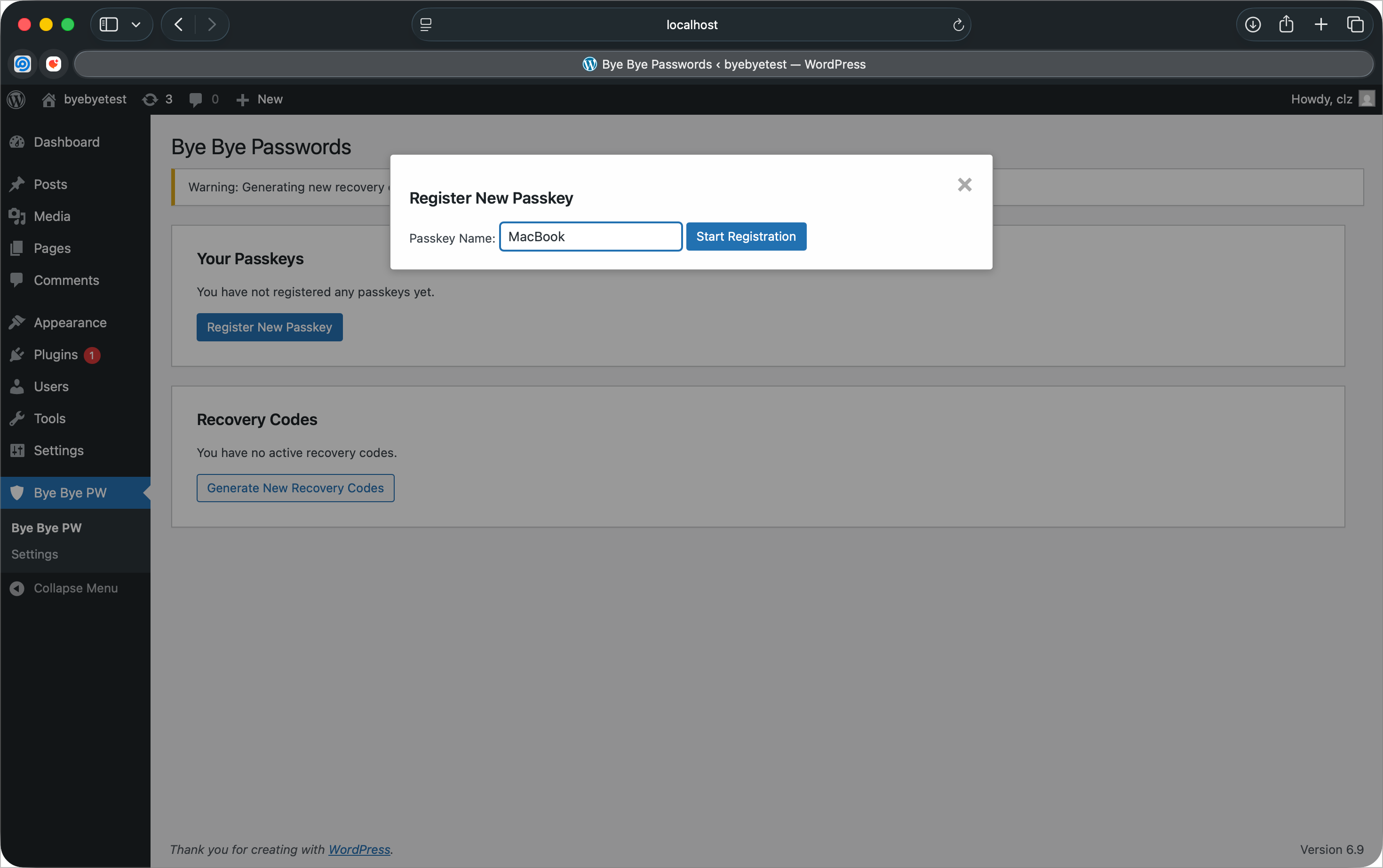
Registering a new passkey from the admin dashboard 
Recovery codes for emergency account access 
Plugin settings page with security configuration 
Passwordless-only login page with password authentication disabled
Rakibaad
- Upload the plugin folder to the
/wp-content/plugins/directory - Activate the plugin through the ‘Plugins’ menu in WordPress
- Navigate to “Bye Bye Passwords” in the admin menu
- Register your first passkey
- Generate recovery codes as backup
SBI
-
What browsers support WebAuthn/Passkeys?
-
Chrome/Edge 67+, Firefox 60+, Safari 14+, and Opera 54+ all support WebAuthn.
-
What happens if I lose my device?
-
Use your recovery codes to regain access, then register a new passkey. We recommend registering multiple devices.
-
Is this more secure than passwords?
-
Yes! Passkeys are phishing-resistant, can’t be stolen in data breaches, and use cryptographic authentication.
-
Do I need special hardware?
-
No, most modern devices have built-in authenticators (Touch ID, Face ID, Windows Hello). You can also use USB security keys.
Dibu-eegisyo
Ma jiraan wax dibu-eegis ah oo ku saabsan kaabahan.
Ka-qaybgalayaasha & Horumariyayaasha
“Bye Bye Passwords” waa softiweer il furan. Dadka soo socda ayaa wax ku biiriyay kaabahan.
Ka-qaybgalayaasha
Ku tarjun “Bye Bye Passwords” luqaddaada.
Ma xiisaynaysaa horumarinta?
Baadh koodka, fiiri bakhaarka SVN, ama iska qor diiwaanka horumarinta adigoo adeegsanaya RSS.
Isbeddellada
1.2.6
- Security: Gate “Disable Password Login” setting behind recovery codes for all administrators
- Enhancement: Show admin recovery code status on settings page
1.2.5
- Compliance: Removed CLAUDE.md development file from plugin distribution
1.2.4
- Compliance: Renamed main plugin file to bye-bye-passwords.php per WordPress.org naming convention
- Compliance: Plugin folder structure updated to match plugin slug
1.2.3
- Compliance: Use wp_enqueue commands for all CSS (removed inline styles)
- Compliance: Document external FIDO Alliance Metadata Service in readme
- Compliance: Replace PHP sessions with cookies + transients for cache compatibility
- Security: Mandatory nonce validation for authentication challenge endpoint
- Performance: Plugin no longer starts sessions on every page load
1.2.2
- Compliance: Text domain changed to ‘bye-bye-passwords’ to match WordPress.org slug
- Security: Added ABSPATH direct access protection to template files
- Compliance: Removed plugin assets from ZIP (uploaded via SVN separately)
1.2.1
- Fix: Text domain corrected to match plugin slug (byebyepw)
- Fix: Property name bug in user profile display
- Security: Session regeneration after successful authentication
- Security: HTTPS enforcement check with admin notice
- Security: Browser WebAuthn support detection with user feedback
- Enhancement: Complete uninstall cleanup (tables, options, transients)
- Enhancement: Deactivator cleanup for transients
- Enhancement: Dependency injection in Admin class
- Enhancement: Removed duplicate AJAX handler registrations
- Enhancement: Increased recovery code entropy to 64-bit (4 segments)
- Compliance: Fixed global variable and function name prefixes
- Compliance: Updated to WordPress 6.9 compatibility
1.2.0
- Compliance: Complete WordPress.org plugin directory compliance overhaul
- Security: Enhanced nonce verification for all AJAX endpoints to meet WordPress.org standards
- Security: Fixed output escaping throughout WebAuthn library with WordPress-specific modifications
- Security: Improved input sanitization and validation across all user-facing forms
- Security: Removed discouraged PHP functions (unlink, curl) in favor of WordPress equivalents
- Enhancement: Updated text domain to match WordPress.org requirements (bye-bye-passwords)
- Enhancement: Cleaned up plugin structure removing development files from distribution
- Documentation: Added comprehensive phpcs ignore comments for legitimate security exceptions
- Library: Forked and customized WebAuthn library for WordPress.org compliance requirements
1.1.2
- Security: Fix username enumeration vulnerability by standardizing authentication error messages
- Security: Implement constant-time comparison for recovery code verification to prevent timing attacks
- Security: Add comprehensive CSRF protection for all public authentication endpoints
- Enhancement: Strengthen session security with secure CSRF token management
- Enhancement: Improve error message consistency across all authentication flows
1.1.1
- Fix: Resolve authentication failure with platform authenticators (Touch ID, Face ID, Windows Hello)
- Fix: Improve sign count validation to be more lenient with authenticators that don’t increment counters
- Security: Maintain protection against cloned authenticators while allowing normal platform authenticator operation
- Improved: Enhanced logging for sign count validation debugging
1.1.0
- Security: Critical security updates – Fix session hijacking and race conditions
- Security: Strengthen challenge management to prevent authentication bypass
- Security: Re-enable sign count validation to detect cloned authenticators
- Security: Add rate limiting to authentication endpoints (10 challenges/5min, 5 auth attempts/5min, 3 recovery codes/10min)
- Enhancement: Implement secure session handling with proper timeout and regeneration
- Enhancement: Replace predictable transient keys with secure UUIDs
- Enhancement: Add comprehensive challenge validation and immediate invalidation
- Update: Domain references changed from labountylabs.com to claytonlz.com
1.0.0
- Initial release
- Core WebAuthn/Passkeys authentication functionality
- Multiple passkey registration per user
- Recovery codes system with one-time use codes
- Admin interface for managing passkeys and recovery codes
- Login page integration with passkey authentication
- Option to disable password login for enhanced security
- Debug tools for troubleshooting
- WordPress coding standards compliance
- GPL v2 licensing for WordPress.org compatibility