

وضاحت
TID Custom Login Page plugin can manage to customize your WordPress Login page. You may update Image and color. Also You can change background Image and background overlay from back end.
Plugin documentation: https://wordpress.org/plugins/tid-custom-login-page/
Docs and support
You can find docs, FAQ and more detailed information about Scroll to Top pluign on techitdev.com. When you cannot find the answer to your question on the FAQ or in any of the documentation, check the support forum on WordPress.org. If you cannot locate any topics that pertain to your particular issue, post a new topic for it. About the Author
TID Custom Login needs your support
It is hard to continue development and support for this free plugin without contributions from users like you. If you enjoy using TID Custom Login and find it useful, please consider making a donation. Your donation will help encourage and support the plugin’s continued development and better user support.
You may changes the settings
- Change WordPress Default Logo.
- Change Primary Colors.
- Change Secondary Colors.
- Change Background Image .
Usage
- Go to your Dashboard after installation and navigate to “Login Option” to configure the accordion.
- Change the Primary Color for the Login Button Color and Input Border Color.
- Change the Secondary Color for the Go To Back Button
- Upload Logo and Background Image. You can not directly upload images here. First, upload the image in Media and copy the media link and paste the media link here.
- You can Change the Background Image Overlay Color. Just input 0.1 to 0.9 in the Background brightness area.
Features
- Very easy installation.
- Unlimited Colors option.
- Custom login page logo option.
- Custom logo image.
- Lightweight and fast.
- Flexible and easy to use.
تصوير

screenshot-1.png = Front End 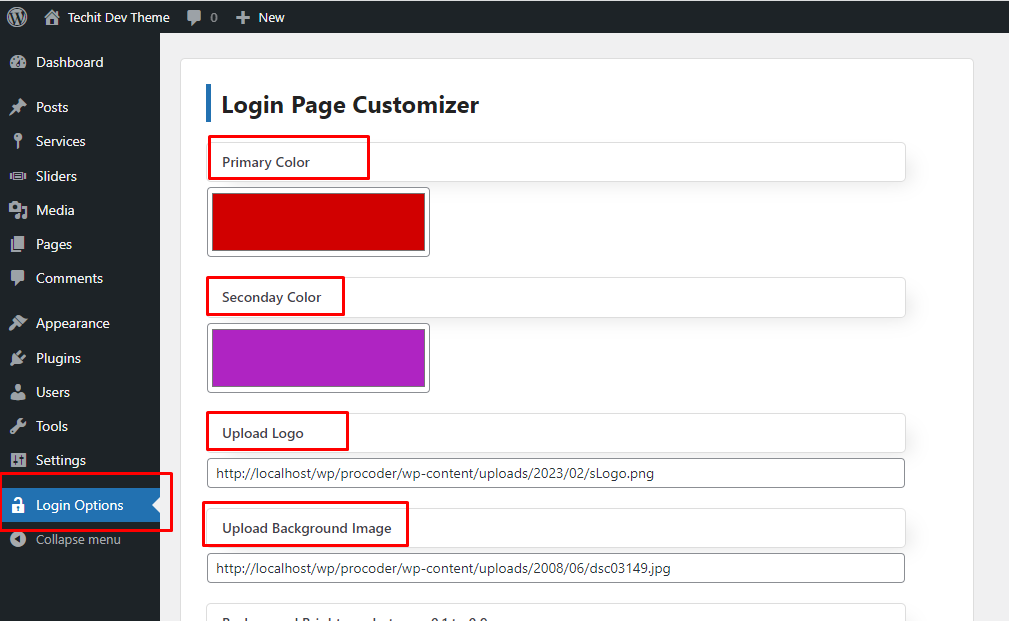
screenshot-2.png = Back End 
screenshot-3.png = Go to Media 
screenshot-4.png = Copy Media Link 
screenshot-5.png = Paste Media Link
انسٽاليشن
- Upload ‘tid-custom-login-page’ to the ‘/wp-content/plugins/’ directory
- Activate the plugin through the ‘Plugins’ menu in WordPress
FAQ
-
Do I need to setup anything?
-
No.
جائزا
ھن پلگ ان لاءِ ڪي به رايا ناھن.
تعاون ڪندڙ & ڊولپرز
“TID Custom Login Page” اوپن سورس سافٽ ويئر آهي. ھيٺين ماڻھن ھن پلگ ان ۾ حصو ورتو آھي.
تعاون ڪندڙ
ترجمو ڪريو “TID Custom Login Page” توهان جي ٻولي ۾.
ڊولپمينٽ ۾ دلچسپي؟
ڪوڊ براؤز ڪريو، چيڪ ڪريو SVN مخزن، يا رڪنيت حاصل ڪريو ڊولپمينٽ لاگ پاران RSS.
لاگ تبدیل ڪريو
1.0.0
- Initial Version