
وضاحت
A powerful WooCommerce product filter plugin that allows customers to filter products by attributes, price range, stock status, and navigate between categories.
Features
- Attribute Filtering – Filter by any WooCommerce product attribute
- Price Range Slider – Interactive price range filtering with visual slider
- Stock Status Filter – Filter products by availability
- Categories Navigation – Collapsible category tree for browsing product categories
- Responsive Design – Mobile-friendly interface
- Admin Configuration – Easy-to-use admin interface for setting up filters
- Drag & Drop Ordering – Reorder filter items in the admin
- Shortcode Support – Display filters anywhere using shortcodes
[nwsfilter_product_filter]and[nwsfilter_selected_filters] - Clean Code – Object-oriented PHP with proper WordPress coding standards
- AJAX Filtering – Fast filtering without page reloads
- Multiple Filter Types – Price range, attributes, stock status, and categories
- Selected Filters Display – Show active filters separately with remove buttons
- Auto-expand Categories – Optional automatic expansion of parent categories
Filter Types
Price Filter
Interactive price range slider that automatically detects the price range for the current category with currency symbol support and real-time visual feedback.
Attribute Filters
Checkbox-based filtering for product attributes with product counts for each option, supports multiple selections, and automatically hides options with zero products.
Stock Filter
Simple checkbox to filter by stock availability, showing only products that are in stock.
Categories Menu
Collapsible category tree showing hierarchical structure with product counts, expandable/collapsible subcategories with visual indicators, current category highlighting, and optional auto-expand parent categories feature.
Usage
Display the main filter using the shortcode:
[nwsfilter_product_filter]
Display only selected/active filters:
[nwsfilter_selected_filters]
Or use PHP in your template:
display_filter_form(); ?>
Configuration
- Navigate to Settings > Product Filter in your WordPress admin
- Select which attributes and filters you want to display
- Drag and drop to reorder the filter items
- Configure categories settings (auto-expand, display location)
- Configure selected filters display options
- Save your settings
Customization
The plugin includes comprehensive CSS classes for easy customization:
* .nws-filter – Main container
* .filter-group – Individual filter sections
* .filter-group.is-active – Active filter sections
* .range-slider – Price range slider
* .selected-filters-section – Selected filters section
* .filter-chip – Individual filter chip
* .nws-clear-filters – Clear filters button
تصوير
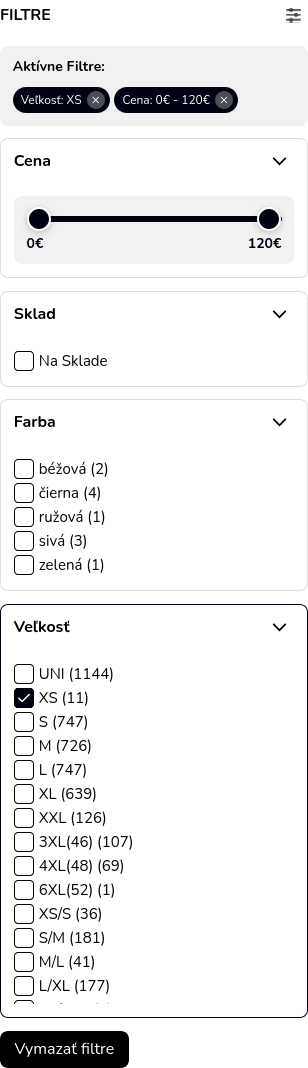
Main filter interface 
Admin configuration panel
انسٽاليشن
- Upload the plugin files to
/wp-content/plugins/nws-filter/ - Activate the plugin through the ‘Plugins’ menu in WordPress
- Go to Settings > Product Filter to configure
- Display the filter using shortcode
[nwsfilter_product_filter]or template functions
FAQ
-
How do I display the filter?
-
Use the shortcode
[nwsfilter_product_filter]in any page or post, or add it to your theme template using<?php echo do_shortcode('[nwsfilter_product_filter]'); ?> -
Can I display selected filters separately?
-
Yes! Use the shortcode
[nwsfilter_selected_filters]to display only the active/selected filters with remove buttons. This is useful when you want to show filters in a different location or when you’ve hidden them from the main filter form. -
How do I change the order of filters?
-
In the admin settings (Settings > Product Filter), you can drag and drop the filter items to reorder them. The order you set will be reflected on the frontend.
-
Can I customize the appearance?
-
Yes! The plugin includes comprehensive CSS classes that you can override in your theme’s CSS file. All main elements have specific classes like
.nws-filter,.filter-group,.range-slider, etc. -
Does it work with AJAX?
-
The filtering uses URL parameters and page reloads. The interface includes a loading indicator for better user experience.
-
Can I hide selected filters from the main filter form?
-
Yes! In the admin settings, enable “Hide Selected Filters in Filter Form” and use the
[nwsfilter_selected_filters]shortcode to display them elsewhere. -
How do I enable category auto-expand?
-
In Settings > Product Filter, check the “Auto-expand Parent Categories” option. This will automatically expand parent categories when viewing a subcategory.
-
What WooCommerce versions are supported?
-
The plugin requires WooCommerce 4.0 or higher and is tested up to WooCommerce 8.0.
جائزا
ھن پلگ ان لاءِ ڪي به رايا ناھن.
تعاون ڪندڙ & ڊولپرز
“NWS Product Filter” اوپن سورس سافٽ ويئر آهي. ھيٺين ماڻھن ھن پلگ ان ۾ حصو ورتو آھي.
تعاون ڪندڙ

ترجمو ڪريو “NWS Product Filter” توهان جي ٻولي ۾.
ڊولپمينٽ ۾ دلچسپي؟
ڪوڊ براؤز ڪريو، چيڪ ڪريو SVN مخزن، يا رڪنيت حاصل ڪريو ڊولپمينٽ لاگ پاران RSS.
لاگ تبدیل ڪريو
1.0.20
- UPDATED: Added declaration about HPOS compatibility
1.0.19
- UPDATED: Added missing translations
1.0.18
- ADDED: Settings link in plugin action list for quick access to plugin settings
- UPDATED: Bumped WordPress tested up to version 6.9
1.0.17
- UPDATED: Enhanced readme.txt with comprehensive description and features
- UPDATED: Added detailed FAQ section with 8 practical questions and answers
- UPDATED: Improved installation instructions and usage examples
- ENHANCED: Better WordPress.org plugin directory presentation
- DOCUMENTATION: Complete feature list and filter type descriptions
1.0.16
- Fixed style enqueue in is_archive()
1.0.15
- Fixed plugin URL in main plugin file
1.0.14
- BREAKING CHANGE: Updated all prefixes from NWS_ to NWSFILTER_ for WordPress.org compliance (minimum 4 characters required)
- CHANGED: Shortcode names updated to [nwsfilter_product_filter] and [nwsfilter_selected_filters]
- CHANGED: Class names updated to NWSFILTER_Plugin, NWSFILTER_Frontend, NWSFILTER_Admin, NWSFILTER_Functions
- CHANGED: Option names updated to use nwsfilter_ prefix (e.g., nwsfilter_settings, nwsfilter_categories_auto_expand)
- CHANGED: Constants updated to NWSFILTER_VERSION, NWSFILTER_PLUGIN_DIR, NWSFILTER_PLUGIN_URL, NWSFILTER_PLUGIN_FILE
- CHANGED: Enqueue handles updated to nwsfilter-style, nwsfilter-script, nwsfilter-admin
- REMOVED: All inline and tags in favor of properly enqueued files
- ENHANCED: Full WordPress.org coding standards compliance
- ENHANCED: Proper use of wp_enqueue_script() and wp_enqueue_style()
- ENHANCED: Added wp_localize_script() for passing dynamic PHP data to JavaScript
- UPDATED: All documentation with new shortcode and class names
1.0.13
- Remove unused file, renmant of previous code
- Fixed URL handling
- Fixed filter on search results page, ie. support for “s” and “post_type” query params
1.0.12
- Optimize DB queries for retrieving max price in categories
1.0.11
- Stable release with all bug fixes and new features
- Enhanced filter performance and reliability
- Complete WordPress.org submission ready version
- All security and coding standard issues resolved
1.0.10
- Fixed categories displaying regardless of plugin settings
- Categories now only show when enabled in admin filter settings
- Improved filter setting validation
1.0.9
- Fixed database query security issues for WordPress.org compliance
- Improved code quality and WordPress coding standards
- Updated all version numbers consistently across plugin files
- Enhanced plugin check compatibility
1.0.8
- Fixed WordPress.DB.PreparedSQL.NotPrepared error in database queries
- Improved database query security by directly passing prepared statements
- Better WordPress Plugin Check compliance
1.0.7
- Added selected filters shortcode
- Added option to hide selected filters in main form
- Security improvements
- Complete Slovak translation
- Refactored code to eliminate duplication
1.0.6
- Enhanced filter functionality and stability improvements
- Bug fixes and performance optimizations
1.0.0
- Initial release