

وضاحت
Protect your WordPress content where traditional scanners fail.
Content Guard Pro is a database-first security scanner that detects malicious content, spam links, and SEO injections hiding inside your posts, pages, and Gutenberg blocks.
While file scanners protect your code, Content Guard Pro protects your content. Attackers increasingly bypass file security by injecting spam into Gutenberg blocks, hiding SEO links in post meta, and burying obfuscated scripts in custom fields. Content Guard Pro finds and neutralizes these database-resident threats.
Why Content Guard Pro?
Many site owners discover that spam and malware bypass file scanners by injecting directly into:
- Post content – Especially nested Gutenberg blocks
- Custom field metadata – Hidden SEO spam and malicious links
- Widget content – Injected scripts that survive file scans
- Options table entries – Persistent backdoors and spam
Traditional security plugins scan files. Content Guard Pro scans where attackers actually hide: your database.
Key Features
- Database-First Scanning – Scans posts, pages, and custom post types where threats actually hide
- Gutenberg-Aware – Deep analysis of block editor content with recursive block parsing
- Real-Time Protection – Automatically scans content when posts are saved or published
- Multi-Layer Decoder – Unwraps up to 3 layers of obfuscation (Base64, URL encoding, ROT13, hex, octal)
- Serialized Data Inspector – Detects malware hidden in PHP arrays (postmeta, Elementor data)
- Smart Detection – Finds hidden links, external scripts, obfuscated code, SEO spam, and crypto miners
- Low False Positives – Accessibility-aware rules respect
.sr-onlyclasses and configurable allowlists - Performance-Conscious – Auto-throttling and batch processing prevent server overload
- Confidence Scoring – Findings ranked 0-100 so you know what to fix first
- Complete Audit Trail – Track all security actions for forensics and compliance
What Content Guard Pro Detects
Core Threats:
- Hidden/cloaked content (
display:none,visibility:hidden) with external links - Suspicious external resources (
<iframe>,<script>from unknown domains) - URL shorteners and redirector services (bit.ly, t.co, cutt.ly)
- SEO spam keywords (pharma, casino, crypto, gambling)
- Obfuscated JavaScript (
fromCharCode(), base64eval, data: URLs) - Inline event handlers (
onclick,onerror,onload, 30+ DOM events) - Serialized PHP malware in postmeta and options
- Cryptocurrency miners (Coinhive, CryptoLoot, JSEcoin)
Advanced Obfuscation:
- Multi-layer encoded attacks:
eval(base64_decode(str_rot13(...))) - Chained dangerous functions with automatic confidence boosting
- Extended CSS cloaking (
opacity:0,font-size:0,z-index:-1) - SVG with embedded JavaScript or event handlers
- Meta refresh redirects and
javascript:URIs - Dangerous PHP functions in encoded strings
How It Works
- Scan – Run manual scans or enable automatic on-save scanning
- Review – Findings categorized as Critical, Suspicious, or Review with confidence scores (0-100)
- Remediate – Click “Edit Post” to fix issues, or mark findings as false positives
- Monitor – Get admin notices and admin bar alerts for Critical findings
Target Users
- WordPress Agencies – Protect client sites from hidden database threats
- Site Owners – Clean up after hacks and ensure nothing remains hidden
- E-commerce Sites – Protect product descriptions from SEO spam
- Security Professionals – Add content-layer scanning to your security stack
Performance
- Scans ~100 posts in 30-60 seconds on shared hosting
- Auto-throttling prevents timeouts and resource exhaustion
- Resumable scans survive server restarts
- Safe Mode automatically activates for large sites (>2M rows)
External Services & Privacy
API Connection:
This plugin connects to Content Guard Pro API (api.contentguardpro.com) for:
- Free tier activation tracking (site URL, WP version, PHP version, plugin version)
- License validation when a paid license key is entered
What is sent: Site URL, site name, WordPress version, PHP version, plugin version, and admin email (free tier only). Sent once on activation via asynchronous, non-blocking request.
Privacy: All data sent over HTTPS. No post content or scan data is ever transmitted. All scanning happens locally on your server.
Service provider: Content Guard Pro Team
Terms: https://contentguardpro.com/terms
Privacy Policy: https://contentguardpro.com/privacy
Documentation & Support
- Documentation: https://contentguardpro.com/docs
- Support Forum: https://wordpress.org/support/plugin/content-guard-pro/
- Bug Reports: WordPress.org support forum
تصوير

Dashboard – Security Overview – Real-time view of your site’s security health, active threats, and recent scan activity. 
Scan Center – Run comprehensive manual scans or configure real-time protection settings for your content. 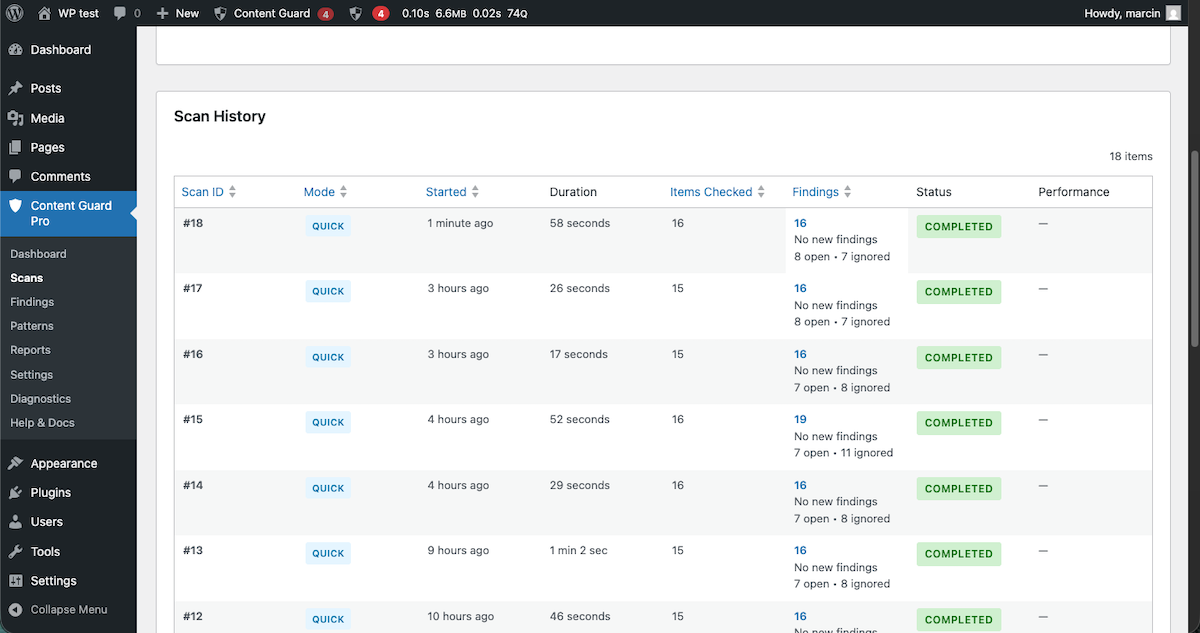
Scan History – Complete audit trail of all scan operations with detailed status, duration, and findings summary. 
Finding Details – Deep dive into detected threats with confidence scoring, threat location, and specific remediation steps. 
Security Reports – Visual analytics of your security posture, showing threat trends, severity distribution, and scan metrics. 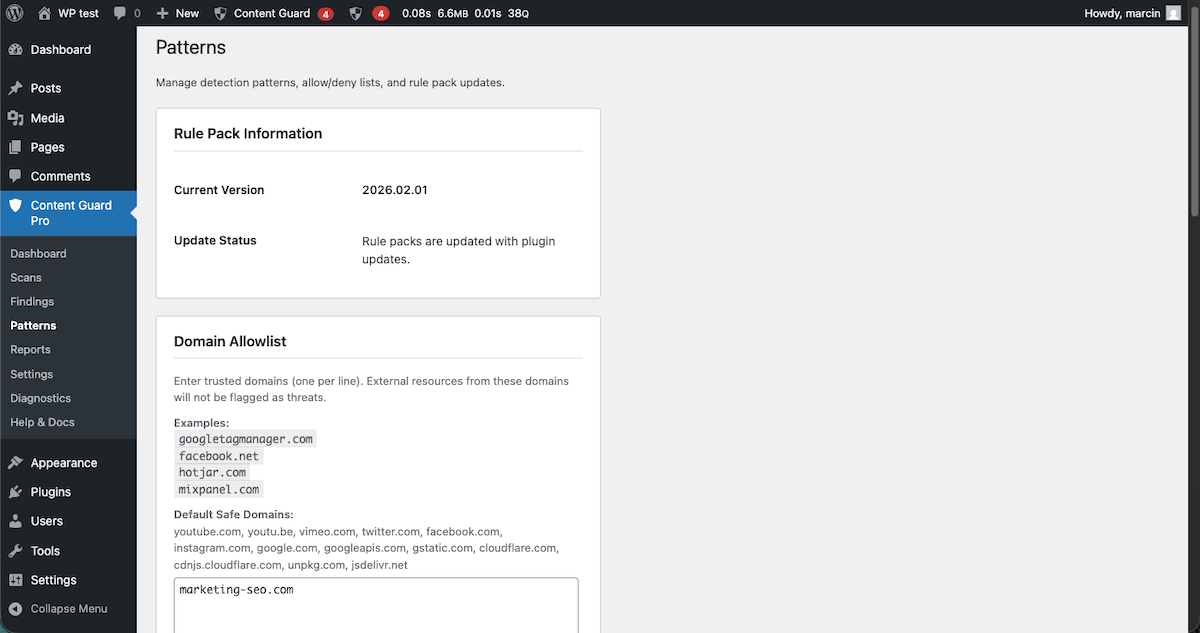
Patterns & Allowlist – Manage detection rules and configure allowlists to prevent false positives for trusted domains. 
Pattern Tester – Verify your custom detection rules against sample content before deployment. 
Settings & Configuration – Customize scanner performance, notification channels, and system preferences to match your hosting environment. 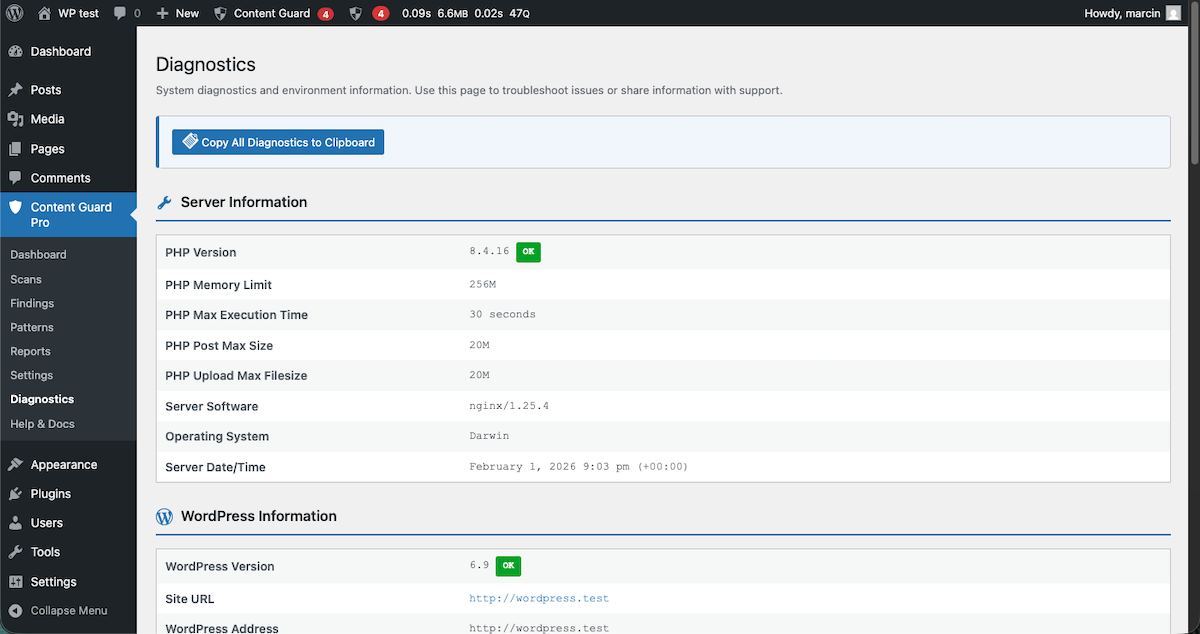
System Diagnostics – Monitor plugin health, memory usage, and background worker status for optimal performance. 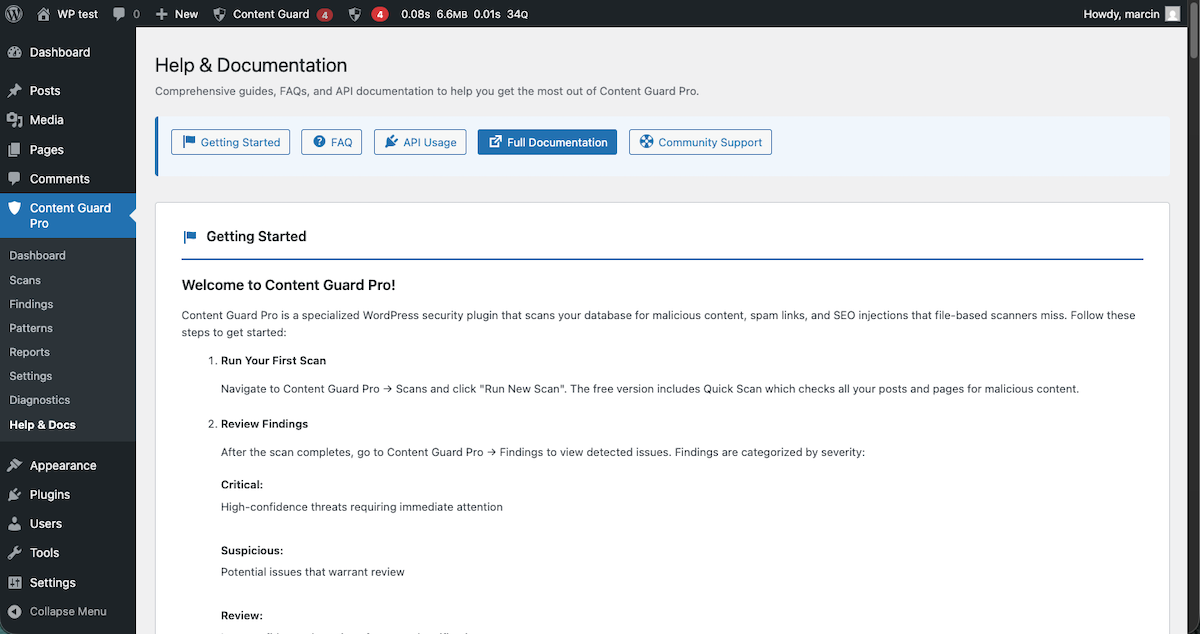
Help Center – Access comprehensive documentation, support forums, and troubleshooting guides directly from your dashboard. 
Smart Admin Alerts – Get unobtrusive notifications for critical findings so you can take immediate action. 
Gutenberg Integration – Real-time content scanning directly within the Block Editor. 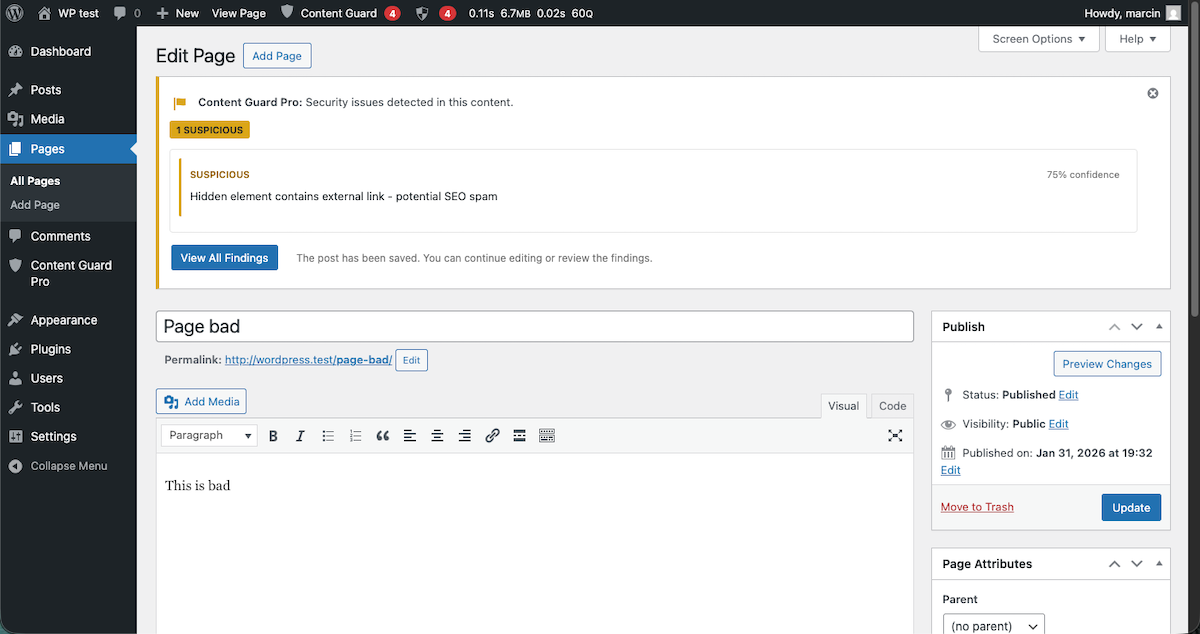
Classic Editor Support – Full security scanning support for the Classic Editor with a dedicated meta box for findings. 
Contextual Threat Analysis – Understand why content was flagged with detailed explanations of the detected threat vectors.
انسٽاليشن
Automatic Installation
- Log in to your WordPress admin panel
- Navigate to Plugins Add New
- Search for “Content Guard Pro”
- Click “Install Now” and then “Activate”
- Follow the setup wizard to configure your preferences
Manual Installation
- Download the plugin ZIP file
- Log in to your WordPress admin panel
- Navigate to Plugins Add New Upload Plugin
- Choose the downloaded ZIP file and click “Install Now”
- Click “Activate Plugin”
- Follow the setup wizard
After Activation
- The setup wizard will guide you through initial configuration
- Configure alert preferences (recommended: enable Critical alerts)
- Run your first scan to establish a baseline
FAQ
-
Does this plugin scan files?
-
No. Content Guard Pro is specifically designed to scan database content where traditional file scanners don’t look. It complements (not replaces) file-based security plugins like Wordfence or Sucuri.
-
Will it slow down my site?
-
No. Scans run in the background with auto-throttling to prevent performance impact. On-save scans complete in under 5 seconds. Your site remains fast and responsive.
-
What is the difference between Quick Scan and Standard Scan?
-
Quick Scan (Free tier) scans wp_posts table only. This covers posts, pages, and custom post types. Standard Scan (Premium) adds postmeta and options table scanning for deeper coverage.
-
Does it work with Gutenberg?
-
Yes! Content Guard Pro includes a Gutenberg block parser that analyzes nested blocks where malware often hides. It also provides real-time scanning directly in the Block Editor.
-
Does it work with Classic Editor?
-
Yes! Full support for Classic Editor with a dedicated meta box showing security status and findings in the post editor sidebar.
-
Can I use this with other security plugins?
-
Absolutely. Content Guard Pro is designed to complement file-based security plugins. Use it alongside Wordfence, Sucuri, iThemes Security, etc.
-
What about false positives?
-
Content Guard Pro uses accessibility-aware detection (ignores
.sr-onlyclasses, etc.) and configurable allowlists to minimize false positives. You can mark findings as “Ignore” if needed. -
Does it delete content automatically?
-
No. Content Guard Pro never deletes content automatically. You review findings and decide what action to take. Non-destructive quarantine (Premium) neutralizes threats without deleting.
-
What happens to my data if I uninstall?
-
By default, all plugin data (findings, scan history) is removed on uninstall. You can enable “Preserve Data” in settings to keep the data.
-
Can I export findings?
-
Yes (Premium Agency+ tiers). Export findings as CSV or JSON for client reports or external analysis.
-
Does it work on multisite?
-
Yes, Content Guard Pro works on WordPress multisite installations. Each subsite is scanned independently. Network-wide administration is on the roadmap.
-
What PHP and WordPress versions are required?
-
WordPress 6.1+ and PHP 8.0+. We recommend keeping WordPress and PHP up to date for best security.
-
Is there an API?
-
Yes (Premium Agency+ tiers). REST API available at
/wp-json/content-guard-pro/v1/findingsfor programmatic access with authentication. -
What database tables does it create?
-
Content Guard Pro creates three custom tables:
{prefix}content_guard_pro_findings(security findings),{prefix}content_guard_pro_scans(scan history), and{prefix}content_guard_pro_audit_log(activity tracking). -
Are there hooks and filters for developers?
-
Yes! Hooks include:
content_guard_pro_loaded,content_guard_pro_finding_saved,content_guard_pro_detection_patterns, andcontent_guard_pro_allowlist_domains. See documentation for full list. -
Can I test detection patterns?
-
Yes! The Pattern Tester tool (in Patterns & Allowlist page) lets you test custom patterns against sample content before deploying them.
-
How do I report a false positive?
-
Use the “Ignore” action on any finding and optionally check “Report as False Positive” to help improve detection accuracy.
-
Where can I get support?
-
Use the WordPress.org support forum, check our documentation at contentguardpro.com/docs, or submit bug reports via GitHub.
جائزا
ھن پلگ ان لاءِ ڪي به رايا ناھن.
تعاون ڪندڙ & ڊولپرز
“Content Guard Pro” اوپن سورس سافٽ ويئر آهي. ھيٺين ماڻھن ھن پلگ ان ۾ حصو ورتو آھي.
تعاون ڪندڙ
ترجمو ڪريو “Content Guard Pro” توهان جي ٻولي ۾.
ڊولپمينٽ ۾ دلچسپي؟
ڪوڊ براؤز ڪريو، چيڪ ڪريو SVN مخزن، يا رڪنيت حاصل ڪريو ڊولپمينٽ لاگ پاران RSS.
لاگ تبدیل ڪريو
1.0.4
- Minor fixes to scan functionality (removed duplicated scans)
1.0.3
- NEW: Serialized Data Inspector – Advanced serialized array scanning to detect malware hidden in wp_postmeta, wp_options, and Elementor data
- Safe unserialization with error handling to prevent PHP crashes
- Recursive array traversal up to 10 levels deep with path tracking
- Dangerous key detection: custom_css, custom_js, callback, eval, exec, raw_html, and 20+ others
- Automatic confidence boost (+15) for findings in high-risk array keys
- Nested JSON decoding for Elementor widget structures
- NEW: Multi-Layer Malware Decoder – Advanced recursive decoding system that automatically peels back multiple layers of obfuscation
- Supports 6 encoding types: Base64, URL encoding, HTML entities, ROT13, hex strings, octal strings
- Recursively decodes through up to 3 layers with safety protections
- Entropy analysis and validation to reduce false positives
- Automatic confidence boost (+20) for findings in multi-layer encoded content
- NEW: Advanced Obfuscation Detection Patterns – Chained dangerous functions, triple nested decoding, ROT13+Base64 chains, hex/octal in eval(), gzinflate+Base64 attacks
- ENHANCED: Detection Engine – Scans both original and decoded content, significantly improving detection of sophisticated malware
1.0.2
- Minor fixes
1.0.1
- Minor fixes
1.0.0
- Initial release
- Database scanning engine with Quick Scan mode
- Gutenberg block parsing and analysis
- Real-time on-save scanning
- Admin notices for Critical findings
- Admin bar badge with critical count
- Dashboard widget
- REST API for findings
- Auto-throttling and Safe Mode
- Audit trail for activity tracking
- Setup wizard with sensible defaults
- Bulk operations (Ignore, Delete)
- Allow/Deny list management
- Diagnostics and system checks
- Detection Patterns: External scripts/iframes, hidden content, URL shorteners, SEO spam, obfuscated JavaScript, inline event handlers, document.write(), javascript: URIs, Object/Embed/Applet tags, meta refresh redirects, PHP dangerous functions, extended CSS cloaking, SVG with scripts, cryptocurrency miners, JavaScript redirects, multi-layer obfuscation decoding