

وضاحت
- create multiple menu items at once
- menu items are created from multiline text
- you can provide menu items labels one per line
- use 2 space indent to create subitem
- you can provide menu items URLs one per line – they are automatically paired line by line
- if you don’t provide URLs, then hash is automatically generated for each label
- quick delete menu item with or without all subitems
- quick copy/clone menu item
PRO version features (BUY HERE):
-
generate posts directly from the Menus screen
- no need to leave your Menus screen to create new drafts that you will need later
- generate multiple posts, pages or other post type posts at once
- use 2 space / tab indent to create subpages
- you can provide custom slugs for newly generated posts or let them generate automatically from the titles
-
duplicate menu functionality
- works with all the menu items metas
- you will not lose your Polylang Languages settings
- also works with ACF icons or other data
-
taxonomy terms auto generated menu items
- select any public taxonomy like Blog post categories or WooCommerce product categories or other custom taxonomies
- you can limit how many terms will be listed
- you can limit how many levels of subterms will be listed
- you can exclude some specific terms
- you can order terms by name, parent, count, or other parameters
- you can show/hide empty terms
- you can show/hide terms count (number of assigned posts)
-
post type posts auto generated menu items
- select any public post type like Posts, Pages, Products or other custom post types
- you can limit how many posts will be listed
- you can limit how many levels of subposts will be listed
- you can exclude some specific posts
- you can filter posts by any term and taxonomy
- you can order posts by title, author, date, or other parameters
-
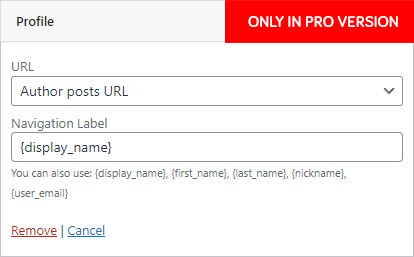
Profile menu item
- show current user in menu
- you can use variables {display_name}, {first_name}, {last_name}, {nickname}, {user_email} to create any custom menu item, like `Hello John ([email protected])` by `Hello {first_name} ({user_email})`
- you can link it to admin profile or author posts URL or choose from WooCommerce account endpoint URLs or to # to use it just as a parent menu item for dropdown
-
Login / Logout menu item
- show login and logout links in menu
- you can provide your own login URL or use default WP login
- you can provide your own login and logout redirect URL
- you can provide your own login and logout menu item label and it’s fully translatable with WPML, Polylang or others
- you can use variables {display_name}, {first_name}, {last_name}, {nickname}, {user_email} in logout menu item
-
special field for hash or $_GET parameters for any post menu item
- you can write some `#hash` that will be added at the end of the post URL
- you can write some `?get_attribute=123` that will be added at the end of the post URL
-
automatically generates anchor links menu items for any post
- click on anchor button to get all anchors from that specific post
- you can select title for every anchor
- you can decide which anchors to add
تصوير

Bulk menu creator 
Quick delete 




انسٽاليشن
- Upload
bulk-menu-creatordirectory to the/wp-content/plugins/directory - Activate the plugin through the ‘Plugins’ menu in WordPress
- In case you don’t see Bulk menu in Appearance > Menus, just click on top right Screen Options and activate it
جائزا

19 سيپٽمبر 2022
This plugin saved me a ton of time compared to manually adding one menu item at a time. Super fast!

9 فيبروري 2022
This plugin has just saved me days worth of work building out a huge mega menu of countries and districts of the world, each with it’s own URL parameter to trigger an action on a map.
To bulk edit this project, I used google sheets (excel would work too) to create a 4 column spreadsheet:
Column A contained 1 empty cell then double spaces below (double space = sub menu item)
Column B contains the country menu title
In column C I used CONCATENATE to combine column A & B to generate the text that I then pasted into the Bulk Menu Creator app.
The finally column D contains the link
Simply copy and paste column C into the Menu items labels, and column D into the Menu items URLs.
I made the mistake of missing the top link the first time, but the delete button that comes with this amazing plugin makes correcting it a 10 second job breeze.
Absolutely amazing app, one of the best time saving plugins on WordPress if you want to create and edit large menus.

24 جنوري 2021
Didn’t find a comparable solution to create a very large menu. Fantastic!

11 آڪٽوبر 2020
Очень удобный плагин для массового создания меню из ссылок.

4 آڪٽوبر 2020
So convenient and easy to use. it saved me a lot of time!

5 سيپٽمبر 2020
Useful and time saving
تعاون ڪندڙ & ڊولپرز

ترجمو ڪريو “Bulk menu creator” توهان جي ٻولي ۾.
ڊولپمينٽ ۾ دلچسپي؟
ڪوڊ براؤز ڪريو، چيڪ ڪريو SVN مخزن، يا رڪنيت حاصل ڪريو ڊولپمينٽ لاگ پاران RSS.
لاگ تبدیل ڪريو
9.6
- Tested on WP 6.9
- PRO ONLY: generate posts directly from the Menus screen
9.5
- Tested on WP 6.5
- stop wrapping lines inside Bulk menu textareas
- now you can resize Bulk menu textareas horizontally and vertically
- PRO ONLY: now you can use TAB and SHIFT+TAB in Bulk menu textareas to change indent
9.4
- Tested on WP 6.4
9.3
- Tested on WP 6.3
- PRO version promo notice
9.2
- Tested on WP 6.1
- new features in PRO version
9.1
- previous fix was not updated… what the hell?
9.0
- fix missing JS localization
8.0
- new Quick copy button on every menu item
- rewrite quick delete to use WordPress core JS functions for better compatibility
7.0
- fix Firefox not working new line with Enter
6.0
- Tested on WP 5.9
- fix children detection for Quick delete
- PRO version introduced
5.0
- Tested on WP 5.7
- possibility to quick delete menu item with or without all subitems – trash icon will appear on hover
4.0
- Tested on WP 5.4
- textarea has now numbers so you can easily visually pair labels and urls
- possibility to create subitems with 2 spaces indent ( use 4 spaces to create sub-sub-item etc. )
3.0
- Tested on WP 5.2.1
- auto generate hash from title if URL is empty
2.0
- Tested on WP 5.0
- Optimized for translations
- Auto unhide metabox on plugin activation
1.0
- First version