

Description
Features | Setup Guide | Documentation | Contact Us
The WordPress OTP Verification plugin verifies users’ email IDs and mobile numbers through an OTP (One-Time Password) sent during registration, login, and contact form submissions. This ensures that only genuine users can sign up while preventing fake registrations and duplicate accounts.
Watch this video to learn more about the OTP Verification plugin and its capabilities:
Enjoy 10 free email and SMS OTPs upon installation to experience the plugin’s functionality.
FEATURES OF ONE-TIME PASSWORD PLUGIN
- OTP Verification On 30+ forms
- miniOrange SMS gateway support
- Login with Phone Number
- Register with Phone Number
- SMS Notifications for WooCommerce Order Status
- OTP Spam Preventor/Limit OTP Addon
- Allow OTP for selected countries
- Ultimate Member SMS Notification
- Ultimate Member Password Reset
- Detailed Transaction Reports and Logs
- Passwordless Login using OTP Verification
- Country code dropdown
- Customize OTP length and validity
- Block specific email domains and phone numbers
- OTP pop-up customization (available on limited login, registration, and checkout forms)
PREMIUM FEATURES AVAILABLE ON UPGRADE
- OTP Over WhatsApp
- Both Email and Phone Verification
- Custom SMS & Email Gateways
- Register Using phone number Addon
- WCFM Vendor SMS Notifications
- Dokan Vendor SMS Notifications
- Elementor Pro Forms
- Checkout WC Form
- Jet Engine Form
- JetFormBuilder Form by Crocoblock
- WS Pro Contact Form
- Tutor LMS Instructor Registration Form
- Tutor LMS Login Form
- Tutor LMS Student Registration Form
- User Registration Forms — WP Everest
- WooCommerce Frontend Manager Form (WCFM)
- Houzez — Real Estate Theme
- Login using phone number Addon
- Customize specific SMS and Email templates
THIRD PARTY CUSTOM SMS GATEWAY FOR OTP Verification and SMS Notifications
In the OTP Verification Plugin, you can use your third-party gateway for sending the SMS/Email & SMS Notifications.
You can also use the miniOrange gateway to perform OTP verification over Phone/SMS and Email or to send SMS notifications. We support OTP Verification worldwide.
Some of the well-known Gateways supported for OTP and SMS (OTP):
— Twilio
— Clickatell
— ClickSend
— SendGrid
— Plivo
— AWS SNS
— Msg91
Check the list of a few of our supported SMS gateways here : SMS Gateways
WHATSAPP OTP VERIFICATION & NOTIFICATIONS
In our OTP Plugin, you can enable OTP Verification via WhatsApp as well as send custom messages & order notifications on WhatsApp.
Enables order status notifications, new account sms notifications, and many more on WhatsApp.
Contact us at [email protected]/[email protected] to know more.
FREE AND PREMIUM OTP VERIFICATION ADDONS SUPPORTED
Follow the link to check free and premium addons supported in the OTP Verification plugin : OTP Verification Addons Supported
- Login with Phone Number:The login with Phone add-on allows users to log in using a phone number only.
- WooCommerce SMS Notifications:Allows your site to send automated WooCommerce order notifications and WooCommerce sms notifications to buyers, sellers, and admins. Buyer and seller both can get SMS notifications after an order is placed or when the order status changes.
- Passwordless Login:With Passwordless login, users would be able to log in using their Username and OTP.
- Register Using Phone Number Only:: Users can register on your WordPress site using only a Phone Number and OTP instead of an Email address or Username.
- WooCommerce Password Reset:Addon replaces the existing WooCommerce Password reset functionality with OTP Verification. Allow users to reset their password using OTP Verification instead of email links.
- Ultimate Member SMS NotificationsAllows your site to send automated Ultimate Member notifications to admins and users.
- Ultimate Member Password Reset:Add-on that replaces the existing Ultimate Member Password reset functionality with OTP Verification. Allow users to reset their passwords using OTP Verification instead of email links.
- Country Restriction Addon:Add-on allows OTP Verification to be enabled for a selected list of countries only. OTP Verification for any other country outside the selected list will be blocked by the addon.
- OTP Over Phone Call:Add-on allows OTP Verification over a Phone Call instead of SMS. The code will be received via a phone call to the customer.
Updated List Of Supported Forms
- WordPress Login Form
- Elementor Pro Forms
- WordPress default registration/TML Registration Form
- WooCommerce Login Form
- WooCommerce Registration Form
- WooCommerce Checkout Form
- WooCommerce FrontEnd Manager Form(WCFM)
- WooCommerce Billing Address Form
- Ultimate Member Registration Form
- Ultimate Member Profile/Accounts Page
- Ultimate Member Login Form
- Ultimate Member Password Reset Form
- Gravity Forms
- Form Maker Form
- User Registration Form — WP Everest
- WooCommerce Social Login form
- ARMember Registration Form
- Profile Builder Registration Form
- Simplr Registration Form
- BuddyPress registration Form
- RegistrationMagic / User Registration Form Builder
- Users Ultra Registration form
- User Profiles Made Easy Registration Form
- Checkout WC
- PIE Registration Form
- Contact Form 7
- Ninja Forms Above version 3.0
- Theme My Login
- Gravity Forms
- WP-Members
- Indeed Ultimate Membership Pro
- Classify Theme Registration
- Real estate 7 pro Theme
- WP eMember Form
- FormCraft Basic — Free Version
- FormCraft — Premium Version
- WordPress Comment Form
- DocDirect Theme
- WpForms
- Caldera Forms
- MemberPress Registration
- Paid Membership Pro
- Real Estate 7 Pro
- WooCommerce Product Vendor Registration Form
- Formidable Form
- Visual Form Builder
- Eduma Login Form
- Eduma Theme Registration Form
- UserPro Plugin
- WS Pro Contact form
- JetFormBuilder by Crocoblock
- Everest Contact Form
- Fluent Form
- Houzez Theme Registration
- Jet Engine
- miniOrange Social Login
- WP User Manager Registration Form
- Real Estate WP Theme Registration Form
- WP Client Registration Form
- MemberPress Single Checkout Registration Form
- MultiSite Registration Form
How does this plugin work?
- On submitting the registration/login form, an Email/SMS with OTP is sent to the email address/mobile number provided by the user.
- Once the OTP is entered, it is verified, and the user gets registered/logs in.
External Services and Libraries
- This plugin uses the miniOrange Servers for OTP Validation.
- intlTelInput – The plugin uses the intlTelInput library for international telephone input formatting and validation. The minified files
intlTelInput.min.jsandintlTelInput.min.cssare included in the plugin distribution. The source code for intlTelInput is available at: intlTelInput GitHub repository
SUPPORT
Customized solutions and Support options are available. Email us at [email protected]/[email protected].
Screenshots

OTP Verification Form Settings 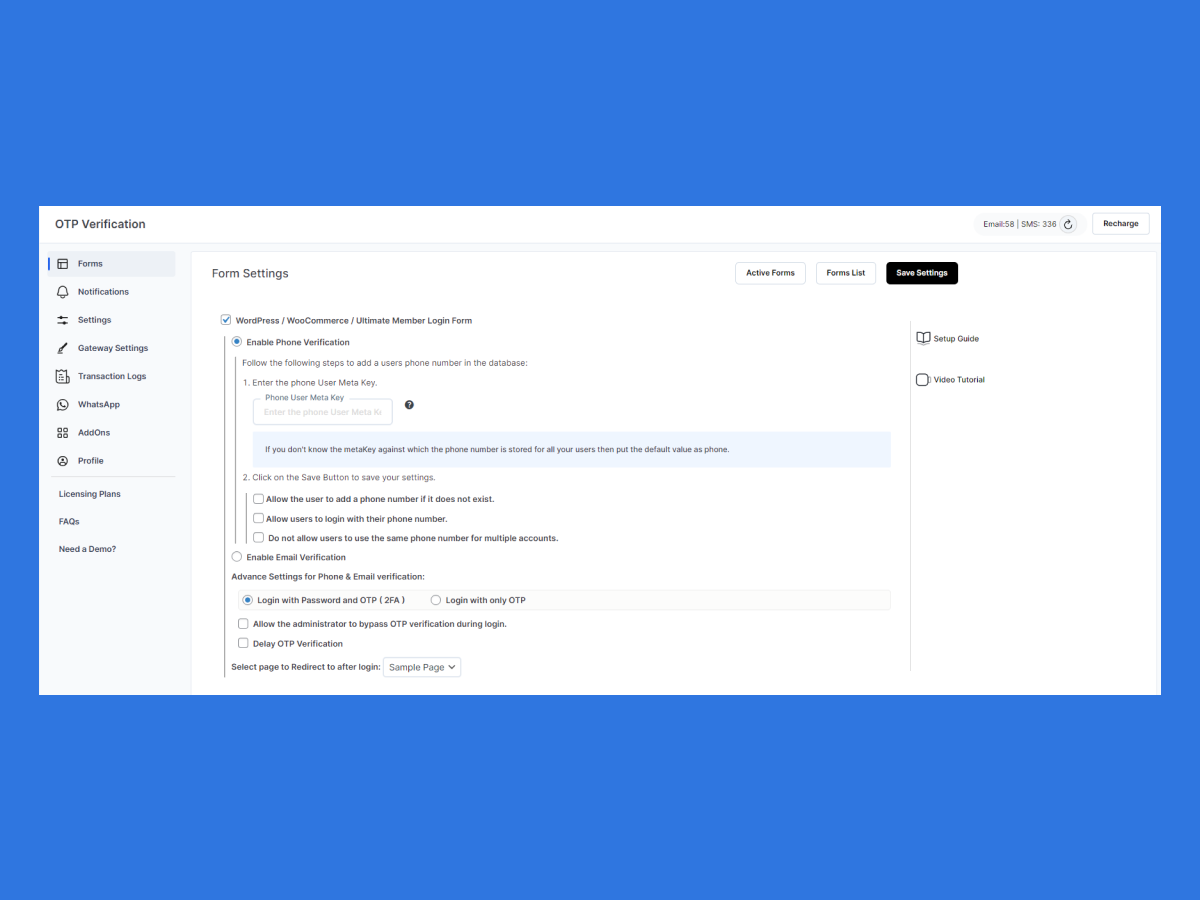
OTP Verification Form Settings — Login Form settings 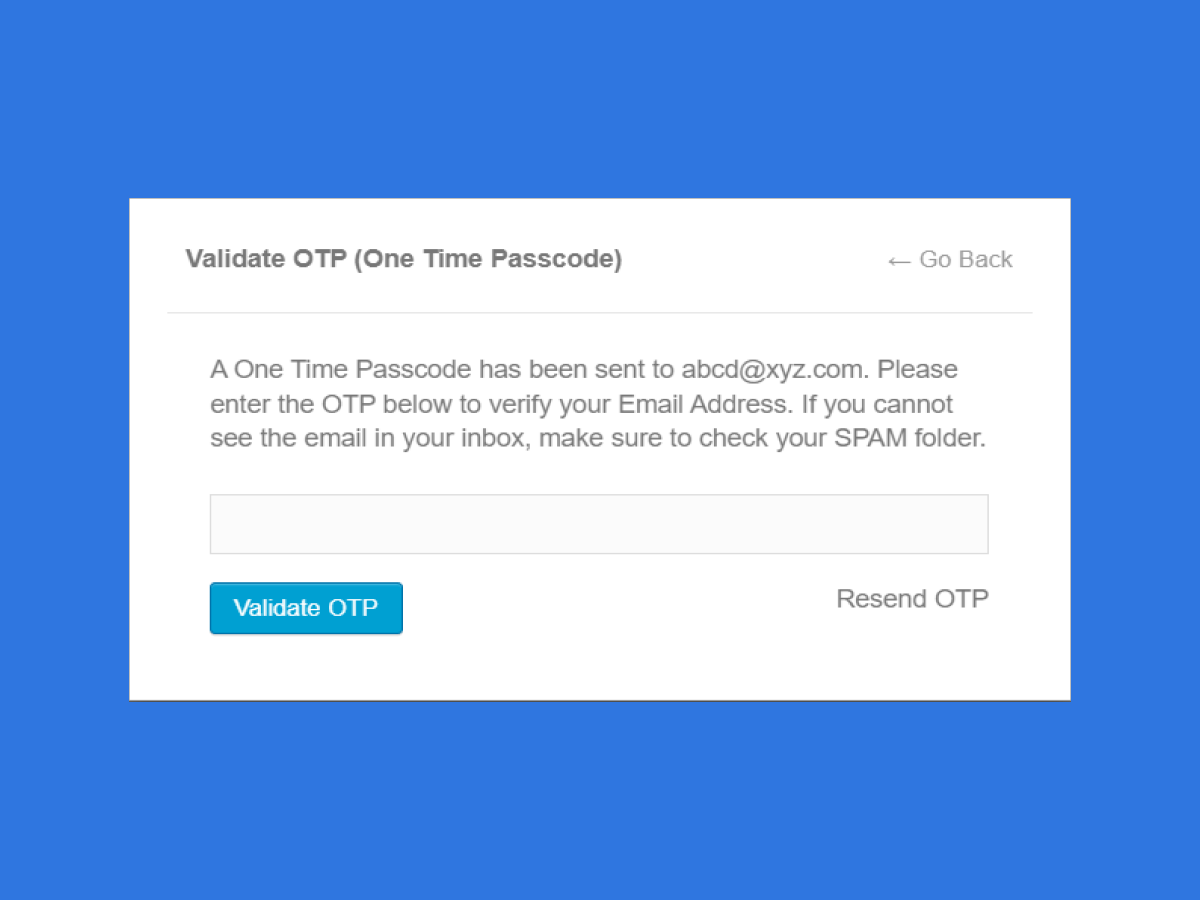
Email Verification via OTP 
Mobile Number Verification via OTP (Login with Phone) 
WooCommerce SMS Notification settings 
WooCommerce SMS Notification specific setting 
WooCommerce SMS Customized SMS 
OTP Verification Plugin Settings
Installation
From your WordPress dashboard
- Visit
Plugins > Add New - Search for
OTP verification. Find and installOTP verification - Activate the plugin from your Plugins page
From WordPress.org
- Download the miniOrange otp verification.
- Unzip and upload the
miniorange-otp-verificationdirectory to your/wp-content/plugins/directory. - Activate miniOrange OTP verification from your Plugins page.
FAQ
-
Why am I required to register?
-
Our simple and easy registration of the OTP Verification Plugin saves you the time of configuring WordPress email settings. You don’t need to configure your own SMS or Email gateway; our SMTP gateway is used for sending OTP.
-
Can I use my SMS gateway?
-
Yes! We support 100+ SMS gateways in our OTP Verification Plugin. You can choose any of our plan that supports the custom SMS gateway feature. You can refer to How do I use my gateway with the OTP Verification plugin? guide as well. Or reach out to us at [email protected] for guidance regarding the best and cost-effective plan for your needs.
-
How to Set Up the WordPress miniOrange OTP Plugin?
-
Please refer to the Step-by-step Plugin guide to configure the plugin. Or else reach out to us @otpsupport@xecurify for support.
-
I want support for other forms. What should I do?
-
To get support for custom forms or a plugin-designed form, please email us at [email protected]/[email protected] with a Form Name & Form Link. You can also submit your query from the OTP Verification plugin’s settings page.
-
Can you add customized features for me?
-
Yes! To get support for any customized features, please email us at [email protected] or submit your query from the OTP Verification plugin.
-
What countries does the plugin supports for OTP delivery?
-
The plugin supports OTP delivery via SMS , WhatsApp and call in all the regions. You can submit your query from the OTP Verification plugin’s settings page incase you face any issues with OTP delivery.
-
For any other query/problem/request
-
Please mail us at [email protected]/[email protected]. You can also submit your query from the OTP Verification plugin’s settings page.
Reviews


Contributors & Developers
“miniOrange OTP Login, Verification and SMS Notifications” is open source software. The following people have contributed to this plugin.
Contributors

“miniOrange OTP Login, Verification and SMS Notifications” has been translated into 4 locales. Thank you to the translators for their contributions.
Translate “miniOrange OTP Login, Verification and SMS Notifications” into your language.
Interested in development?
Browse the code, check out the SVN repository, or subscribe to the development log by RSS.
Changelog
5.4.8
- miniOrange WordPress OTP Verification
- Spam preventor addon Bug Fixes.
5.4.7
- miniOrange WordPress OTP Verification
- OTP spam preventer addon release.
5.4.6
- miniOrange WordPress OTP Verification
- Country Restriction addon release.
- Contact form-7 bug fixes.
5.4.5
- miniOrange WordPress OTP Verification
- bug fixes of mismatch error
- bug fixes of classic checkout.
- Readme updates
5.4.4
- miniOrange WordPress OTP Verification
- WC Block Checkout Form issue fix
- Login Form issue fix
- Formidable Form issue fix
- WordPress beta compatibility
- Addons issue fix
5.4.3
- miniOrange WordPress OTP Verification
- Security fixes updates
5.4.2
- miniOrange WordPress OTP Verification
- Readme updates
5.4.1
- miniOrange WordPress OTP Verification
- Bug fixes of Ninja Forms
- Minor updates
5.4.0
- miniOrange WordPress OTP Verification
- Released transaction logs feature in free plugin
- Released selected country addon in free plugin
- Minor bug fixes
5.3.8
- miniOrange WordPress OTP Verification
- Security fixes
- WhatsApp OTP Verification in the Twilio Plan
- Minor bug fixes in Fluent Forms
- Minor bug fixes in Gravity Forms
- Bug fixes in WooCommerce Checkout Forms
- UI Improvements
5.3.7
- miniOrange WordPress OTP Verification
- Minor bug fixes
- UI/UX improvements of WhatsApp tab.
5.3.6
- miniOrange WordPress OTP Verification
- Security Updates.
- Phone Number length check based on country.
5.3.5
- miniOrange WordPress OTP Verification
- WooCommerce Checkout Form Bug Fixes.
5.3.4
- miniOrange WordPress OTP Verification
- WooCommerce Checkout Form Bug Fixes.
- Forms UI fixes.
5.3.3
- miniOrange WordPress OTP Verification
- Login using phone number method bug fixes
5.3.2
- Merged classic & block checkout form
- Introduced miniOrange Login/Register using Phone & Dokan Registration form
- Masked phone number & email address on the frontend
- Added an option in the administrator to remove a form from anywhere if multiple forms are saved
- Minor fixes
5.3.1
- miniOrange WordPress OTP Verification
- Added setup guides for WooCommerce and Ultimate Member Notifications
5.3.0
- miniOrange WordPress OTP Verification
- Security Improvements & Fixes
For older changelog entries, please see the additional changelog.txt file provided with the plugin.