

HubSpot CMS vs WordPress (2026): Detailed Comparison for Businesses
Choosing the right Content Management System (CMS) in 2026 is about more than just building a website; it’s about building the central nervous system for your entire digital marketing operation.
In this high-stakes decision, the HubSpot CMS vs WordPress debate represents a critical choice between two powerhouse platforms with fundamentally different philosophies.
One is a tightly integrated, all-in-one marketing and sales ecosystem, while the other is an infinitely flexible, open-source universe that puts you in complete control.
This decision directly impacts your ability to attract, engage, and delight customers.
A seamless user experience is paramount, as 88% of online consumers are less likely to return to a site after a single bad experience.

Furthermore, businesses that excel at lead nurturing, a core strength of integrated platforms, generate 50% more sales-ready leads at a 33% lower cost.
Meanwhile, the flexibility of open-source platforms like WordPress, which powers over 43% of the internet, allows for unparalleled customization.
Choosing the right platform is a strategic decision that will define your marketing capabilities for years to come.
This in-depth guide will provide a detailed, feature-by-feature comparison of HubSpot CMS Hub and WordPress.
We will dissect their core strengths, true costs, and ideal use cases to help you make a confident, strategic choice that aligns with your business’s growth ambitions.
Key Takeaways
- The Core Difference: Understand the fundamental distinction: HubSpot CMS is a comprehensive, all-in-one marketing and sales platform with a website builder, while WordPress is a powerful, open-source website builder that relies on plugins for advanced functionality.
- Integrated Power vs Infinite Flexibility: See why HubSpot’s native integration with its world-class CRM and marketing automation tools is its killer feature, while WordPress’s open-source nature and massive plugin library offer limitless customization.
- The True Cost of Ownership: Discover why WordPress’s “free” software tag is misleading. We’ll compare the total cost, including hosting, security, and premium plugins, against HubSpot’s all-inclusive subscription fees.
- Ease of Use for Marketers: Learn why HubSpot’s unified, code-free environment is often easier for marketing teams to manage, while WordPress provides deeper control for those with technical resources.
- A Platform for Every Business Model: Get a clear, scenario-based verdict to help you decide which platform is the ideal fit, whether you’re a content-focused small business, a B2B company with a complex sales cycle, or a large enterprise.
What is HubSpot CMS Hub?
HubSpot CMS Hub is a website builder and content management system that is built on top of HubSpot’s world-class Customer Relationship Management (CRM) platform.
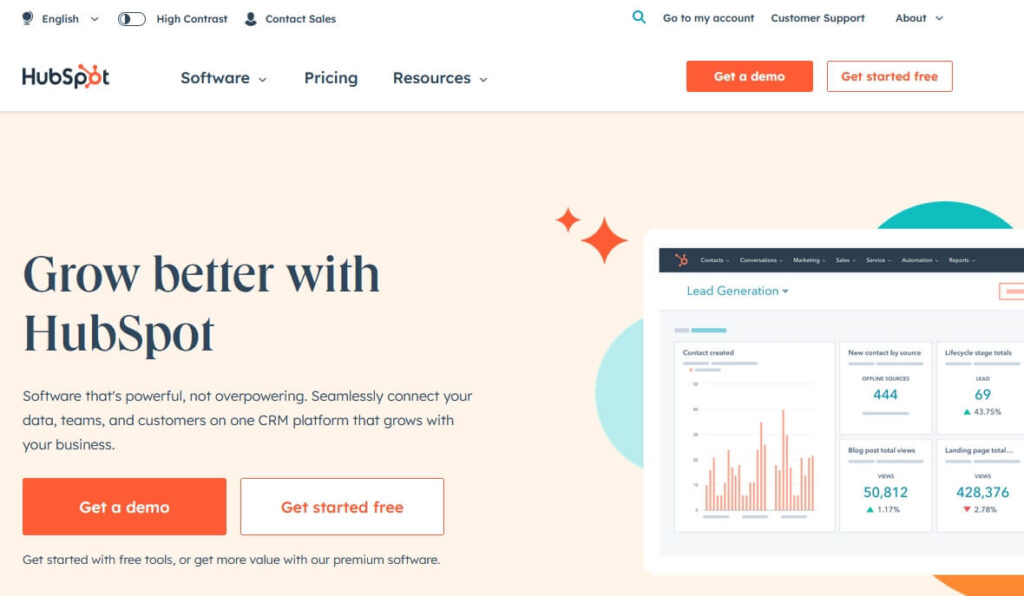
Its core strength is its native, seamless integration with HubSpot’s full suite of marketing, sales, and service tools.
It is an all-in-one, hosted solution designed for businesses that want to create personalized, data-driven web experiences and manage their entire customer lifecycle from a single, unified dashboard.
What is WordPress?
WordPress is a free, open-source Content Management System (CMS). However, for this comparison, we are specifically referring to WordPress.com, the hosted version of WordPress.

Unlike the self-hosted WordPress.org, WordPress.com takes care of hosting, security, and maintenance for you.
This makes it much easier for beginners and non-technical users to build a website without worrying about server management or updates.
While it may not offer the same level of unlimited customization as WordPress.org, WordPress.com still provides a wide range of themes and built-in tools.
Access to plugins and advanced customization is available on higher-tier plans, making it suitable for both beginners and growing businesses.
Quick Comparison Table: HubSpot CMS vs WordPress
| Feature | HubSpot CMS Hub | WordPress |
| Primary Focus | Integrated Marketing & Sales Platform | Flexible, Open-Source Website Builder |
| Core Strength | Native CRM, Analytics & Marketing Automation | Unparalleled Flexibility & Plugin Ecosystem |
| Ease of Use | Excellent (for Marketers) | Moderate (Requires setup & some learning) |
| Total Cost | Predictable (High monthly fee) | Variable (Can be cheaper or more expensive) |
| Design Control | Good (Theme-based, drag-and-drop) | Unlimited (Full code access & thousands of themes) |
| Security & Maintenance | Fully Managed by HubSpot | User-Managed (You are responsible) |
| Marketing Tools | Excellent (Built-in, world-class) | Excellent (Requires third-party plugins) |
| Blogging | Very Good | Excellent (Industry Leader) |
| Ownership | You rent the platform | You own your website and all its data |
| Best For | B2B, marketing teams, data-driven businesses | Bloggers, SMBs, and businesses needing full control |
Pricing Comparison: WordPress vs HubSpot CMS
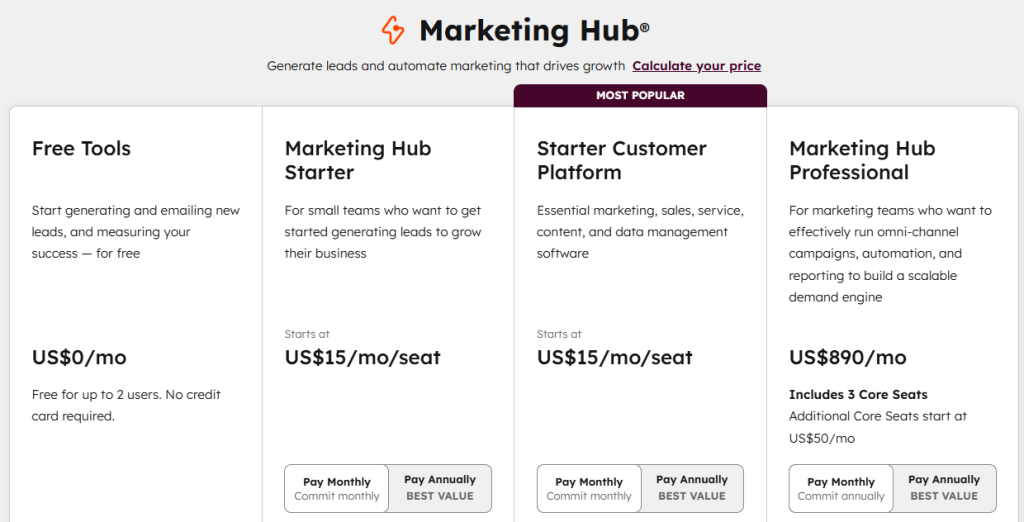
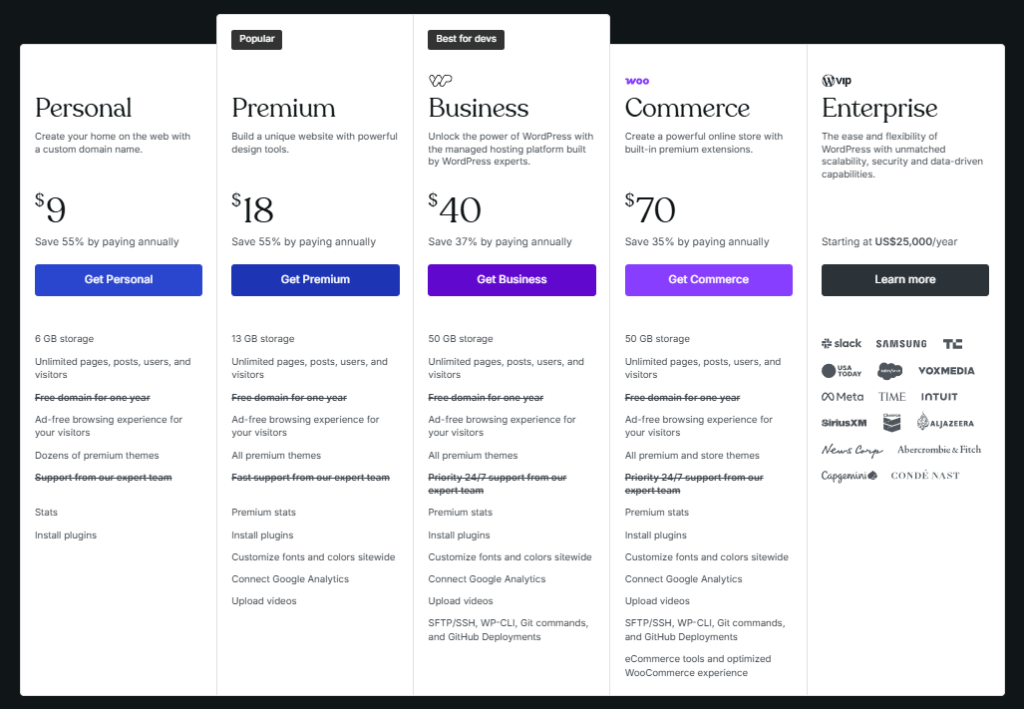
| Platform | HubSpot | WordPress |
| Entry eCommerce Plan | Marketing HubStarter ($15/month) | Business ($9/month) |
| Mid-Tier eCommerce Plan | Starter CustomerPlatform ($15/month) | Business ($40/month) |
| Advance eCommerce Plan | Marketing HubProfessional (890$/month) | Commerce (70$/month) |
| Business eCommers Plan | Marketing HubEnterprise (Starting from 3600$/year) | Enterprise (Starting from 25000$/year) |
| Transaction Fees | 0% with HubSpot | 0% with WordPress |
| For Yearly Payment | Save Up to 40% | Save Up to 69% |
Pricing Analysis:
WordPress almost always has a lower upfront and total cost, especially for businesses that don’t need advanced marketing automation.
HubSpot CMS has a high price tag, but it can provide immense value for businesses that would otherwise be paying for separate CRM, email marketing, analytics, and security software.
HubSpot CMS vs WordPress: Detailed Comparison
1. Ease of Use and Technical Maintenance
HubSpot CMS Hub
As a fully hosted, all-in-one SaaS platform, HubSpot is incredibly easy to use for its target audience: marketers.
You never have to worry about finding a host, managing security updates, running backups, or dealing with plugin conflicts.
The drag-and-drop editor is intuitive, and all the tools work together seamlessly out of the box.
Explore this detailed review of HubSpot to see if it’s the right fit for you.
WordPress
WordPress requires a more hands-on approach.
You are responsible for everything: choosing a hosting provider, installing the software, managing all updates (core, themes, plugins), running backups, and ensuring your site is secure.
While this provides control, it is a significant technical responsibility that can be daunting for beginners or non-technical teams.
2. Marketing, Automation, and Analytics
HubSpot CMS Hub
This is HubSpot’s killer feature. It is built on a foundation of a world-class CRM.
This means every interaction a user has with your website, from a page view to a form submission, is tracked in their contact record.

This allows for deeply personalized content, powerful email marketing automation, A/B testing, and detailed analytics reports, all within a single, unified dashboard.
WordPress
WordPress has no built-in marketing automation or CRM functionality.
To achieve what HubSpot does natively, you need to stitch together a collection of third-party plugins for forms (e.g., Gravity Forms), analytics (e.g., Google Analytics via a plugin), CRM (e.g., a HubSpot or Salesforce plugin), and email marketing (e.g., Mailchimp).
While this is highly flexible, the tools don’t always integrate perfectly.
3. Design and Customization Flexibility
HubSpot CMS Hub
HubSpot offers a drag-and-drop page editor and a marketplace with hundreds of themes and modules.
While it’s flexible and easy to use for marketers to create and edit pages, it operates within a more controlled ecosystem.
You don’t have the same level of deep, code-level access to fundamentally change how the platform works.
WordPress
WordPress offers unlimited design and customization flexibility. Because it’s open-source, you have complete control over every line of code.
You can choose from tens of thousands of themes and plugins to create any design and add any functionality you can imagine.
For businesses that need a truly custom or unique website, WordPress’s flexibility is unmatched.
4. SEO and Blogging Capabilities
HubSpot CMS Hub
HubSpot provides an excellent suite of built-in SEO tools. It offers on-page SEO recommendations as you write, a topic cluster tool to help you build topical authority, and integrated analytics to track your performance.
Its blogging platform is powerful and user-friendly for marketing teams.
WordPress
WordPress is the undisputed champion of blogging and content-driven SEO. Its architecture is built for content.
When combined with market-leading SEO plugins like Yoast SEO or Rank Math, it provides the most granular and powerful set of SEO tools available, allowing you to optimize every aspect of your site for search engines.
Best Hosting Solutions
- Best High Speed Web Hosting by Hostinger
- Low Cost Web Hosting Solution for Everyone by NameCheap
- Next-Gen VPS Hosting Solutions by Liquid Web
- Exclusive Website hosting by Inmotion Hosting
Best Cloud Hosting Solutions
Start Your eCommerce Online Store
Shopify eCommerce Online Store Builder for just $1
Marketing Tools
SEO Tools
#1 All in One SEO Tool – Semrush
5. eCommerce Capabilities
HubSpot CMS Hub
HubSpot has built-in payments and eCommerce features, but they are best suited for simple use cases, like selling digital products or taking one-off payments for services.
It is not designed to be a full-featured eCommerce platform for businesses selling a large catalog of physical goods.
WordPress
With the free WooCommerce plugin, WordPress transforms into an incredibly powerful and flexible eCommerce platform.
It can handle thousands of products, complex shipping rules, and integrates with virtually any payment gateway.
For businesses that need a robust online store alongside their content, WordPress + WooCommerce is a superior solution.
Which is Right for Your Business? A Scenario-Based Guide
Choose HubSpot CMS Hub if you are a…
- Marketing and Sales-Driven B2B Business: If your primary goal is to generate leads, nurture them through a complex sales cycle, and measure the ROI of your marketing efforts, HubSpot’s integrated CRM and automation tools are purpose-built for you.
- Mid-to-Large Sized Company: If you have a dedicated marketing team that needs a powerful, all-in-one platform without the burden of technical maintenance, HubSpot is an excellent, albeit premium, choice.
- Business Focused on Personalization: If your strategy involves creating personalized web experiences and targeted marketing campaigns based on user data, HubSpot’s native capabilities are unmatched.
Choose WordPress if you are a…
- Blogger or Content-First Business: If your business is built on attracting a large audience through content and SEO, WordPress is the industry-standard and most powerful platform.
- Small Business or Startup on a Budget: If you need a professional website but have a limited budget, the low entry cost and vast ecosystem of free tools in WordPress make it the most cost-effective option.
- Business Needing Full Control and Customization: If you want complete ownership of your data, the freedom to choose any host, and the ability to build a completely custom website with unique functionality, the open-source nature of WordPress is ideal.
Here’s another resource worth checking out:
👉 Proven Methods How CRM Can Help Your Business
👉 Useful Plugins for WordPress Website Owners
👉 WordPress Popup Plugins to Boost Conversions
👉 WordPress vs Squarespace vs Wix (2026): Which Website Builder Should You Choose?
Frequently Asked Questions (FAQ)
Is HubSpot CMS really that much more expensive than WordPress?
The upfront subscription for HubSpot is significantly higher. However, when you calculate the total cost of a comparable WordPress setup, including premium hosting, a security solution, a premium theme, and subscriptions for CRM, email marketing, and analytics tools, the costs can become more competitive. For businesses that will use all of HubSpot’s features, it can provide good value.
Can I integrate HubSpot with WordPress?
Yes, and this is a very popular strategy. HubSpot offers an excellent free WordPress plugin that adds many of its best features, like live chat, forms, email marketing, and the free CRM, directly to your WordPress site. This best of both worlds approach allows you to use WordPress for its flexibility and SEO while leveraging HubSpot’s powerful marketing tools.
Which platform is better for SEO?
Both are excellent for SEO, but they excel in different ways. WordPress offers more granular technical control and is superior for content-heavy sites. HubSpot’s strength lies in its integrated analytics and topic cluster tool, which helps you build and measure your topical authority more effectively.
Can I migrate from WordPress to HubSpot CMS?
Yes, HubSpot offers tools and services to help you migrate your content from WordPress. However, it is a significant project that involves rebuilding your site’s design on the HubSpot platform.
Conclusion: A Choice Between an Integrated Ecosystem and an Open Universe
The HubSpot CMS vs WordPress decision is a strategic choice between two different models for building a digital presence.
There is no universally better platform; there is only the platform that is better for your business.
Choose HubSpot CMS Hub if you are a marketing and sales-focused business that needs a powerful, all-in-one, integrated ecosystem and you value ease of use and managed security over total control.
Choose WordPress if you want an infinitely flexible, cost-effective, and powerful foundation that gives you complete ownership and the freedom to build anything you can imagine, and you are comfortable managing the technical aspects.
By carefully evaluating your team’s skills, your budget, and your core business goals, you can confidently choose the platform that will not just host your website but actively help you grow your business in 2026.
