

How to customize WordPress login page
You can make more beautiful of your WordPress login page. here has include some css or you can do css by yourself.
Today i will show how you can customize your wordpress login page.
you can do it 2 way
1. copy all code and paste it in your functions.php file.
2. create another file and do include it in your functions.php file. e.g.
require_once(‘inc/custom-login.php’);
and paste all code in custom-login.php file
[php]
//login page css
function custom_enqueue_script(){ ?>
		<style type="text/css">
		.skyb_login.login input[type="text"],
		.skyb_login.login input[type="email"],
		.skyb_login.login input[type="password"],
		.skyb_login.login .submit .button-primary{
			-webkit-transition: 0.3s;
			-o-transition: 0.3s;
			transition: 0.3s;
		}
		.skyb_login.login .submit .button-primary,
		.skyb_login.login form .input{
			box-shadow: none;
		}
		.skyb_login.login .submit .button-primary,
		.skyb_login.login form,
		.skyb_login.login form .input,
		.skyb_login.login .checkmark,
		.skyb_login.login p.message,
		.skyb_login.login #login_error{
			border-radius: 3px;
		}
		.skyb_login.login .submit .button-primary:hover,
		.skyb_login.login #backtoblog a:hover,
		.skyb_login.login #nav a:hover{
			opacity: 0.85;
		}
		.skyb_login.login #backtoblog a,
		.skyb_login.login #nav a,
		.skyb_login.login #backtoblog a:hover,
		.skyb_login.login #nav a:hover		{
			color: #ffffff;
		}
		.skyb_login.login,
		.skyb_login.login .submit .button-primary{
			background: #8C7DFC;
		}
		.skyb_login.login .submit .button-primary{
			border: 1px solid #8c7dfc;
			font-size: 14px;
			height: 40px;
			padding-left: 25px;
			padding-right: 25px;
			text-shadow: 0 -1px 1px #8c7dfc, 1px 0 1px #8c7dfc, 0 1px 1px #8c7dfc, -1px 0 1px #8c7dfc;
		}
		.skyb_login #login h1 a{
			background-image: url('https://skybootstrap.com/wp-content/uploads/2017/12/skybootstrap-logo.png');
			background-size: 100% auto;
			width: auto;
			margin-bottom: 30px;
		}
		.skyb_login #login h1 a:active{
			border:none;
			box-shadow: none;
		}
		.skyb_login.login form .input{
			padding-left: 10px;
			padding-right: 10px;
			border:1px solid #8C7DFC;
			margin-top: 7px;
		}
		.skyb_login.login form .input:focus,
		.skyb_login.login input[type="text"]:focus,
		.skyb_login.login input[type="email"]:focus,
		.skyb_login.login input[type="password"]:focus{
			box-shadow: 0 0 2px rgba(140, 125, 252, 0.8);
		}
		.skyb_login.login .forgetmenot{
			margin-top: 7px;
		}
		.skyb_login.login .forgetmenot label{
			position: relative;
			padding-left: 15px;
			height: 27px;
			line-height: 27px;
			display: block;
		}
		 .skyb_login.login input#rememberme{
			opacity: 0;
			margin: 0;
			visibility: hidden;
		}
		.skyb_login.login input#rememberme:checked{
			content:none;
		}
		.skyb_login.login .checkmark {
			position: absolute;
			top: 0;
			left: 0;
			height: 25px;
			width: 25px;
			background-color: #f6f6f6;
			border:1px solid #8C7DFC;
			-webkit-transition: 0.1s;
			-o-transition: 0.1s;
			transition: 0.1s;
		}
		.skyb_login.login input#rememberme ~ .checkmark:hover {
			background-color: #ececec;
		}
		.skyb_login.login input#rememberme:checked ~ .checkmark {
			background-color: #8C7DFC;
		}
		.skyb_login.login .checkmark:after {
			content: "";
			position: absolute;
			display: none;
		}
		.skyb_login.login input#rememberme:checked ~ .checkmark:after {
			display: block;
		}
		.skyb_login.login .checkmark:after {
			left: 9px;
			top: 5px;
			width: 5px;
			height: 10px;
			border: solid #fff;
			border-width: 0 3px 3px 0;
			-webkit-transform: rotate(45deg);
			-ms-transform: rotate(45deg);
			transform: rotate(45deg);
		}
		.skyb_login.login p.message{
			margin-bottom: 5px;
		}
		</style>

<?php }
add_filter( 'login_enqueue_scripts', 'custom_enqueue_script' );

// custom js script
function skyb_custom_js_script(){
	 ?>
	<script type="text/javascript">
		document.getElementById('rememberme').insertAdjacentHTML('afterend', '<span class="checkmark"></span>');
	</script>
<?php }
add_action( 'login_footer', 'skyb_custom_js_script' );
do_action( 'skyb_custom_js_script' );

// login title
function custom_login_page_title( $opt ){
	$opt = 'Welcome to our skybootstrap';
	return $opt;
}
add_filter( 'login_headertitle', 'custom_login_page_title' );

// login url
function custom_login_page_url(){

	return home_url();
}
add_filter( 'login_headerurl', 'custom_login_page_url' );
// login faild hide
function custom_login_error_hide(){

	return 'Input Does  Not Match!';
}
add_filter( 'login_errors', 'custom_login_error_hide' );

// logon page body class
function login_page_body_lass( $login_body_class ){
	$login_body_class[] = 'skyb_login';
	return $login_body_class ;
}
add_filter( 'login_body_class', 'login_page_body_lass', 10, 2 );
[/php]
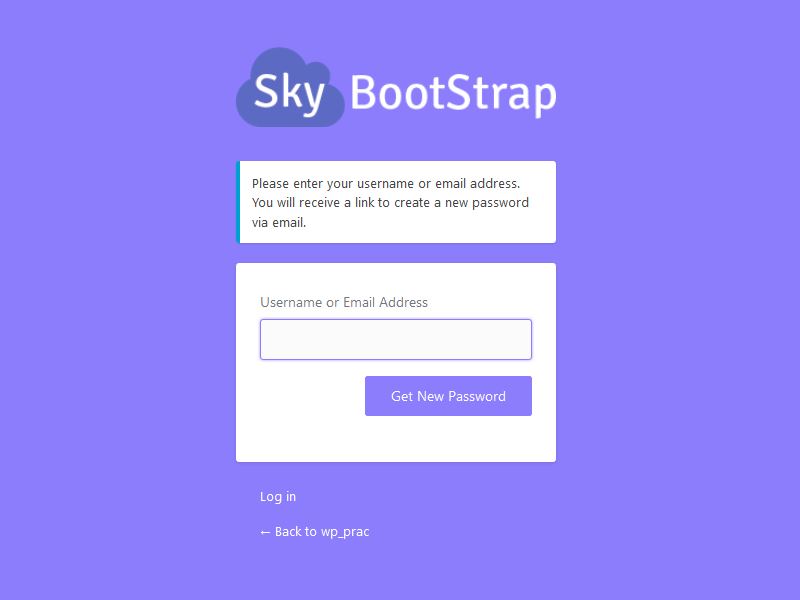
Reset Password Page:
Watch the video How to customize WordPress login page
