
Popis
An easy way to give you more control over the plugins section of WordPress. This plugin features the following functionality:
* Disable upgrade notices for specific plugins
* Hide the plugins page from all users except yourself
* Hide the WP Manage Plugins settings page from all users except yourself
* Automatically email the site admin when any plugin is added/activated/deactivated
This plugin should help anyone who is administering a WordPress website and needs more control over the powerful plugins section. This plugin is also great for blocking updates on plugins that you have modified.
Plugin Support
Obrázky

Blocking a plugin from being updated 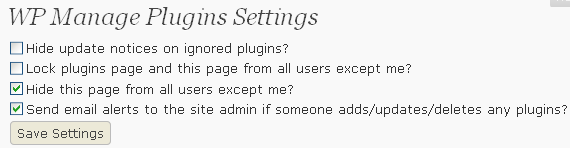
WP Manage Plugins settings
Inštalácia
- Upload the wp-manage-plugins folder to the plugins directory in your WordPress installation
- Activate the plugin
- On the plugins page click „ignore updates“ on any plugin you want to disable updates for
- Visit the settings page for more options
Časté otázky
- Does this plugin work with WordPress MU?
-
Absolutely! This plugin has been tested and verified to work on the most current version of WordPress MU

Prispievatelia a vývojári
“WP Manage Plugins” je softvér s otvoreným zdrojovým kódom. Do tohto pluginu prispeli nasledujúci ľudia.
Prispievatelia


Preložiť „WP Manage Plugins“ do vašho jazyka.
Máte záujem o vývoj?
Prehľadávajte zdrojový kód, preskúmajte SVN repozitár, alebo sa prihláste na odber vývojárskeho logu cez RSS.
Zoznam zmien
1.0
- First official release