

Popis
The Jetpack visibility module is appended to the bottom of all widgets (including 3rd parties). This plugin adds any active WPML language options to the list so you can have widgets appear for specific languages. For example, show french translated text widget, or a french twitter account for the French translation of your website.
Obrázky
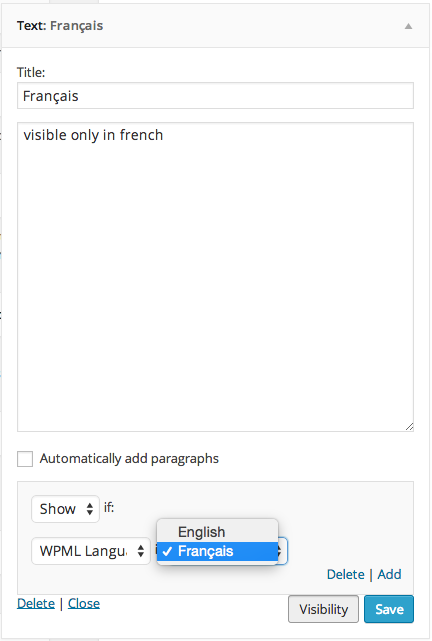
WPML Language Options
Inštalácia
Using The WordPress Dashboard
- Navigate to the ‚Add New‘ in the plugins dashboard
- Search for ‚Jetpack Widget Visibility Extended‘
- Click ‚Install Now‘
- Activate the plugin on the Plugin dashboard
Uploading in WordPress Dashboard
- Navigate to the ‚Add New‘ in the plugins dashboard
- Navigate to the ‚Upload‘ area
- Select
bugherd-dashboard.zipfrom your computer - Click ‚Install Now‘
- Activate the plugin in the Plugin dashboard
Using FTP
- Download
bugherd-dashboard.zip - Extract the
bugherd-dashboarddirectory to your computer - Upload the
bugherd-dashboarddirectory to the/wp-content/plugins/directory - Activate the plugin in the Plugin dashboard
Časté otázky
- This plugin doesn’t appear to do anything
-
This plugin itself does not add any user facing features. It adds the capability for theme/plugin developers to add additional options/fields to the Jetpack Widget Visibility Module.
- What do I need to do to add options or fields within my theme/plugin
-
This feature is not part of the official Jetpack plugin (yet). In order for this to work you must first install the „Jetpack Widget Visibility Extended“ plugin.
Recenzie
Pre tento plugin nie sú žiadne recenzie.
Prispievatelia a vývojári
“Jetpack Widget Visibility – WPML Languages” je softvér s otvoreným zdrojovým kódom. Do tohto pluginu prispeli nasledujúci ľudia.
Prispievatelia
Preložiť „Jetpack Widget Visibility – WPML Languages“ do vašho jazyka.
Máte záujem o vývoj?
Prehľadávajte zdrojový kód, preskúmajte SVN repozitár, alebo sa prihláste na odber vývojárskeho logu cez RSS.
Zoznam zmien
1.0
- Initial Release