

Popis
Akkedli Connector bridges your WooCommerce store with the Akkedli platform to eliminate fake orders and drastically cut return-to-sender rates — especially for Cash-on-Delivery (COD) merchants.
The Problem
COD stores lose thousands in fake orders, wrong addresses, and customers who deny placing orders. Manual phone verification is slow, expensive, and doesn’t scale.
The Akkedli Solution
- A customer places an order on your store
- Akkedli instantly sends a WhatsApp message asking the customer to confirm
- The customer taps Confirm or Cancel — takes 5 seconds
- Your WooCommerce order status updates automatically
No more calling customers. No more shipping to fake addresses. Ship only confirmed orders.
Key Features
- Automated WhatsApp Verification — Customers confirm orders instantly via WhatsApp
- Reduce Fake Orders — Stop shipping to unverified customers and save on returns
- Custom Order Status — New „Confirmed by Akkedli“ status to easily track verified orders
- One-Click Setup — Connect your store in seconds from the Akkedli Dashboard
- HPOS Compatible — Full support for WooCommerce High-Performance Order Storage
- Flexible Triggers — Choose to verify orders on „Pending“ or „Processing“ status
- Secure REST API — Receive real-time status updates from Akkedli with API key authentication
- Order Notes — All verification events are logged as WooCommerce order notes
Who Is This For?
- COD merchants in the Middle East, North Africa, and emerging markets
- Dropshippers looking to reduce return rates
- Any WooCommerce store that wants to confirm orders before fulfillment
Requirements
- WordPress 5.8 or higher
- WooCommerce 5.0 or higher
- PHP 7.4 or higher
- An active Akkedli account
Third-Party Services
This plugin connects to the Akkedli service to process order verifications:
- Service URL: https://api.akkedli.com
- Terms of Service: https://akkedli.com/terms
- Privacy Policy: https://akkedli.com/privacy
When an order is placed, the following data is sent to Akkedli:
- Order details (ID, total, currency, items, shipping method)
- Customer contact information (phone number, name, address)
- Store domain and timestamp
This data is transmitted securely over HTTPS and is used solely for order verification.
Privacy Policy
Akkedli Connector sends order data to the Akkedli service (https://akkedli.com) for processing. This includes:
- Order ID, total, currency, and line items
- Customer name, phone number, and address
- Store domain and timestamp
This data is used solely for order verification purposes and is transmitted securely over HTTPS. No data is collected or stored by the plugin itself — all data processing occurs on the Akkedli platform.
Please review Akkedli’s full privacy policy at https://akkedli.com/privacy for details on data handling and retention.
Obrázky

Settings Page — Clean configuration screen where merchants enter their API Key and Webhook URL, with connection status indicator 
Order Status — The new „Confirmed by Akkedli“ status appears in the WooCommerce orders list alongside standard statuses 
Order Notes — Verification results are automatically logged as order notes showing confirmation or cancellation details 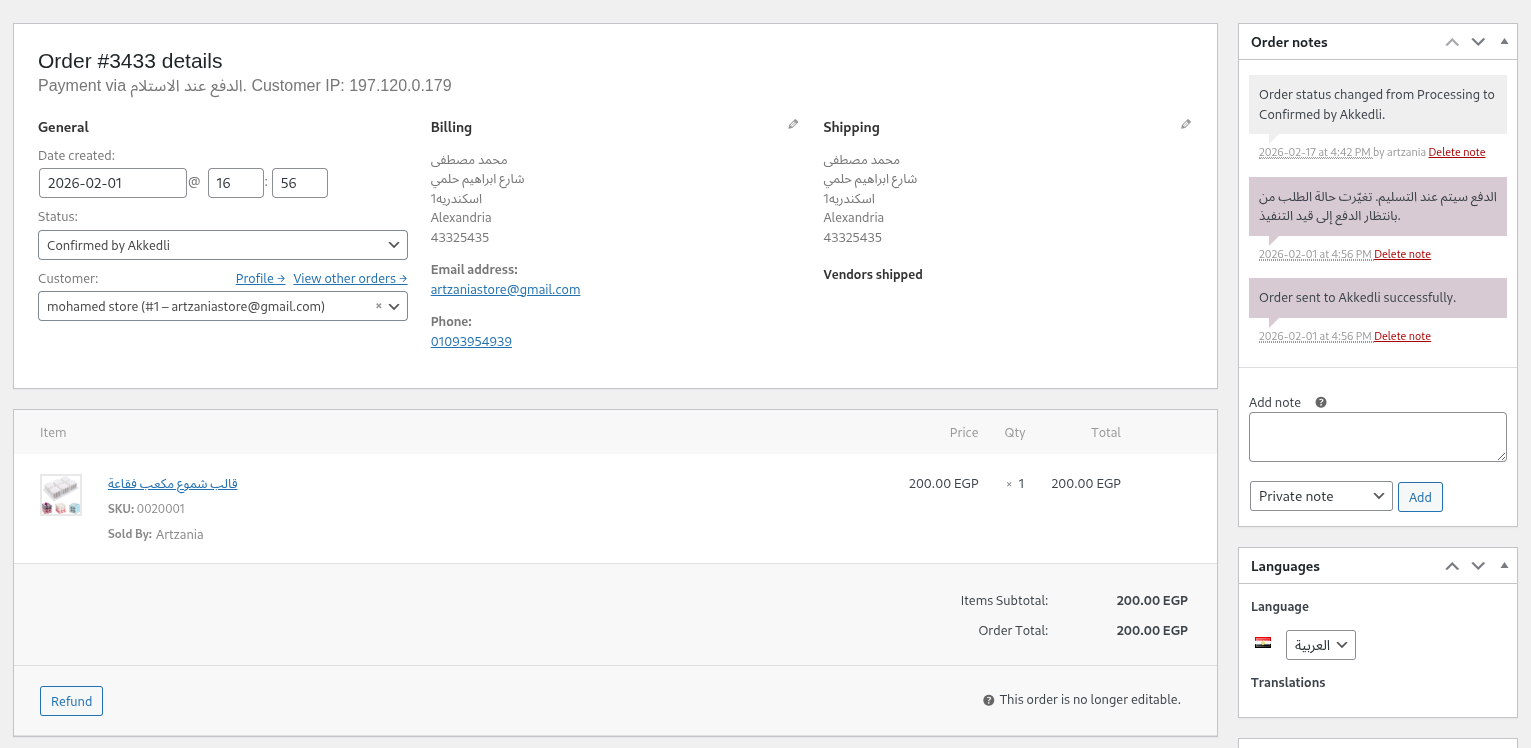
Order Details — Detailed order view showing Akkedli verification metadata and status updates
Inštalácia
Automatic Installation
- Go to Plugins > Add New in your WordPress admin
- Search for „Akkedli Connector“
- Click „Install Now“ and then „Activate“
- Go to the „Akkedli“ menu in your sidebar and enter your API credentials
Manual Installation
- Download the plugin zip file from WordPress.org
- Go to Plugins > Add New > Upload Plugin and select the zip file
- Click „Install Now“ and then „Activate“
- Go to the „Akkedli“ menu in your sidebar
- Enter your Akkedli API Key and Webhook URL
One-Click Setup (Recommended)
- Log in to your Akkedli Dashboard
- Go to Integrations > WooCommerce
- Enter your store URL and click „Connect“
- You’ll be redirected to your WordPress admin to confirm the connection
- Done! Your store is now connected and orders will be verified automatically
Časté otázky
-
Where do I get my API Key?
-
Sign up or log in at merchant.akkedli.com. Go to Settings > API Keys to generate your API key and get your Webhook URL.
-
Is this plugin compatible with HPOS?
-
Yes! The plugin is fully compatible with WooCommerce High-Performance Order Storage (Custom Order Tables).
-
What order data is sent to Akkedli?
-
The plugin sends order details including customer info, billing/shipping addresses, line items, totals, and payment method. No sensitive payment data (credit card numbers, CVV, etc.) is ever transmitted.
-
Can I choose which orders trigger verification?
-
Yes. In the plugin settings, you can toggle whether to verify orders when they reach „Pending“ or „Processing“ status — or both.
-
Orders will still be created in WooCommerce normally. If the webhook fails, an order note is added so you know which orders were not sent. You can always manually verify orders through the Akkedli Dashboard.
-
Does this work with other eCommerce plugins?
-
Akkedli Connector is designed specifically for WooCommerce. Support for Shopify and other platforms is available as separate integrations.
-
Is my customer data secure?
-
Absolutely. All communication uses HTTPS encryption. API key authentication secures every request. Akkedli never stores sensitive payment information.
Recenzie
Pre tento plugin nie sú žiadne recenzie.
Prispievatelia a vývojári
“Akkedli Connector” je softvér s otvoreným zdrojovým kódom. Do tohto pluginu prispeli nasledujúci ľudia.
Prispievatelia
Preložiť „Akkedli Connector“ do vašho jazyka.
Máte záujem o vývoj?
Prehľadávajte zdrojový kód, preskúmajte SVN repozitár, alebo sa prihláste na odber vývojárskeho logu cez RSS.
Zoznam zmien
1.0.0 – 2026-02-17
- Initial release
- Automated webhook integration for new WooCommerce orders
- Custom „Confirmed by Akkedli“ order status
- Secure REST API endpoint for receiving verification results
- One-Click setup from the Akkedli Dashboard
- Full HPOS (High-Performance Order Storage) compatibility
- Flexible order trigger settings (Pending / Processing)
- Complete internationalization (i18n) support