SigmaPlot 12.3
SigmaPlot software helps you quickly create exact graphs
Program info


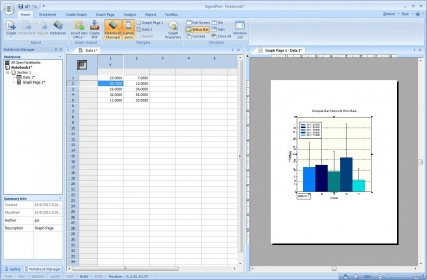


SigmaPlot graphing software from Systat Software takes you beyond simple spreadsheets to help you show off your work clearly and precisely. With SigmaPlot, you can produce high-quality graphs without spending hours in front of a computer. SigmaPlot offers seamless Microsoft Office integration, so you can easily access data from Microsoft Excel spreadsheets and present your results in Microsoft PowerPoint® presentations.
Graph creation starts with SigmaPlot's award-winning interface. Take advantage of industry-standard menu design, menu toolbars, right mouse button support and graph preferences. Select the graph type you want to create from the Graph Toolbar's easy-to-read icons. The interactive Graph Wizard leads you through every step of graph creation. You get compelling, publication-quality charts and graphs in no time. SigmaPlot offers more options for charting, modeling and graphing your technical data than any other graphics software package.
Compare and contrast trends in your data by creating multiple axes per graph, multiple graphs per page and multiple pages per worksheet. Accurately arrange multiple graphs on a page using built-in templates or your own page layouts with SigmaPlot's WYSIWYG page layout and zoom features.
From simple 2-D scatter plots to compelling contour plots, SigmaPlot gives you the exact technical graph type you need for your demanding research. And, to help you see interactions in your 3-D data, SigmaPlot powerfully renders multiple intersecting 3-D meshes with hidden line removal. With so many different chart and graph types to choose from, you can always find the best visual representation of your data.
SigmaPlot offers the flexibility to customize every detail of your graph. You can add axis breaks, standard or asymmetric error bars and symbols; change colors, fonts, line thickness and more. Double-click on any graph element to launch the Graph Properties dialog box. Modify your graph, chart or diagram further by pasting an equation, symbol, map, picture, illustration or other image into your presentation.


Related stories
See all
Discover top alternatives to Microsoft 365 with LibreOffice, Apache OpenOffice, WPS Office, and SoftMaker Office, each offering unique features and good compatibility.

Explore the compatibility of Microsoft 365 alternatives, LibreOffice, OpenOffice, WPS Office, SoftMaker Office, and FreeOffice.

Here is the list of top VPN providers that revolves around the features that matter: latency, jurisdiction, coverage, and pricing.