

Description
PayPlus Payment Gateway for WooCommerce
Accept debit and credit cards on your WooCommerce store in a secure way with the ability to design your own payment page and add high functionalities to it. SSL is not required.
Supported PHP Versions:
This plugin is compatible with PHP versions from 7.4 up to 8.3.
Before installation:
You need your account credentials. For that, you have to contact PayPlus and to join the service.
Plugin Disclaimer:
PayPlus does not accept liability for any damage, loss, cost (including legal costs), expenses, indirect losses or consequential damage of any kind which may be suffered or incurred by the user from the use of this service.
It is important to know that this plugin relies on third-party services.
However, the third-party so mentioned is the PayPlus core engine at their servers – the providers of this plugin.
By being a payment processor, just like many of its kind, it must send some transaction details to the third-party server (itself) for token generation and transaction logging statistics and connecting to invoices.
It is this transfer back and forth of data between your WooCommerce and the PayPlus servers that we would like to bring to your attention clearly and plainly.
The main links to PayPlus, its terms and conditions, and privacy policy are as listed:
– Home Page: https://www.payplus.co.il
– Plugin Instruction page: https://www.payplus.co.il/wordpress
– Terms and Conditions: https://www.payplus.co.il/privacy
The above records, the transaction details, are not treated as belonging to PayPlus and are never used for any other purposes.
The external files referenced by this plugin, due to WordPress policy recommendations, are all included in the plugin directory.
8.0.1 – 14-01-2026
- Tweak – Order notes for IPN and cron processes are now separated for better clarity.
- Added – New setting to skip WooCommerce subscription renewal orders in cron service and invoice runner.
- Tweak – Improved PRUID validation to prevent duplicate processing after successful payment completion.
8.0.0 – 28-12-2025
- Added – Custom Invoice ID field to woocommerce checkot, aloowing customers to specify a different ID for Invoice+ documents – Activated via Invoice+ setting.
7.9.9 – 23-12-2025
- Fix – Resolved harmless installation warnings that appeared in debug logs for first-time users
- Tweak – Enhanced frontend error logging and display for payment page loading issues
- Added – Custom invoice name field to WooCommerce checkout, allowing customers to specify a different name for Invoice+ documents – Activated via Invoice+ settings.
- Tweak – Enhanced network error handling during IPN verification with automatic retry logic and better fallback behavior
- Tweak – Orders now marked as “on-hold” instead of “failed” when network errors occur during payment verification (configurable in Advanced Features)
- Fix – Resolved issue where “PayPlus Error Invoice” note was incorrectly added to cash-only payment orders when no actual error occurred
- Fix – Standardized background color for “Name” and “ID number” fields in PayPlus Embedded to white across all themes
- Added – New Advanced Features setting: “Refactor: Do not change status to failed on requestPayPlusIpn failure” – prevents orders from being marked as “failed” during IPN verification failures (enabled by default)
- Tweak – Improved WordPress Plugin Check (PCP) compliance by updating translator comments and nonce verifications
- Fix – Pruid was firing wrong notes to PayPlus Embedded orders , now fixed
7.9.8 – 17-12-2025
- Added – Customer ID now displays on Invoice+ documents (supports collection from both payment page and embedded forms).
- Tweak – Enhanced PRUID handling for order completion.
7.9.7 – 08-12-2025
- Fix – Fixed issue where pp_iframe was loading multiple times on some setups by removing unnecessary function.
7.9.6 – 30-11-2025
- Tweak – PRUID: Enabled double IPN check for orders with existing payplus_page_request_uid. Now works for all payment gateways and checks for successful payments before allowing duplicate payment attempts, even if the order status wasn’t previously updated.
- Fix – Hosted Fields (PayPlus Embedded): Fixed issue with orders created using temporary data where order_id was stored as a string instead of a numeric order number. Prevents duplicate order payments.
- Fix – Admin Dashboard Payments: Fixed redirect issue where payments initiated from the admin dashboard were redirecting to the customer-facing order received page. Now correctly redirects back to the admin order edit page.
7.9.5 – 23-11-2025
- Tweak – Deletion of payplus_page_uid and order cancellation now only occur via manual admin action.
- Added – Checkbox to enable EMV positioning on Classic Checkout.
- Added – Checkbox to enable POS EMV positioning on Blocks Checkout.
- Fix – Resolved an issue in PayPlus Embedded where the customer’s name could appear incorrectly.
- Tweak – Code improvements and updates to comply with Plugin Check (PCP) requirements.
7.9.4 – 09-10-2025
- Fix – Eliminated problematic logging functionality that was causing errors for certain website users.
7.9.3 – 08-10-2025
- Added – New setting to automatically remove payplus_page_request_uid HPOS meta data from cancelled orders – prevents cron from processing these orders.
7.9.2 – 21-09-2025
- Added – Implemented “Place Order” button integration within PayPlus Embedded for the new block-based checkout experience, maintaining consistency with the classic checkout flow.
7.9.1 – 16-09-2025
- Tweak – Display identification number in PayPlus Order Metabox when available.
- Tweak – Enhanced order handling during IPN processing: improved reliability when processing newly created orders by allowing time for server and database updates to complete.
7.9.0 – 10-09-2025
- Tweak – Enhanced loading indicators for iframe pages in new blocks checkout.
- Tweak – Eliminated outdated functions and streamlined legacy code for improved new blocks checkout functionality.
- Fix – Corrected 3D Secure iframe positioning on mobile devices for PayPlus Embedded.
7.8.9 – 24-08-2025
- Fix – Corrected erroneous transactions in PayPlus Embedded that were recorded with an incorrect order number.
7.8.8 – 17-08-2025
- Fix – Resolved Plugin Check warnings and errors.
- Fix – Resolved Payplus Embedded css issue.
7.8.7 – 17-08-2025
- Added – Introduced PayPlus Invoice+ Runner manager – enables batch processing of today’s orders to generate invoices for orders missing them.
- Added – Included PayPlus Invoice+ Runner cron functionality in Invoice+ settings – once activated it will automatically execute every 30 minutes to generate invoices, functioning similarly to the manual manager.
7.8.6 – 06-08-2025
- Tweak – Enhanced the 3D Secure iframe content and positioning in PayPlus Embedded for mobile devices, ensuring correct display in both RTL and LTR languages.
7.8.5 – 30-07-2025
- Tweak – Improved 3D Secure background and sizing for PayPlus Embedded on mobile devices to ensure proper display.
- Fix – The “Do not create invoices+” option now correctly prevents invoice creation for both charges and refunds, not just charges.
- Fix – Resolved an issue where the Invoice+ cash on delivery refund feature generated multiple duplicate documents instead of a single one when the “POS Override” option was enabled.
7.8.4 – 27-07-2025
- Feature – Previously, PW Gift Cards were redeemed as soon as an order payment was initiated, causing the gift card balance to be deducted even if the payment was not completed or failed. Now, with a new checkbox option, the plugin will refresh and restore the gift card balance for unpaid or failed orders when the same gift card is used again.
- Feature – The same gift card balance restoration logic now also applies to PayPlus Embedded.
- Added – Display Approval ID in the PayPlus Metabox on the order page.
- Fix – Resolved a display overflow issue in the PayPlus Metabox on the order page for Tokens: Long tokens now break correctly instead of overflowing.
7.8.3 – 17-07-2025
- Fix – Corrected price rounding errors in Express checkout that occurred on certain system configurations.
- Tweak – Replaced Voucher ID with Approval Number in the PayPlus metabox within order details (Voucher ID was previously showing the same value as voucher number).
7.8.2 – 16-07-2025
- Fix – Resolved an issue where, on classic checkout, standard payment pages would always open via redirect on subsequent accesses, disregarding the configured page settings.
7.8.1 – 06-07-2025
- Added – Option to: Auto-adjust iframe height for screen size and zoom (overrides the Iframe Height setting above) – Only for classic checkout!
7.8.0 – 29-06-2025
- Added – Do not create invoices+ documents option for Stripe payment gateway.
7.7.9 – 11-06-2025
- Added – Separate VAT configuration options for international customers.
7.7.8 – 27-05-2025
- Tweak – Improved the
payPlusRemote()function to better handle$payloadissues. - Tweak – Removed outdated logs and deprecated API calls.
- Tweak – Optimized payment page logic to reuse existing pages when possible, reducing unnecessary API requests.
- Tweak – Corrected inaccurate status reporting in “Orders Reports/Validator”.
- Tweak – Streamlined
callback_responseby removing redundant functions and passing data directly instead of using SQL. - Added – When “Update status in IPN” is enabled, the callback function will skip status updates and related checks.
- Added – Disallow voucher payment for shipping – Enforce a minimum amount for non-voucher payments: voucher payments can no longer be used to pay for shipping, preventing customers from covering delivery costs with vouchers.
Screenshots
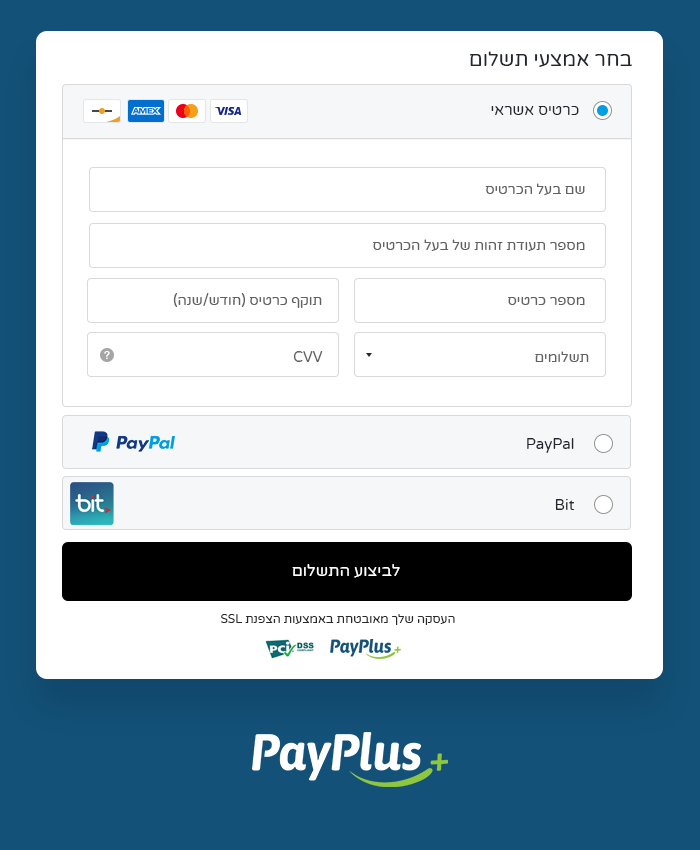
The PayPlus Payment page! (Example – This page can be edited for design and more!). 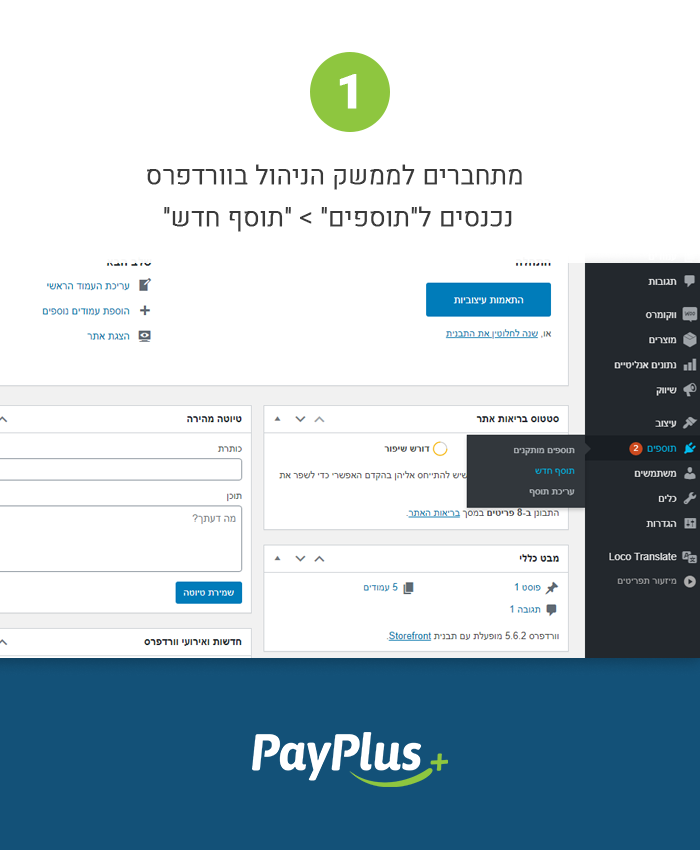
Go into Plugins -> Add New Plugin. 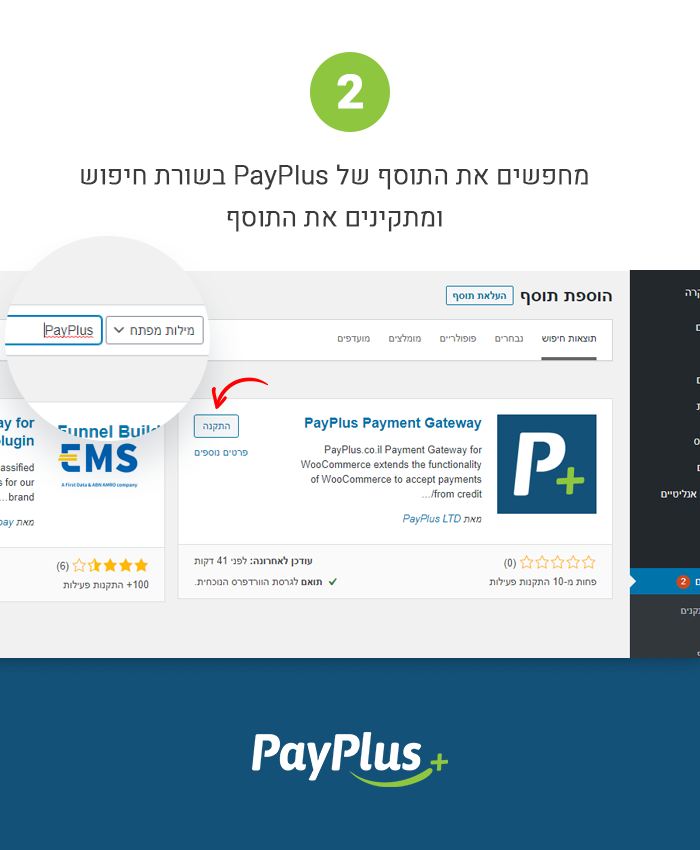
Search for PayPlus Payment Gateway in the search line and click install. 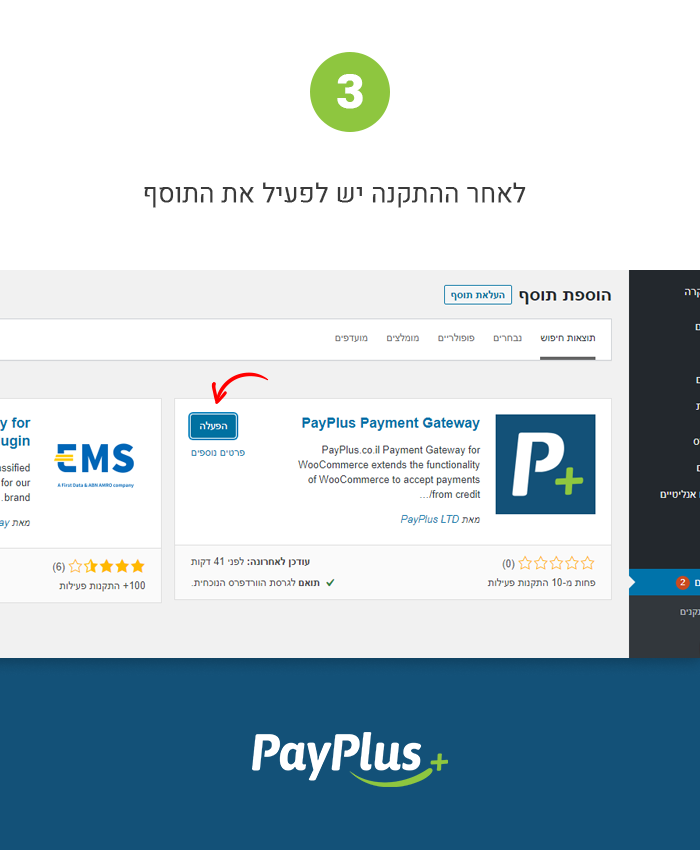
After installation click activate. 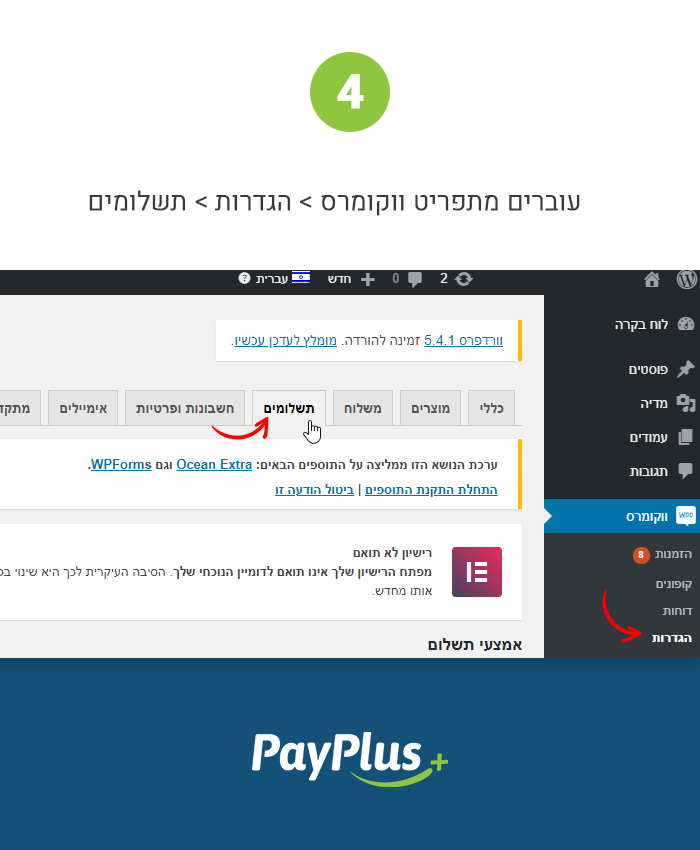
Select WooCommerce -> Settings -> Payments. 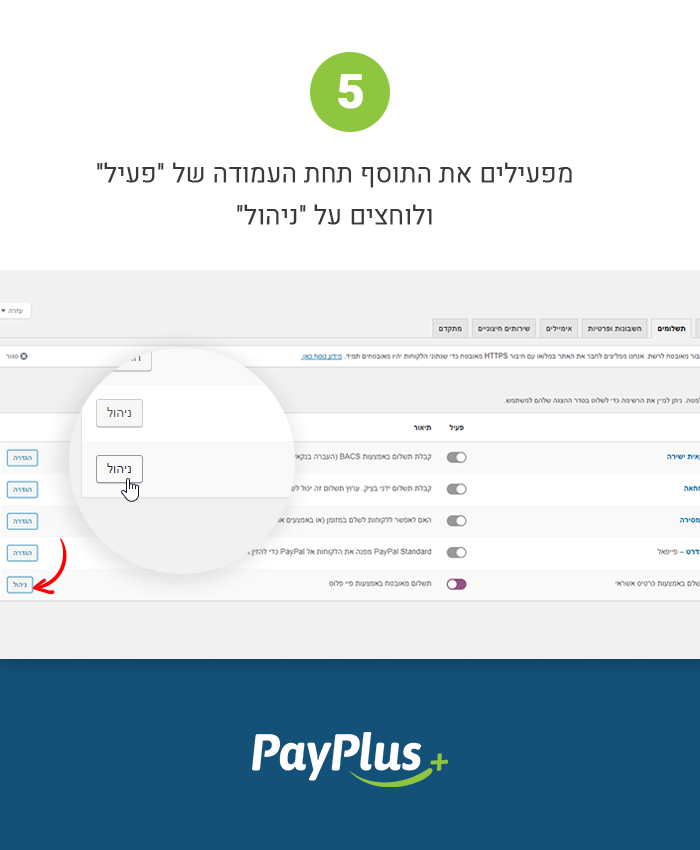
Activate the gateway under the “active” tab and select manage. 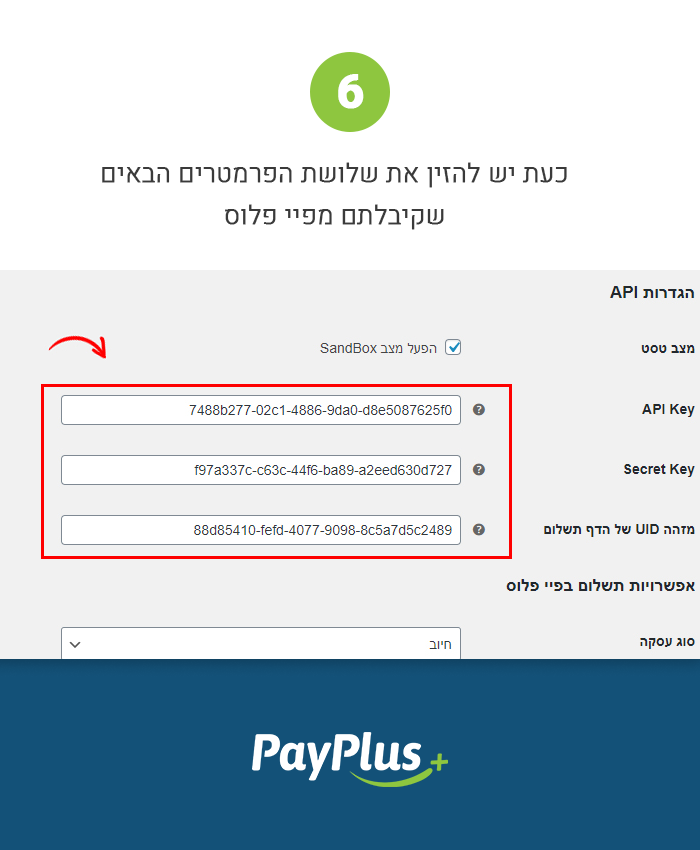
Enter the 3 credentials (in basic settings) you have received from PayPlus (when you signed up with us). 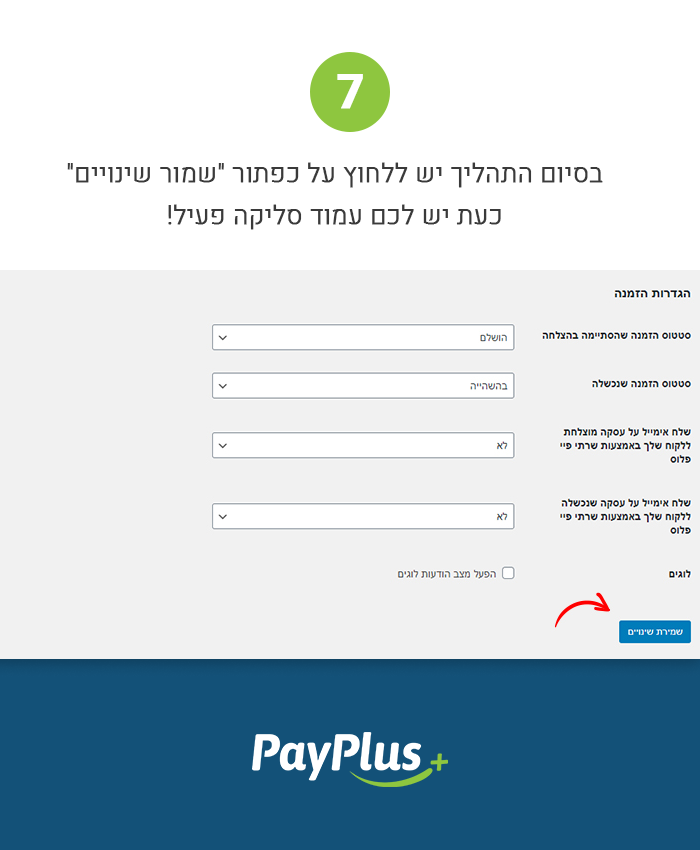
Save your settings, now you have an active payment page!
Installation
- In your WordPress Dashboard go to “Plugins” -> “Add Plugin”.
- Search for “payplus-payment-gateway”.
- Install the plugin by pressing the “Install” button.
- Activate the plugin by pressing the “Activate” button.
- Open the settings page for WooCommerce and click the “Checkout” tab.
- Click on the sub tab for “PayPlus Payment Gateway”.
- Configure your PayPlus Gateway settings.
FAQ
-
Do this plugin support recurring payments, like subscriptions?
-
Yes!
-
Does this require an SSL certificate?
-
No! You can use our Redirect option and you are free from SSL, However it is still recommended.
-
Does this support both production mode and sandbox mode for testing?
-
Yes, it does – production and Test (sandbox) mode is driven by the API keys you use with a checkbox in the admin settings to toggle between both.
-
Where can I find documentation?
-
For help setting up and configuration refer to documentation.
-
Where can I get support or talk to other users?
-
If you get stuck, you can ask for help in the Plugin Forum. or contact us directly at (https://www.payplus.co.il).
Reviews
There are no reviews for this plugin.
Contributors & Developers
“PayPlus Payment Gateway” is open source software. The following people have contributed to this plugin.
Contributors
Translate “PayPlus Payment Gateway” into your language.
Interested in development?
Browse the code, check out the SVN repository, or subscribe to the development log by RSS.