

Use Partial Payment on WooCommerce Store & Eliminate Purchase Barrier
Decrease cart abandonment rate, improve customer loyalty, and increase sales on your WooCommerce store with ShopBuilder’s Partial Pay module.
It allows you to lower the financial burden of your targeted customers and helps them reserve products by paying a portion of the total payment in advance.


Check Out The Advantages of ShopBuilder’s Partial Pay Module on Your WooCommerce Store
Provide shoppers flexible deposit options, stand out from your competitors, and attract price-sensitive customers with this powerful module.
Partial Pay Notice on Shop Page
Attract customers instantly with partial payment notice on the shop page. So, whenever shoppers browse your online store, the partial payment option is the first thing they will notice. It also motivates them to initiate the purchase process.


Partial Pay View on Product Page
You can clearly mention the partial payment details in the product age. Also showcase the remaining balance update to clear any confusions among customers. Provide customers flexible payment options, gain their trust, and optimize order tracking.
Partial Pay Message on Cart Page
Exhibit partial payment details on the cart page and ensure full transparency for shoppers. In this way price-hasitant browsers will convert into loyal buyers. Thus your sales margin will boost and you can earn more profit.


Partial Pay Settings
You can display partial payment availability notes on shop, archive, related, upsells, and cross-sell sections. Select default payment type and restrict payment method in the first checkout.
Partial Pay Rules Creation
Create customized rules of partial payments for products, categories, or tags. Moreover, you can independently pick the applicable products of partial pay rules.


Partial Payment Notification Settings
Most important part, you can manage email set up for partial payment notifications of your WooCommerce store. Admin will receive the new partial payment notification email while customers will get the confirmation mail with balance expiration reminder email.
Partial Pay Style Settings
Freely customize frontend labels and styles of partial payment elements to match your brand identity perfectly. Make the partial payment process more interactive and enjoyable to customers.


Partial Pay Global Rules Override Settings
Override ShopBuilder’s global partial payment settings for particular products and fine-tune payment rules as needed. You can effortlessly customize partial payment for each product.
Payment Data on Admin Order Screen
View essential partial payment data from the admin order screen, such as paid amount, payment date, and order status. As a store owner, these details will help you in keeping track of your orders.


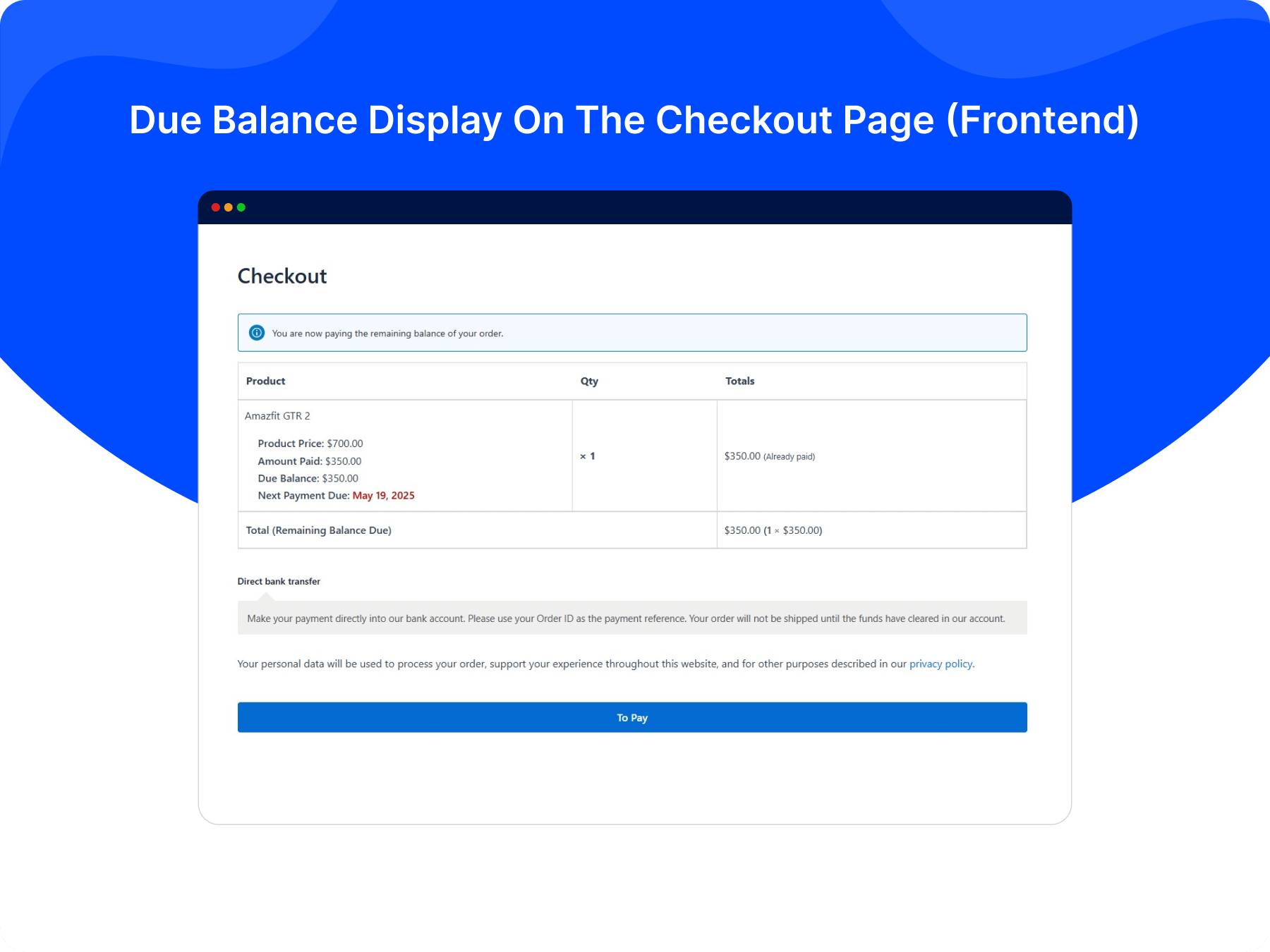
Due Balance Notice on Checkout Page
Customers can clearly view the due payment details and due payment dates on the checkout page. This will ensure a transparent communication in purchasing products and gain customer’s trust.
Due Balance Notice on Admin Order Screen
As the store admin, you can clearly view the due balance amount with the next payment date. You can see the order number, order details and track the order process without any mistakes.
Witness The Increase of Conversions With The Always-Accessible Partial Payment
Provide shoppers flexible payment options, gain their trust, optimize order tracking, and Boost Sales with ShopBuilder’s Partial Payment module.
Disable Coupon Feature
Restrict coupon use for customers when they add partial payment products to their carts.
Role-Based Partial Payment Display
Control who can view the partial payment options based on user roles. Show the partial payment feature to particular users.
Admin Final Payment Notice
Manually send balance due reminders to customers via email when needed and ensure they pay you on time.
Product/Category/Tag Based Partial Payment
Set the partial payment options on product, category, or product tag to suit your store’s strategy and promotions.
Testimonials
Customer Reviews
Read genuine and unfiltered reviews of our customers regarding
our products and services and make informed decisions.
This is the best of the best!
Absolutely unique product.
It is exactly what I am looking for, Great plugin, works exactly as expected.
Partial Pay Module in Action
See how the Partial Pay module helps you offer the partial payment options to let customers
reserve products with flexible payment plans.



FAQs
Frequently Asked Questions
ShopBuilder is a top-notch WooCommerce page builder that works in tandem with Elementor and enhances its functionality.
This plugin provides users with an intuitive and user-friendly interface and helps them create and manage professional WooCommerce stores without hassle.
Here are some FAQs about ShopBuilder and its Partial Pay module.
Partial pay is a payment option that enables customers to pay a portion of the total cost upfront to secure a product. Once shoppers reserve the product, they pay the remaining balance later in installments at a specific time.
Install and activate ShopBuilder and visit Settings > Modules > Partial Pay. Then, turn on the “Enable Partial Pay?” switch and customize this module as you wish. That’s how you enable the Partial Pay module on your WordPress website.
Your WordPress website should meet the following requirements to use ShopBuilder:
PHP: 7.4+ recommended
WordPress: 6.1 or later
Elementor: Latest version recommended
WooCommerce: Latest version recommended

100% Money-Back Guarantee
30-day refund, no questions asked.
Fully Documented
Comprehensive, easy-to-follow solutions.
Expert Support Team
24/7 professional assistance available.