
Typebar
Every key you press lights up on an on-screen keyboard, and each shortcut is named. For screen recordings, demos and learning shortcuts.
About Typebar
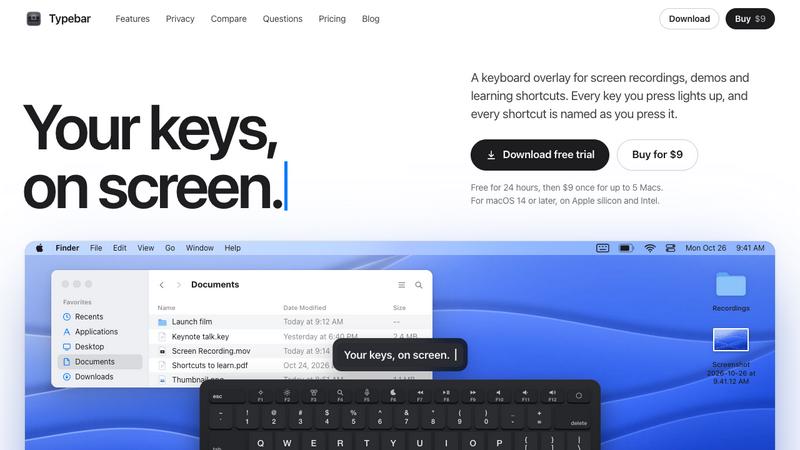
Typebar is a keyboard overlay for the Mac, made for screen recordings, demos and learning shortcuts. Every key you press lights up on an on-screen keyboard, and a pill names each shortcut from the app's own menus, like Screenshot Selection for Shift Command 4.
Hold a modifier and the keys show what they do in the app in front. There are cheatsheets for every app, 20 hand-made packs and your own keybindings from 11 apps. Click ripples, a cursor halo, Spotlight, six switch sounds and 40 themes with a theme editor are built in.
Password fields stay private, and nothing you type is saved or sent anywhere. Typebar can show itself when a recording starts and hide when it stops.
Free for 24 hours, then $9 once for up to 5 Macs. macOS 14 or later, on Apple silicon and Intel.
Explore more in this category:
Top Alternatives to Typebar


Thmenu
Free QR digital menu in 31 languages with live table ordering, kitchen display system (KDS), guest calls, bill split, kiosk mode, and loyalty.

Bracket Maker
Free bracket maker for single elimination, double elimination and round robin, up to 64 teams. Print it or share a live link.

p7m online
Open P7M files and read FatturaPA XML invoices locally in your browser.


Video Extend
AI video extender that continues short clips with motion, style, and scene consistency.

PayDocs
Pay stub generator for US employers and payslip generator for UK employers, with a free preview

Goshortsai
Turn photos into AI videos for free with Goshortsai. Sign in daily to get free credits, upload an image, describe motion, and generate your video.