
Foreman
See every app and what it's using in plain English, and end or slow down the one that's hogging your Mac.
About Foreman
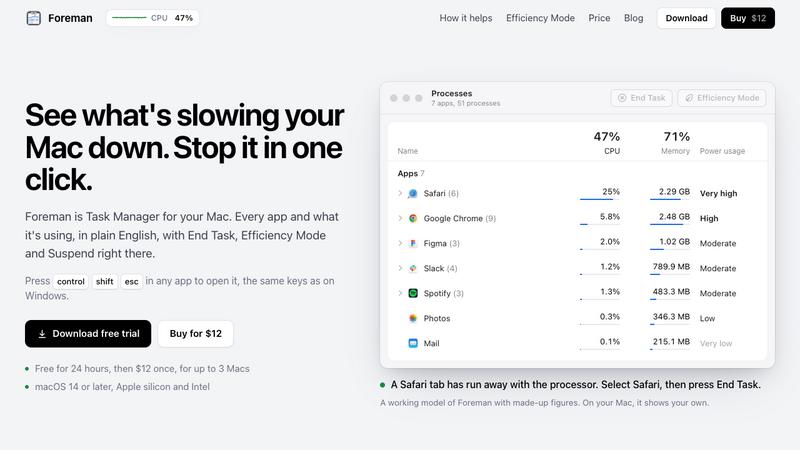
Foreman is a Windows-style Task Manager for the Mac. Press Control Shift Escape in any app to open it and see every app and what it's using, in plain English, with End Task, Efficiency Mode and Suspend right there.
Six pages in the sidebar: Processes, Performance with live graphs for CPU, memory, disk, Wi-Fi and GPU, App History, Startup Apps (including leftovers of deleted apps), Details and Services. System processes get a plain description beside their real name.
Efficiency Mode lets an app you need open run slowly in the background, on the efficiency cores of Apple silicon, and at full speed again when you switch to it. A live readout sits in the menu bar.
Free for 24 hours, then $12 once for up to 3 Macs. macOS 14 or later, Apple silicon and Intel.
Explore more in this category:
Top Alternatives to Foreman


Thmenu
Free QR digital menu in 31 languages with live table ordering, kitchen display system (KDS), guest calls, bill split, kiosk mode, and loyalty.

Bracket Maker
Free bracket maker for single elimination, double elimination and round robin, up to 64 teams. Print it or share a live link.

p7m online
Open P7M files and read FatturaPA XML invoices locally in your browser.

Copero
Free browser football career simulator with quick careers, daily challenges and shareable result cards.

PayDocs
Pay stub generator for US employers and payslip generator for UK employers, with a free preview

Free Graph Paper Online Tool
Create free printable graph paper and other paper templates, customize the layout, then print at true size or download a PDF, PNG or SVG.

Travel Itinerary Template
Free travel itinerary templates — edit online, download PDF/Excel/calendar