Remove Handwriting
Effortlessly remove handwritten text from images and PDFs while preserving original content with our AI-powered handwriting removal tool.
Visit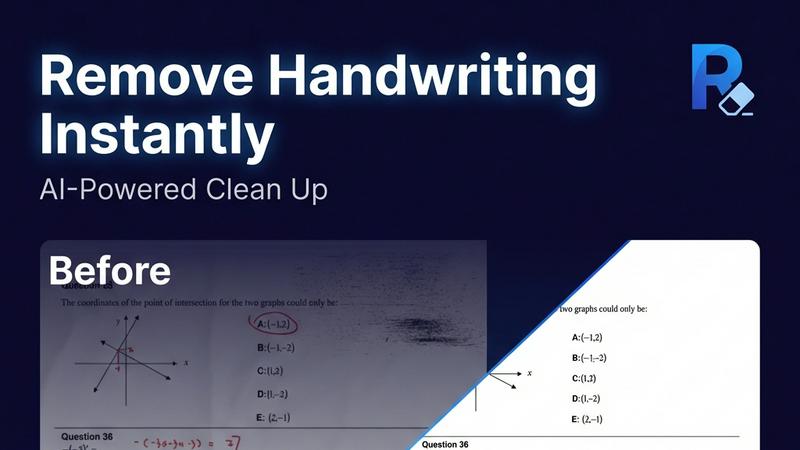
About Remove Handwriting
Remove Handwriting is an innovative AI-powered tool designed to facilitate the removal of handwritten text from images, PDFs, and scanned documents. It caters to a wide range of users, including students, educators, businesses, and archivists who need to clean up documents for improved readability and presentation. This tool offers a seamless solution for erasing handwritten notes, annotations, and markings while preserving the integrity of printed content, tables, and diagrams. Whether you are dealing with exam papers, contracts, or archival materials, Remove Handwriting enables you to restore documents to a pristine state, enhancing their usability. With its user-friendly interface and availability on both web and mobile platforms, this tool allows users to perform document cleanup tasks quickly and efficiently. Best of all, you can try it for free with no credit card required, making it accessible for anyone looking to streamline their document management process.
Features of Remove Handwriting
AI-Powered Handwriting Removal
This feature utilizes advanced artificial intelligence to intelligently detect and erase handwritten text, notes, and annotations from images and PDFs. It ensures that printed text and other important elements remain intact, providing a clean and professional final document.
Multi-Format Support
Remove Handwriting supports various file formats, including JPG, PNG, JPEG, and PDF. This versatility allows users to work with different types of documents seamlessly, whether they are single images or multi-page PDFs, making it suitable for diverse applications.
Batch Processing Capability
For users dealing with large volumes of documents, the batch processing feature allows for multiple files to be processed simultaneously. This saves time and enhances productivity, especially for businesses and educational institutions that require efficient document management.
Manual Processing Options
In addition to automated features, Remove Handwriting also offers manual processing for challenging cleanup tasks. Users can manually adjust settings to address complex issues such as damaged pages or intricate markings, ensuring a high-quality output even in difficult scenarios.
Use Cases of Remove Handwriting
Document Cleanup for Students
Students can use Remove Handwriting to erase handwritten answers, notes, or grading marks from their exam papers or worksheets, allowing them to create clean, shareable copies for study purposes or submission.
Archival Restoration
Archivists can benefit from this tool by restoring old documents that may have handwritten annotations, stains, or folds. By cleaning up these documents, they can preserve historical materials for future generations.
Business Documentation
Businesses can utilize Remove Handwriting to prepare contracts, reports, and marketing materials by removing handwritten notes and revisions. This creates a polished and professional appearance for important documents.
Enhancing Scanned Images
Individuals or organizations with low-quality scanned documents can employ Remove Handwriting to enhance clarity and remove unwanted marks. This ensures that all text is legible and visually appealing, improving overall document quality.
Frequently Asked Questions
How does Remove Handwriting work?
Remove Handwriting uses advanced AI algorithms to analyze documents, automatically detecting and removing handwritten text while preserving the original printed content and layout.
What file formats are supported?
The tool supports multiple file formats, including JPG, PNG, JPEG, and PDF, allowing users to work with a variety of document types for their specific needs.
Is there a limit on the number of documents I can process?
The application supports batch processing, enabling users to upload and process multiple documents at once, thus streamlining workflows for users with larger quantities of files.
Can I use Remove Handwriting on mobile devices?
Yes, Remove Handwriting is available on both iOS and Android platforms, making it convenient for users to clean up documents on the go, whether they are using a smartphone or tablet.
Explore more in this category:
Top Alternatives to Remove Handwriting


Nano Banana
Create and edit stunning images effortlessly with Nano Banana's powerful AI, all through simple chat prompts.


SparkPix
SparkPix is a fundamental AI photo editor that transforms your images simply by typing what you want to change.


RemoveTexts
RemoveTexts is an AI tool that effortlessly erases text from images in seconds, no design skills required.


AI Photo Generator
Create stunning, photorealistic images from text or your own photos with this free and fast AI generator.


Facejam
Transform your selfies into professional headshots in minutes with Facejam's easy-to-use AI photo generator.


MyImageUpscaler
MyImageUpscaler enhances and upscales images to 4K resolution in seconds while preserving sharp text and details.


Nano Banana Pro
Nano Banana Pro is an AI image generator that creates stunning 4K visuals with exceptional detail and editing tools.


Cool PFP
Cool PFP offers free high-quality profile pictures for social media in anime, cute, and aesthetic styles.