

Description
Advanced Pixel Editor is a powerful WordPress plugin that brings professional-grade image editing capabilities directly to your WordPress admin panel. Requires the ImageMagick PHP extension for superior image processing. Edit images from your media library with real-time preview, advanced filters, and seamless integration.
🚀 Powered by ImageMagick: This plugin requires the ImageMagick PHP extension for image processing. Imagick is extremely common and should be available on most modern hosting platforms. Enabling Imagick is a significant upgrade for image handling on WordPress sites, leading to better results from plugins and core features.
Core Features:
* Real-time Preview: See filter changes instantly as you adjust sliders
* Contrast Adjustment: Professional contrast control with fine-tuned precision
* Unsharp Masking: Advanced sharpening with full control over amount, radius, and threshold
* Accessibility: Full keyboard navigation and screen reader support
* Security: Rate limiting, input validation, and secure file handling
* Performance: Optimized processing with memory management and dimension limits
* Responsive Design: Works perfectly on all screen sizes
* WordPress Integration: Seamless media library workflow
Support
For support, feature requests, or bug reports, please visit:
* GitHub Repository
* WordPress Support Forums
Contributing
Contributions are welcome! Please see our contributing guidelines on GitHub.
Credits
Developed by Rafael Minuesa
* GitHub
* Website
Icons and assets used in accordance with their respective licenses.
License
This plugin is licensed under the GPL v2 or later.
Advanced Pixel Editor is free software: you can redistribute it and/or modify
it under the terms of the GNU General Public License as published by
the Free Software Foundation, either version 2 of the License, or
(at your option) any later version.

Advanced Pixel Editor is distributed in the hope that it will be useful,
but WITHOUT ANY WARRANTY; without even the implied warranty of
MERCHANTABILITY or FITNESS FOR A PARTICULAR PURPOSE. See the
GNU General Public License for more details.

You should have received a copy of the GNU General Public License
along with Advanced Pixel Editor. If not, see <https://www.gnu.org/licenses/gpl-2.0.html>.
Screenshots
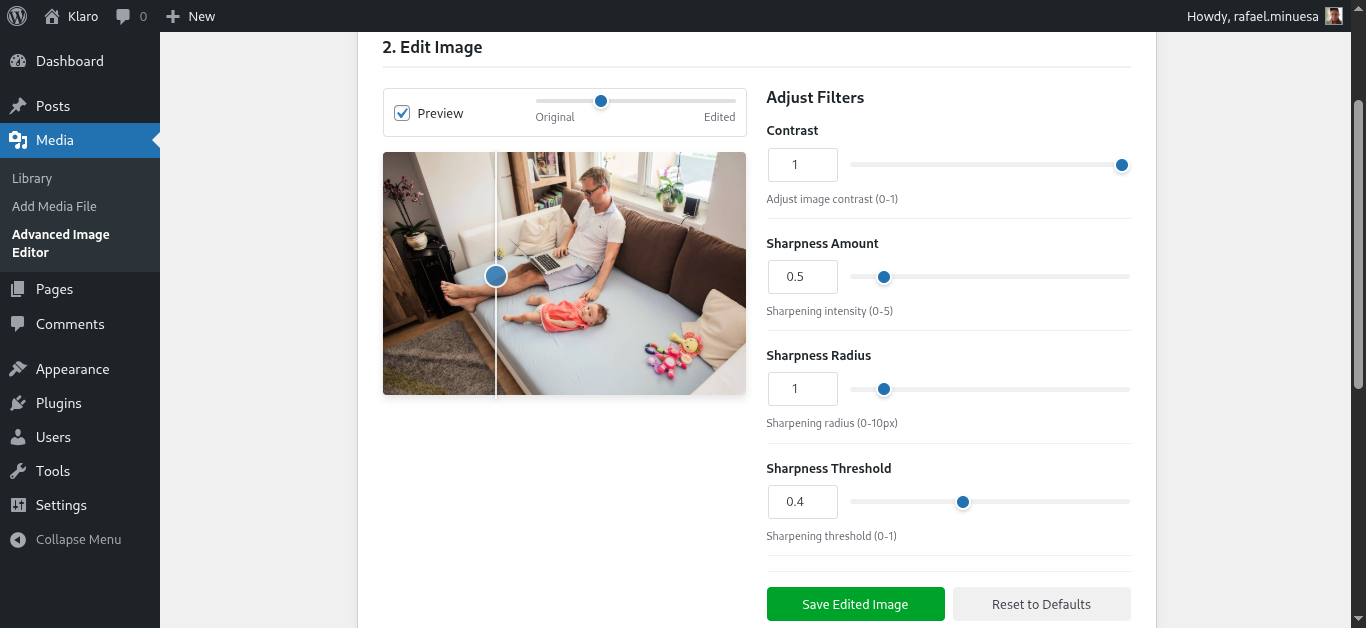
Main Editor Interface – Clean, professional interface with real-time preview
Installation
⚠️ Important Prerequisites:
This plugin requires the ImageMagick PHP extension (Imagick) to be installed and enabled on your server.
Imagick is extremely common and should be available on most modern hosting platforms. If Imagick is not enabled:
- Contact your web hosting provider
- Request that they enable the ImageMagick PHP extension
- Most hosting providers can enable this quickly (usually within hours)
- Enabling Imagick is a significant upgrade for image handling on WordPress sites, leading to better results from plugins and core features
Installation Steps:
- Upload the
advanced-pixel-editorfolder to/wp-content/plugins/ - Activate the plugin through the ‘Plugins’ menu in WordPress
- Go to Media Advanced Pixel Editor to start editing
Need help? Contact your webhost provider if Imagick is not installed on your server.
FAQ
-
How do I access the image editor?
-
Navigate to Media Advanced Pixel Editor in your WordPress admin panel.
-
What image formats are supported?
-
The plugin supports all standard web image formats including JPEG, PNG, GIF, and WebP.
-
Is there a limit to image size?
-
By default, images up to 10MB and 4096×4096 pixels are supported for optimal performance.
-
Can I edit images that are already in my media library?
-
Yes! Select any image from your WordPress media library to edit.
-
Does this plugin create backups of original images?
-
Yes! When using “Save as new image” mode, the original is untouched. When using “Replace original” mode, a backup is created automatically and you can restore it at any time.
-
Is the plugin accessible for users with disabilities?
-
Yes! The plugin includes full ARIA support, keyboard navigation, and screen reader compatibility.
-
Can I use this plugin on mobile devices?
-
Yes, the editor is fully responsive and works on tablets and mobile devices.
-
Does this plugin require any special server configuration?
-
Yes, the plugin requires the ImageMagick PHP extension (Imagick) to be installed and enabled on your server. Imagick is extremely common and should be available on most modern hosting platforms. Contact your web hosting provider if it’s not installed – most can enable it quickly (usually within hours). Enabling Imagick is a significant upgrade for image handling on WordPress sites, leading to better results from plugins and core features.
Reviews
There are no reviews for this plugin.
Contributors & Developers
“Advanced Pixel Editor” is open source software. The following people have contributed to this plugin.
Contributors
Translate “Advanced Pixel Editor” into your language.
Interested in development?
Browse the code, check out the SVN repository, or subscribe to the development log by RSS.
Changelog
3.1.1
- Fixed “Advanced Editor” button placement on attachment edit page — now appears next to “Edit Image”
- Added translation template (.pot) file
3.1
- Added “Advanced Editor” button to attachment edit page sidebar
3.0
- Added save mode selection: save as new image or replace original
- Added custom filename input for new image saves
- Added automatic backup when replacing original image (WordPress
_wp_attachment_backup_sizespattern) - Added “Restore Original” option to revert replaced images
- Updated help text to reflect new save options
2.9
- Added “Advanced Editor” button to Media Library grid view modal (next to “Edit Image”)
- Added “Advanced Edit” row action to Media Library list view
- Editor now supports direct image pre-loading via URL parameter from Media Library
2.8
- Added draggable comparison slider handle on the image preview
- Clicking anywhere on preview wrapper now moves the comparison slider
- Added touch support for comparison slider on mobile devices
- Filter controls now support negative values (contrast, sharpness amount, radius, threshold)
2.7
- Changed plugin slug from “advanced-image-editor” to “advanced-pixel-editor” per WordPress.org review
- Updated text domain, class names, and all file references to match new slug
- Renamed main plugin file to advanced-pixel-editor.php
2.6
- Renamed plugin display name from “Advanced Image Editor” to “Advanced Pixel Editor”
2.5
- Fixed plugin URI validation issue
- Changed prefix from ‘aie’ to ‘advaimg’ to meet WordPress.org guidelines (4+ characters)
- Improved base64 image data sanitization with dedicated validation method
- Renamed internal files to match new prefix convention
- Added build script for WordPress.org submission
2.4
- Fixed WordPress.org validation errors
- Improved UI and user experience
2.3
- Added preview toggle checkbox to show/hide image preview
- Added before/after comparison slider with draggable handle
- Redesigned layout with preview at top and compact controls sidebar
- Improved responsive design for mobile devices
- Enhanced user interface with better space utilization
2.2
- Complete plugin rename from “Advanced Image Filters” to “Advanced Image Editor”
- Enhanced security with rate limiting, input validation, and capability checks
- Improved accessibility with ARIA support and keyboard navigation
- Performance optimizations with memory management and dimension limits
- Better user interface with loading states and progress indicators
- Comprehensive internationalization support
- WordPress coding standards compliance
2.1
- Initial release with basic image editing functionality