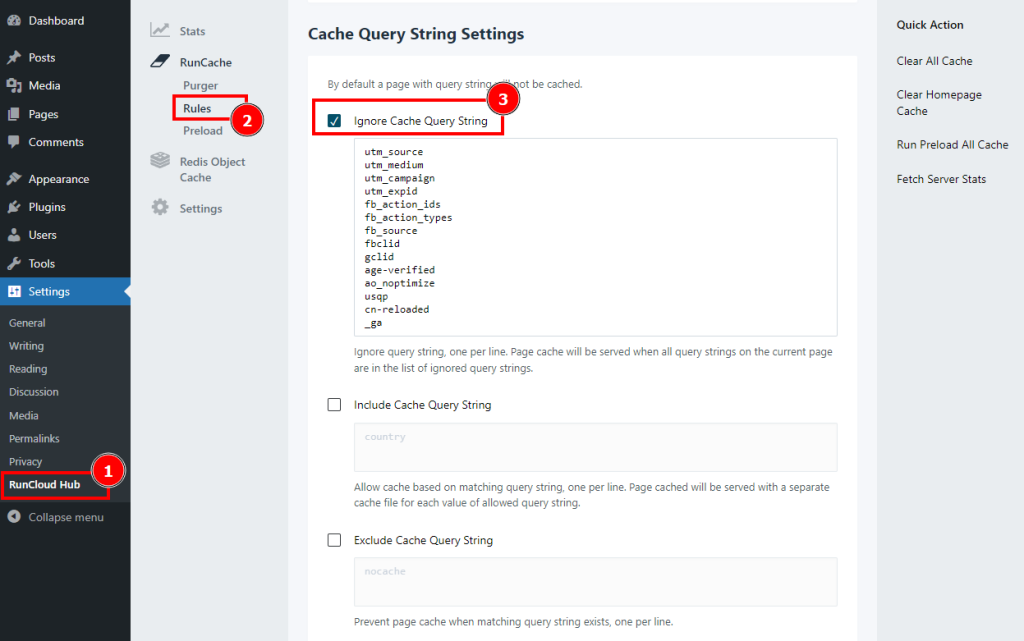
RunCloud Hub allows you to optimize your site performance by caching your pages and assets. However, some pages may have query parameters in their URLs that affect the content or functionality of the page. For example, a page may have a query parameter for tracking, filtering, sorting, or personalizing the content.
In this case, you may want to ignore some query parameters while caching, so that the same cached page can be served to different visitors regardless of the query parameters.
Alternatively, you may want to allow some query parameters while caching, so that the cached page can vary based on the value of the query parameters. Or, you may want to prevent caching altogether for some pages that have certain query parameters.
RunCloud Hub lets you configure these options in the Cache Query String Settings section of the plugin settings. Here is how to use them:
- Ignore cache query string: This option allows you to specify a list of query parameters that will be ignored while caching. For example, if you enter `utm_source` and `utm_medium` in this list, then the page `https://example.com/?utm_source=runcloud&utm_medium=abcd` will be cached and served as `https://example.com/`. This option is useful for ignoring query parameters that are used for tracking or analytics purposes and do not affect the page content or functionality.
- Include cache query string: This option allows you to specify a list of query parameters that will be allowed while caching. For example, if you enter `country` in this list, then the page `https://example.com/?country=us` will be cached and served separately from the page `https://example.com/?country=uk`. This option is useful for allowing query parameters that are used for filtering or personalizing the page content based on the visitor’s preference or location.
- Exclude cache query string: This option allows you to specify a list of query parameters that will prevent caching when they exist in the URL. For example, if you enter `nocache` in this list, then the page `https://example.com/?nocache=1` will not be cached at all and will always be served dynamically. This option is useful for preventing caching for pages that have dynamic or sensitive content that should not be cached.
To use these options, simply enter one query parameter per line in the corresponding text box, and save the settings.
You can also use wildcards (*) to match any value of a query parameter. For example, if you enter `fb_*` in the ignore list, then any query parameter that starts with `fb_` will be considered for the corresponding rule while caching.