Query Loop Block Tutorial
In this lesson, we will talk about the Query Loop block that appeared in WordPress version 5.8. Today, you can use it to display post loops in both block and classic WordPress themes.
In the first part of the tutorial (and in the video below), I will show you how to create a child block for the query loop block. In the second part, we will talk about creating a query loop block variation.
How to Find Internal Links to a Page or Post
Since I am working a lot with my website posts recently, from time to time I change the URLs of some specific articles or even set redirects to other articles.
When I do so, of course I use 301 redirects, but there still could be links from other posts and even comments to this particular post.
And in this tutorial I would like to show you how to easily find these kind of links in your website content and replace them.
At the same time we can rest a little bit from some complicated developer topics like Interactivity API and REST API which we took a look at in my previous blog posts.
Sending Multiple REST API Requests using PHP Requests Library
Recently I got a message from one of my customer and he complained about that inventory sync in my Simple Inventory Sync plugin doesn’t work as fast as he wanted it to.
When I took a look at his website configuration, I noticed that he wanted to syncronise the product stock up to 10 websites at the same time.
At that moment my plugin was already using batch API requests in case someone made an order with 50 products (for example) at the same time (so we can send only a one request instead of 50), but we can not send a single batch request to 10 different sites, can we?
Get Attachment Alt Text, Caption, Description and Title Programmatically
Every time I work with WordPress attachments I always forget what is what, for example:
- What is the name of the alt text meta field?
- How to get an image caption programmatically?
Probably after publishing this tutorial I will never forget that again, but I really hope that it will be helpful for you guys.
So, the long story short, in this tutorial I am going to show you how you can get the following attachment data programmatically:
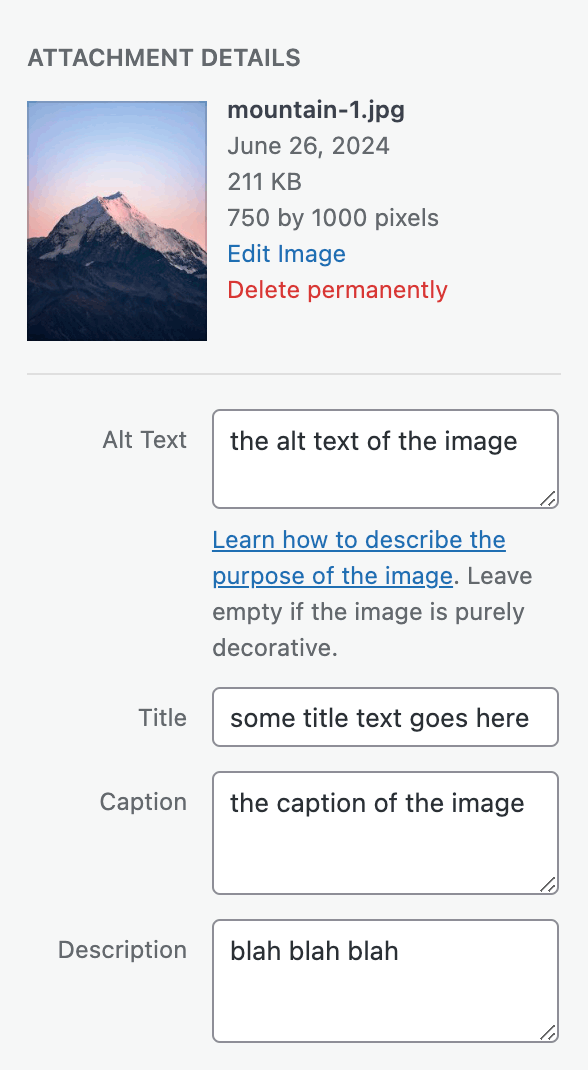
Let’s dive into it right now!
Hooks When Creating or Updating a Post (Classic Editor, Gutenberg and REST API)
Probably all of us know the save_post action hook which usually runs every time a WordPress post of any type (or even a WooCommerce product) is getting created or updated.
But sometimes you need to process only post updates in some specific cases, for example only when you do it via the REST API or using the Classic Editor. Is there a way to do that?
Let’s try to figure it out.
Create a Post with WordPress REST API using JavaScript
In the previous tutorial we discussed how you can create WooCommerce products by sending REST API requests in JS, so I kind of liked this topic and decided to take a deeper look at regular WordPress posts as well, besided there is almost no similar information out there.
The main struggle here of course is to send POST API requests in JavaScript. When you need to get posts, it is simple – just use fetch() and there we go. But when we need to authenticate – how we can do that so nobody can obtain our site application data by just inspecting the code?
How to Publish a Plugin to the WordPress Plugin Directory
Recently I published one more plugin to the wordpress.org repository and I decided it is time to share the whole process with you.
This is not going to be the guide how you need to develop your own plugin in order for it to be accepted by the moderators team, the long story short – just read the guidelines, make sure that any user input is properly validated and sanitized, any output is escaped, turn on WP_DEBUG while developing and make sure that there are no PHP notices etc.