Dashboard Widgets in WordPress
In this tutorial we’re going to discuss everything related to WordPress dashboard widgets – I will show you how to remove default ones, and how to create custom dashboard widgets, plus, we will learn how to add some setting fields to that widget.
As usual, I decided to uncover this topic with you, guys, and to share my experience, because some of my plugins have their custom dashboard widgets, for example – Multisite Indexer and Multisite Order Sync for WooCommerce.
Remove Default Dashboard Widgets
Let’s start by removing some standard dashboard widgets in WordPress. For example, maybe you’re not interested in WordPress news, or maybe you never use a “Quick Draft” feature.
Before actually removing these widgets in the code, I’d like to remind you that you can easily turn them off in the “Screen Options”.

On the other hand, if you want to remove them completely, you can use the code snippet below:
add_action( 'wp_dashboard_setup', 'rudr_remove_dashboard_widgets', 99 );

function rudr_remove_dashboard_widgets() {

	// Remove the At a Glance dashboard widget
	remove_meta_box( 'dashboard_right_now', 'dashboard', 'normal' );

	// Remove the Activity dashboard widget
	remove_meta_box( 'dashboard_activity', 'dashboard', 'normal' );

	// Remove the WordPress News dashboard widget
	remove_meta_box( 'dashboard_primary', 'dashboard', 'side' );

	// Remove the Quick Draft dashboard widget
	remove_meta_box( 'dashboard_quick_press', 'dashboard', 'side' );

	// Remove the Site health dashboard widget
	remove_meta_box( 'dashboard_site_health', 'dashboard', 'normal' );

	// Remove the welcome panel, technically it is not a dashboard widget
	remove_action( 'welcome_panel', 'wp_welcome_panel' );

	// WooCommerce: Removing WooCommerce Setup dashboard widget
	remove_meta_box( 'wc_admin_dashboard_setup', 'dashboard', 'normal' );
}
If you don’t know where to use this code snippet, check this guide.
Did you know that the remove_meta_box() function is just modifying the global variable $wp_meta_boxes – meaning that we can easily remove all dashboard widgets (both standard and custom) with two lines of code.
add_action( 'wp_dashboard_setup', function() {

    global $wp_meta_boxes;
    $wp_meta_boxes = array();

}, 9999 );
It may be useful when you need to add some custom dashboard widgets for a project, but you don’t need any widgets added by third-party plugins.
Create a Custom Dashboard Widgets
Time to talk about creating our custom dashboard widget!
Adding a custom dashboard widget is simple:
- We need to use the same
wp_dashboard_setuphook which we have already discussed before. - Inside this hook, we can use either the
add_meta_box()or thewp_add_dashboard_widget()– doesn’t really matter, which one.
You can use this code:
/**
 * @snippet Create a custom WordPress dashboard widget
 * @author Misha Rudrastyh
 * @url https://rudrastyh.com/wordpress/dashboard-widgets-in-wordpress.html#custom-dashboard-widgets
 */
add_action( 'wp_dashboard_setup', 'rudr_custom_dashboard_widget' );

function rudr_custom_dashboard_widget(){

	wp_add_dashboard_widget(
		'rudr_widget', // widget ID
		'My Custom Widget',
		'rudr_custom_widget_callback', // callback function (below)
		null,
		null,
		'normal', // 'side', 'column3', 'column4'
		'core', // 'high', 'default', 'low'
	);

	// add_meta_box(
	// 	'rudr_widget',
	// 	'My Custom Widget',
	// 	'rudr_custom_widget_callback',
	// 	'dashboard-network',
	// 	'normal',
	// 	'high'
	// );

}

function rudr_custom_widget_callback(){
	echo 'Some content for my custom dashboard widget';
}
Here you go, our custom dashboard widget is ready:

It is worth mentioning, that the wp_add_dashboard_widget() function has a couple of more interesting parameters and we’re going to talk about them in the next chapter when I show you how to create a custom dashboard widget with options.
Dashboard Widgets with Options
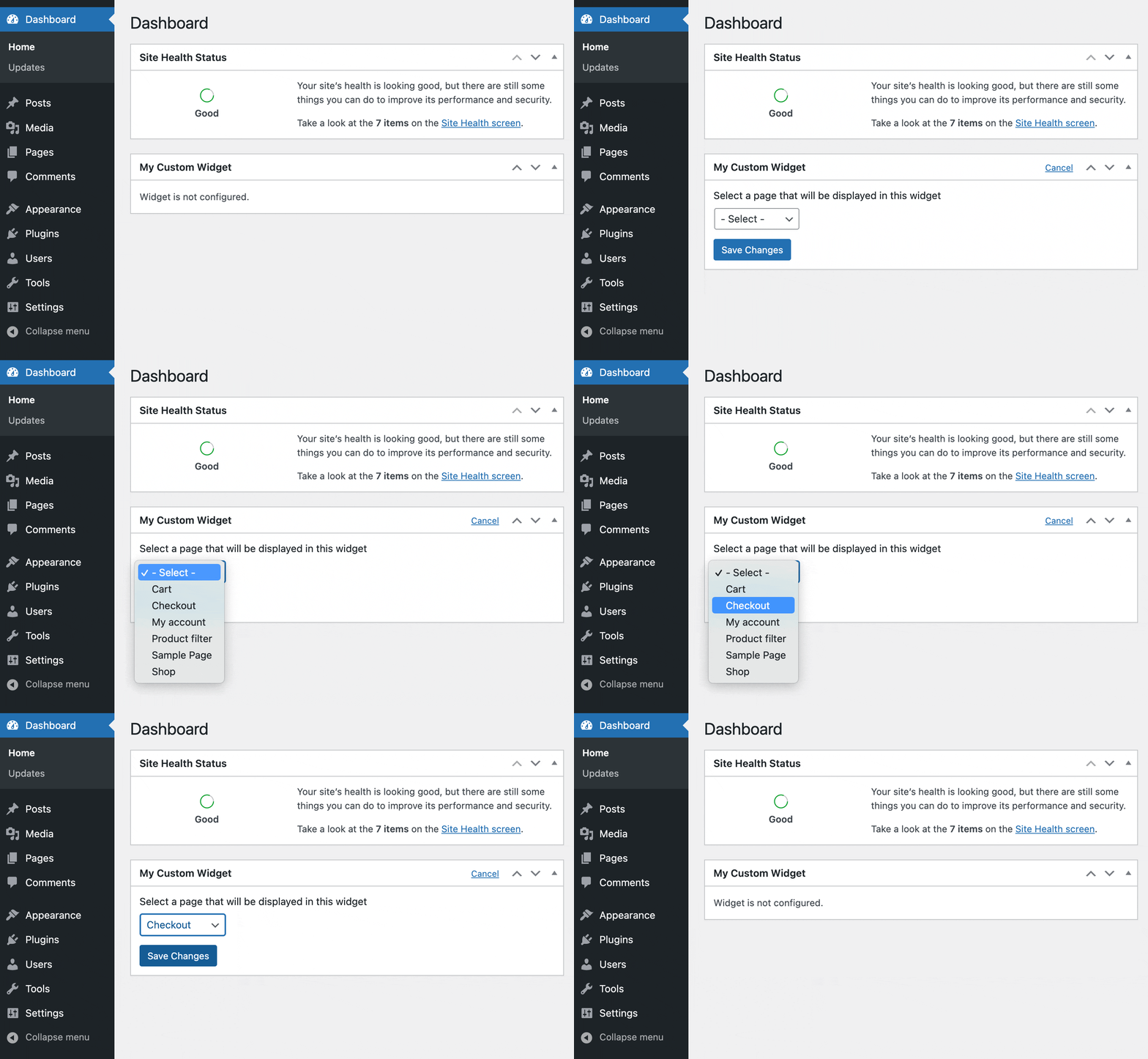
That’s where a fourth parameter of the wp_add_dashboard_widget() function comes into play – $control_callback. Into this parameter, we will need to pass a PHP function that will print the settings for our widget.
<?php
/**
 * @snippet Create a custom WordPress dashboard widget with options
 * @author Misha Rudrastyh
 * @url https://rudrastyh.com/wordpress/dashboard-widgets-in-wordpress.html#dashboard-widgets-with-options
 */
add_action( 'wp_dashboard_setup', 'rudr_custom_dashboard_widget' );

function rudr_custom_dashboard_widget(){

	wp_add_dashboard_widget(
		'rudr_widget',
		'My Custom Widget',
		'rudr_custom_widget_callback',
		'rudr_custom_widget_control_callback' // callback function for settings
	);

}

function rudr_custom_widget_callback(){

	$page_id = get_option( '_rudr_widget_page_id' );

	if( $page = get_post( $page_id ) ) {
		// display a selected page title
		?><h2><?php echo esc_html( get_the_title( $page ) ) ?></h2><?php
	} else {
		?><p>Widget is not configured.</p><?php
	}

}

function rudr_custom_widget_control_callback() {

	// update the widget settings
	if( 'POST' === $_SERVER[ 'REQUEST_METHOD' ] ) {
		$page_id = isset( $_POST[ 'page_id' ] ) && $_POST[ 'page_id' ] ? absint( $_POST[ 'page_id' ] ) : 0;
		update_option( '_rudr_widget_page_id', $page_id );
	}

	?>
		<h3>Select a page that will be displayed in this widget</h3>
		<p>
			<?php
				wp_dropdown_pages( array(
					'post_type' => 'page',
					'selected' => get_option( '_rudr_widget_page_id' ),
					'name' => 'page_id',
					'id' => 'page_id',
					'show_option_none' => '- Select -',
					'echo' => true
				) );
			?>
		</p>
	<?php
}
The main question you might have here is – do we need to validate the nonces using the wp_verify_nonce() function, specifically the dashboard-widget-nonce nonce with the edit-dashboard-widget_rudr_widget value? The answer is – no, we don’t. WordPress will do it.
Network Dashboard Widgets
What about creating dashboard widgets for WordPress multisite, or, I mean, for the Network Dashboard?
More than, I have already mentioned before I created a bunch of dashboard widgets in my plugins – Multisite Indexer and Multisite Order Sync for WooCommerce, and those were exactly the widgets for the Network Dashboard.
So, how to do that?
Honestly, I think you would be disappointed about how simple it is. Because all you need to do is to replace the wp_dashboard_setup hook with the wp_network_dashboard_setup one.
Let’s do it:
/**
 * @snippet Create a network WordPress dashboard widget
 * @author Misha Rudrastyh
 * @url https://rudrastyh.com/wordpress/dashboard-widgets-in-wordpress.html#network-dashboard-widgets
 */
add_action( 'wp_network_dashboard_setup', 'rudr_network_dashboard_widget' );

function rudr_network_dashboard_widget(){

	wp_add_dashboard_widget(
		'rudr_network_widget',
		'My Network Widget',
		'rudr_network_widget_callback'
	);

}

function rudr_network_widget_callback(){
	echo 'Some content for my network dashboard widget';
}
For this widget to appear in the network dashboard you need to either network activate the code above or activate it on the main site of the network at least.
Here you go:


Misha Rudrastyh
Hey guys and welcome to my website. For more than 10 years I've been doing my best to share with you some superb WordPress guides and tips for free.
Need some developer help? Contact me
thanks for sharing
Thank you. You and LoicTheAztec are true WP champions.