Create Users Programmatically
You can create a WordPress user programmatically using either wp_create_user() or wp_insert_user() functions, so in this tutorial I am going to show you the difference between them and we’re also going to take a look at several examples.
There is also a way how you can do that with SQL-requests but it is not exactly creating users programmatically, so we’re not going to uncover it in this tutorial, but you can read more here.
Difference Between wp_create_user() and wp_insert_user()
wp_create_user()
This function allows to provide only username, password and email when creating a user.
A user will be created with a default role which is set in Settings > General.
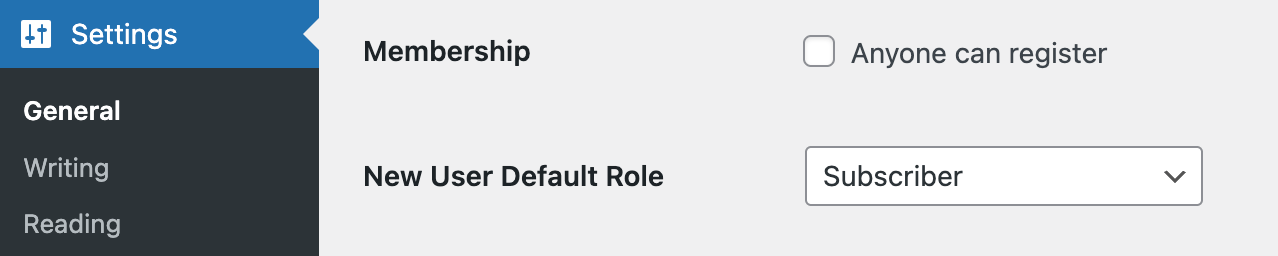
More than that, wp_create_user() works on the base of wp_insert_user().
wp_insert_user()
It is a complete way of creating a WordPress user programmatically, you can provide other quite useful data like first and last names, a display name, a user role and so on.
Examples
Ok, now we know the basics, so let’s take a look at the examples.
1. Simple example of creating a WordPress user programmatically using both functions
Right now let’s just create a subscriber user with a username misha and a password “12345qwerty” (never use that password on live projects by the way, read below how to use the wp_generate_password() function to generate passwords instead). We’re going to use both functions to do that, so you can understand the difference more clearly.
wp_create_user()-way:
$user_id = wp_create_user( 'misha', '12345qwerty' );

if( is_wp_error( $user_id ) ) {
	// we can not create that user for some reason, let's display a message
	echo $user_id->get_error_message();
} else {
	// everything is great
	echo 'User is created successfully!';
}wp_insert_user()-way:
$user_id = wp_insert_user(
	// here we provide all the user data as an array
	array(
		'user_login' => 'misha',
		'user_pass' => '12345qwerty',
	)
);

if( is_wp_error( $user_id ) ) {
	// we can not create that user for some reason, let's display a message
	echo $user_id->get_error_message();
} else {
	// everything is great
	echo 'User has been created successfully!';
}
Once we run this code a new user will appear in WordPress admin:

2. Create an admin user programmatically
All right, in this case we can not use wp_create_user() function anymore, because it doesn’t allow to provide a user role. I’ve seen a couple examples over the internet where other folks were trying to use wp_create_user() anyway and then assign a role with the set_role() method of the WP_User class, but for me it doesn’t look like a very good idea.
You can easily create a WordPress administrator using the code below:
$admin_user_id = wp_insert_user(
	array(
		'user_login' => 'misha',
		'user_pass' => '12345qwerty',
		'role' => 'administrator',
	)
);

if( ! is_wp_error( $admin_user_id ) ) {
	echo 'New website admin has been created!';
}
Just a reminder – you can do it in the database with SQL requests as well, read here how.
If you’re running a WordPress multisite there is a couple more functions it is worth to remember about:
add_user_to_blog()– adds a user to a specific site within a multisite network with the specific role. More info about this function you can find in this tutorial.grant_super_admin()– makes user a superadmin.
Let’s add a user we’ve already created on “Site 2” as an administrator as well:
if( ! is_wp_error( $admin_user_id ) ) {

	if( is_multisite() ) {
		add_user_to_blog( 2, $admin_user_id, 'administrator' ); // Blog ID=2
	}
	...
Make a user super administrator:
if( ! is_wp_error( $admin_user_id ) ) {

	if( is_multisite() ) {
		grant_super_admin( $admin_user_id );
	}
	...
3. Complete example of creating a user with all the data
If you take a look at a user’s profile page in WordPress admin, you will see a lot of settings and fields there.

Let me show now how to provide the data for all of these fields programmatically. Most of them we can pass as arguments of the wp_insert_user() function, but some of them can be provided only with the help of the update_user_meta() function.
Here is how:
$userdata = array(
	'user_login'           => 'misha',
	'user_nicename'        => 'misha',
	'nickname'             => 'misha',
	'user_email'           => '[email protected]',
	'user_pass'            => '12345qwerty',
	'first_name'           => 'Misha',
	'last_name'            => 'R',
	'display_name'         => 'Misha R',
	'user_url'             => 'https://rudrastyh.com',
	'description'          => 'A couple words about Misha here.',
	'rich_editing'         => 'true',
	'syntax_highlighting'  => 'true',
	'comment_shortcuts'    => 'false',
	'admin_color'          => 'fresh',
	'use_ssl'              => false,
	'user_registered'      => '2023-12-31 00:00:00',
	'show_admin_bar_front' => 'true',
	'role'                 => 'subscriber',
	'locale'               => '',
);

$user_id = wp_insert_user( $userdata );

// better safe than sorry
if( ! is_wp_error( $user_id ) ) {
	// does anyone is still using these services?
	update_user_meta( $user_id, 'aim', '' );
	update_user_meta( $user_id, 'yim', '' );
	update_user_meta( $user_id, 'jabber', '' );
}
In the code example above please mind the following:
- The values of
rich_editing,syntax_highlighting,comment_shortcuts,admin_color,use_ssl,show_admin_bar_frontandlocaleare the default ones, so you can just skip all of these parameters if you’re ok with the values provided. - The values of
rich_editing,syntax_highlighting,comment_shortcutsandshow_admin_bar_frontshould be provided as strings though they look like a boolean type. user_nicenameis just a URL-friendlyuser_login.- In case you don’t know – you can not just insert this code into your
functions.php, please use it specifically in the parts of your code when you need to create a user programmatically.
The long story short we’re using wp_insert_user() function to update the fields in the wp_users database table and some of the fields in the wp_usermeta table, update_user_meta() function on the other hand allows to update any record in the wp_usermeta table.

4. Create a WooCommerce customer programmatically
In my blog I talk quite often about WooCommerce, so let’s also take a look at the example of creating a WooCommerce customer here as well.
You can for sure use wp_insert_user() function with 'role' => 'customer' argument for that purpose, but of course I always recommend to use WooCommerce-specific functions whenever possible. So we’re about to use wc_create_new_customer() instead.
$customer_id = wc_create_new_customer(
	'[email protected]',
	'misha',
	'12345qwerty',
	array(
		'display_name' => 'Misha R',
	)
);

if( ! is_wp_error( $customer_id ) ) {
	// you can add WooCommerce customer billing address like this
	update_user_meta( $customer_id, 'billing_first_name', '' );
	update_user_meta( $customer_id, 'billing_last_name', '' );
	update_user_meta( $customer_id, 'billing_company', '' );
	update_user_meta( $customer_id, 'billing_address_1', '' );
	update_user_meta( $customer_id, 'billing_address_2', '' );
	update_user_meta( $customer_id, 'billing_city', '' );
	update_user_meta( $customer_id, 'billing_postcode', '' );
	update_user_meta( $customer_id, 'billing_country', '' );
	update_user_meta( $customer_id, 'billing_state', '' );
	update_user_meta( $customer_id, 'billing_email', '' );
	update_user_meta( $customer_id, 'billing_phone', '' );

	// customer shipping address
	update_user_meta( $customer_id, 'shipping_first_name', '' );
	update_user_meta( $customer_id, 'shipping_last_name', '' );
	update_user_meta( $customer_id, 'shipping_company', '' );
	update_user_meta( $customer_id, 'shipping_address_1', '' );
	update_user_meta( $customer_id, 'shipping_address_2', '' );
	update_user_meta( $customer_id, 'shipping_city', '' );
	update_user_meta( $customer_id, 'shipping_postcode', '' );
	update_user_meta( $customer_id, 'shipping_country', '' );
	update_user_meta( $customer_id, 'shipping_state', '' );
	update_user_meta( $customer_id, 'shipping_email', '' );
	update_user_meta( $customer_id, 'shipping_phone', '' );
}
When creating a WooCommerce customer with the help of the wc_create_new_customer() function only the email argument is required.
5. Create a user on another WordPress site
I developed a WordPress plugin which allows to automatically create the same user on different WordPress sites with the help of REST API.
Here is how it works:

If you’re interested in this kind of functionality, take a look at my plugin then.
Useful Functions
In this part of the tutorial I would like to give you some extra bonus examples. I believe all of them will be very helpful for you in case you decide to create users programmatically.
Generating user passwords
WordPress has a built-in function wp_generate_password() which allows to return a strong password as a string which you can use in wp_create_user() or wp_insert_user() functions.
Example:
$username = 'misha';
$password = wp_generate_password( 8, true );
// 8 – password length
// true - allow these special characters in passwords: !@#$%^&*()

$user_id = wp_insert_user(
	array(
		'user_login' => $username,
		'user_pass' => $password,
	)
);

if( ! is_wp_error( $user_id ) ) {
	echo "Username: {$username}<br />Password: {$password}";
}
Check if user exists
WordPress doesn’t allow to create another user with the same username or email. So if you’re going to use the wp_insert_user() function it will return a WP_Error object anyway. But sometimes you may want to check whether the user exists beforehand. You can use either username_exists() or email_exists() functions for that.
if( username_exists( 'misha' ) ) {
	// the username is already in use
}
if( email_exists( '[email protected]' ) ) {
// the user email is already in use
}Update an existing user
Sometimes you may want to update an existing user programmatically, there are actually two ways to do that well – you can use either wp_insert_user() or wp_update_user() function for that purpose. Let me show you how.
For example let’s update a user email:
$user_id = wp_insert_user(
	array(
		'ID' => 5,
		'display_name' => 'Misha Rudrastyh',
	)
);
Or in an absolutely identical way:
$user_id = wp_update_user(
	array(
		'ID' => 5,
		'display_name' => 'Misha Rudrastyh',
	)
);
Misha Rudrastyh
Hey guys and welcome to my website. For more than 10 years I've been doing my best to share with you some superb WordPress guides and tips for free.
Need some developer help? Contact me
Excellent article, thank you. Clearly written!