How to Disable Action Scheduler on a WooCommerce Store
I keep noticing that sometimes I publish guides just because my clients ask me to. In this tutorial, I’ll show different alternatives to Action Scheduler on your WordPress website (or, to be more specific, on your WooCommerce store) and why you may need to consider using them.
WooCommerce HPOS Explained – High-Performance Order Storage
In this tutorial, I would like to guide you through the High-Performance Order Storage (HPOS) feature in WooCommerce – how to turn it on for your store, how it may affect it, and how to update your plugins in order to make them work with the latest WooCommerce versions.
Sending Multiple REST API Requests using PHP Requests Library
Recently I got a message from one of my customer and he complained about that inventory sync in my Simple Inventory Sync plugin doesn’t work as fast as he wanted it to.
When I took a look at his website configuration, I noticed that he wanted to syncronise the product stock up to 10 websites at the same time.
At that moment my plugin was already using batch API requests in case someone made an order with 50 products (for example) at the same time (so we can send only a one request instead of 50), but we can not send a single batch request to 10 different sites, can we?
WooCommerce Network Orders Dashboard Widget
Today I am going to talk about a very interesting widget in WooCommerce which is available to you only when you’re using WooCommerce within a WordPress Multisite network:
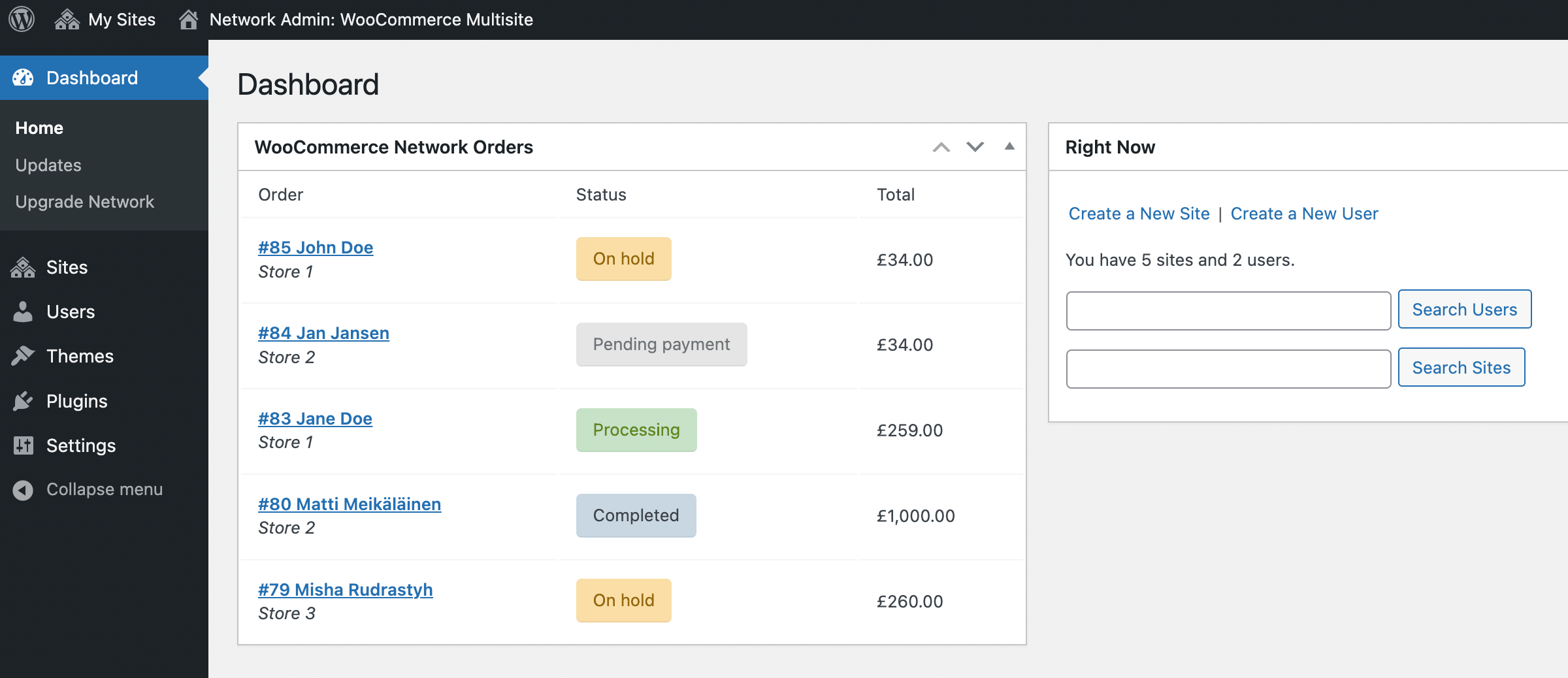
This widget appears in two places:
- Network admin dashboard,
- Admin dashboard of a main site of your multisite network (usually a site with ID = 1).
In order for this widget to appear, WooCommerce has to be either network activated or activated for the main site of your network.
Let’s take a look how this widget really works.
How to Run Heavy Functions on Repeatable Action Hooks
Sometimes when you’re using some hooks, for example save_post, you may notice that functions connected to those hook may be fired twice, for example it happens when you’re using outdated metaboxes instead of Gutenberg plugin sidebars.
But there is no need to worry about save_post hook because it can be fixed pretty easily – depending whether you’re using the Block Editor or not, just create meta fields the appropriate way and it fixes everything… it is woocommerce_update_order hook I am worried about.
When you create or update a WooCommerce order, the woocommerce_update_order action hook is going to be fired multiple times and at least it may create performance issues.
Tapping into switch_to_blog() Function Performance
It just happened that in my WordPress-related work I focused mostly on WordPress Multisite. I had a couple of big client projects in the past, then I developed WordPress plugins for multisite specifically, for example this one or this another one and here we go.
So I have quite a picture in my mind how the things should work the best.
In this tutorial I am about to talk about switch_to_blog() function, especially about its usage within a loop:
- How does it work exactly?
- Is it slow?
- Can we improve it somehow?
First of all let me show you a code snippet I am talking about.
How to Improve WP Cron Performance
Recently I got some requests from the client who uses my Simple Inventory Sync plugin, and the request was about its “full resync tool”.
The thing is that full resync is using WP Cron to sync product inventory because it is a more seemless solution and sutable for a large stores (with an AJAX approach you can not refresh the tool page and forget about it). But this tool has a limit of HTTP requests per cron job, let’s say 5, so no page overload happen. And even when everything is coded with batch requests, sometimes the client could have tons of products with tons of variations for each for them – in that case the resync will take some time anyway.
The issue is when you have scheduled 1 cron job every minute, but your website has 1 visitor every hour, then guess what – WP Cron will run every hour.
Luckily it is possible to fix if you deactivate WordPress standard cron and just run it from the server.
Let’s do it now.