

Описание
Display beautifully styled author bios below your posts with full control over layout, design, and social links. WP About Author integrates seamlessly with WordPress profiles and works instantly with minimal setup.
Features include:
- Multiple layout styles including left, right, and centered designs
- Border and background options to match your site’s theme
- Custom avatar sizing and optional circular display
- Toggle display on posts, pages, archives, search results, and more
- Choose between text or SVG icon social links for 20+ services
The plugin also adds additional fields to user profiles for platforms like GitHub, LinkedIn, Threads, TikTok, YouTube, and more making it easy for readers to connect with your authors.
Скриншоты
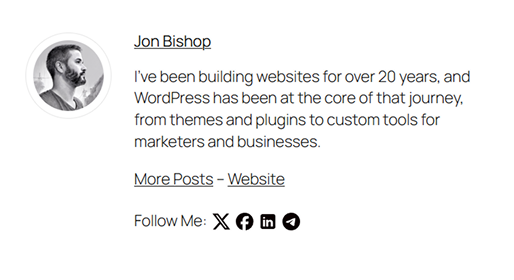
Author bio with social icons displayed below a post 
Plugin settings page with layout and display options
Установка
- Upload the
wp-about-authorfolder to the/wp-content/plugins/directory - Activate the plugin through the ‘Plugins’ menu in WordPress
- Edit your user profile to fill in your bio and social fields
- Use the plugin settings page to configure display and styling options
Часто задаваемые вопросы
-
Can I customize the appearance?
-
Yes. You can change the layout, background, border, and avatar shape and size directly from the settings panel.
-
You can display text or icons linking to over 20 popular social services including Instagram, Facebook, Threads, Reddit, GitHub, Stack Overflow, and more.
-
Can I control where it displays?
-
Yes. You can enable or disable the bio on posts, pages, archives, search results, and even RSS feeds.
Отзывы


Участники и разработчики
«WP About Author» — проект с открытым исходным кодом. В развитие плагина внесли свой вклад следующие участники:
Участники
Перевести «WP About Author» на ваш язык.
Заинтересованы в разработке?
Посмотрите код, проверьте SVN репозиторий, или подпишитесь на журнал разработки по RSS.
Журнал изменений
The current version is 1.6.3 (2025.05.25)
1.6.3 (2025.05.25)
- Fixed layout issue overwriting margins needed for positioning
1.6.2 (2025.05.21)
- Fixed layout selector bug caused by stray whitespace in value
- Improved escaping in admin settings output for security compliance
- Verified nonce usage and sanitized background color input on save
- Passed Plugin Check security audit and resolved all flagged issues
1.6.1 (2025.05.21)
- Fixed security issues flagged by Patchstack (XSS sanitization)
- Validated and escaped all output to meet WordPress.org standards
- Verified plugin compatibility with latest WordPress release
- Improved admin settings panel layout and color picker support
- Minor accessibility and formatting fixes
1.6 (2025.05.21)
- Replaced legacy PNG icons with inline SVGs for all social platforms
- Added support for
svg_colorandsvg_sizeplugin settings - Expanded supported social profiles: Instagram, TikTok, Threads, GitHub, Stack Overflow, Medium, Discord, Twitch, Telegram, WhatsApp
- Escaped all attribute-level output for improved security and context accuracy
- Added new author box style and changed how they work to better support the SVGs
- Added three new layout options for the author box with better responsiveness
- Cleaned up legacy code and improved compatibility with modern themes
1.5 (2014.4.5)
- Fixed update
- Fixing title alignment with avatar
- Fixing display of text area next to avatar
1.4 (2014.3.29)
- Fixed conflict with WordPress SEO
- Can change size and shape of Avatar image
- Fixed broken color picker
- Added link to Settings page from Plugins page
1.3 (2012.2.23)
- Added social media icons as an alternative to text links
- Optimized code and added actions and filters for developers to modify output
- Cleaned up settings area
1.2 (2011.7.13)
- Added option to display bio in feed
1.1 (2010.11.30)
- Updated Reame
- Fixed formatting issues
1.0
- Plugin released