

Описание
Disable Updates is a lightweight updates manager that gives you full control over how and when updates run on your site. You can disable all updates, turn off automatic updates, or manage updates individually for WordPress core, plugins, and themes.
Key Features
Disable Plugin Updates
You can disable plugin updates globally or manage them on a per-plugin basis. This allows you to prevent update notifications for all plugins or selectively disable updates only for specific plugins you want to keep unchanged.
The plugin also lets you disable automatic plugin updates, giving you full control over which plugins update automatically and which ones require manual approval.
Disable Theme Updates
You can disable theme updates entirely or control them individually for each theme. This is especially useful if you are using custom themes or child themes where updates could overwrite changes.
You can also disable automatic theme updates or allow automatic updates only for selected themes, depending on your workflow.
Disable WordPress Core Updates
Take control of WordPress core updates by disabling them completely or managing how they are applied. You can choose to disable all core updates or fine-tune automatic updates by release type.
Options include:
- Disable WordPress core updates entirely
- Disable automatic core updates
- Allow automatic updates for major releases
- Allow automatic updates for minor releases
- Allow automatic development updates
This gives you full control over how WordPress itself updates on your site.
Additional Features
- Disable translation updates
- Hide update notices for all users except admins
- Get email notifications when updates are available or on successful update
- Disable core update notification emails
- Force automatic updates
Support
We’re here to help. Feel free to open a new thread on the Support Forum.
Useful Resources
- If you like this plugin, you’re sure to love our other plugins as well.
- Our blog is a great place to learn more about WordPress.
- Get the most out of your website with our helpful WordPress YouTube Tutorials.
Скриншоты
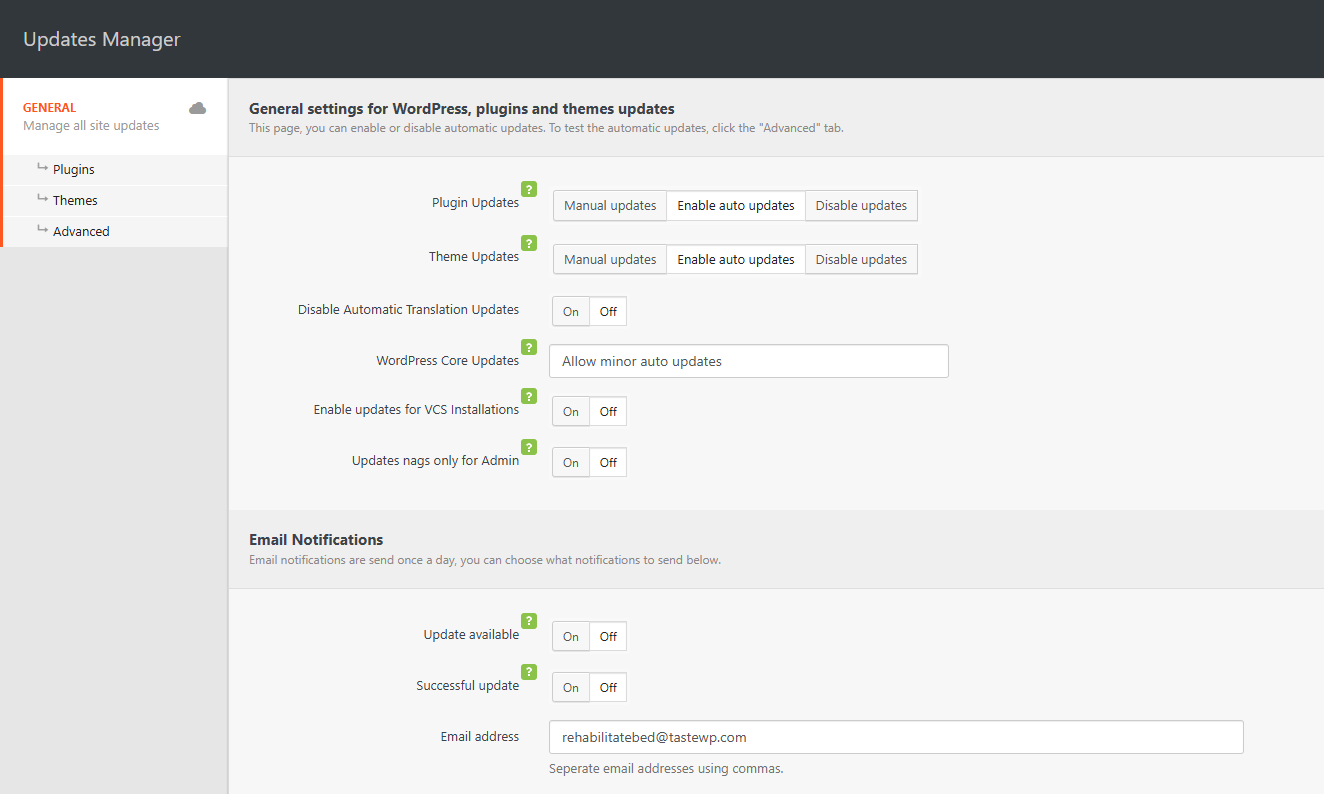
General settings for disabling updates 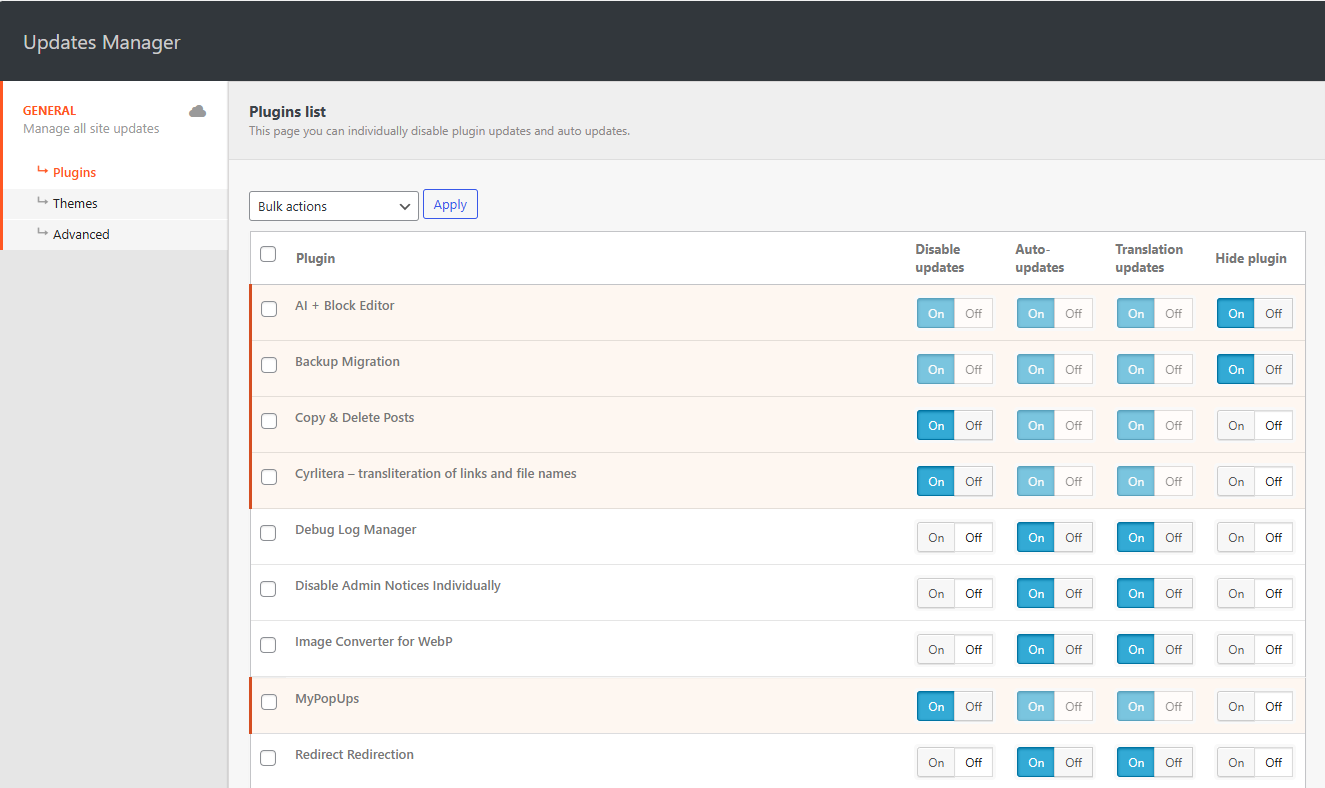
Disable plugin updates individually 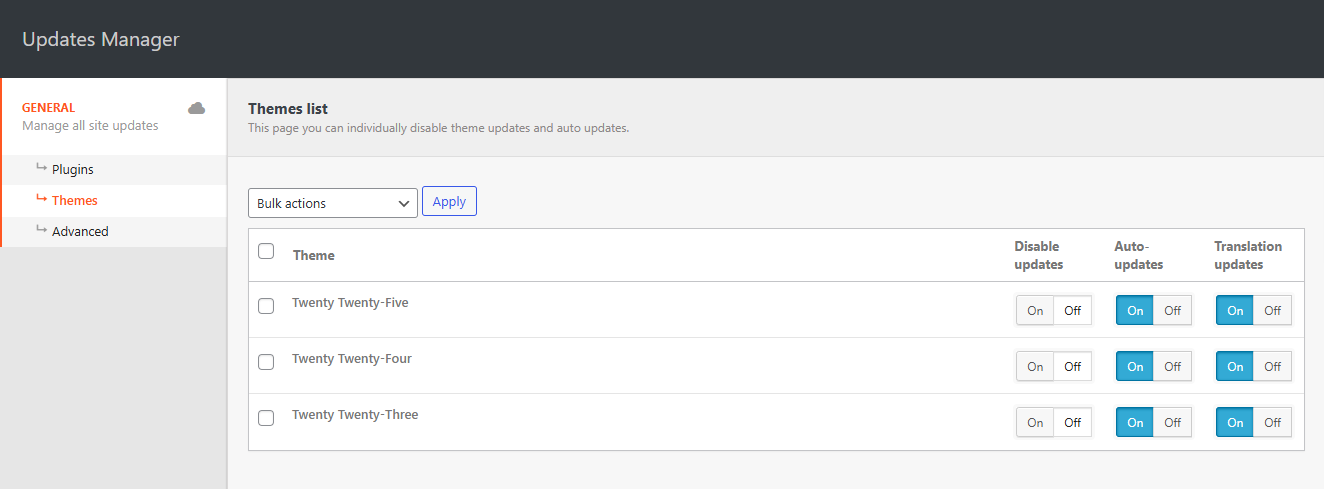
Disable theme updates individually
Установка
- In your WordPress admin, go to Plugins > Add New
- In the Search field, type «Disable Updates»
- Under «Disable Updates» by Themeisle, click the Install Now link
- Once the process is complete, click the Activate Plugin link
- Go to Settings Updates manager to configure the plugin
Часто задаваемые вопросы
-
Can I disable all WordPress updates completely?
-
Yes. Disable Updates plugin lets you disable all updates (core, plugins and themes) entirely.
-
What is the difference between disabling updates and disabling automatic updates?
-
Disabling updates stops WordPress from checking for and offering updates at all. Disabling automatic updates only prevents updates from being installed automatically, while still allowing you to see available updates and install them manually if you choose.
-
Can I still see available updates if I disable automatic updates?
-
Yes. When you disable automatic updates only, WordPress will still show available updates for core, plugins, and themes in the dashboard. You can review and install updates manually whenever you’re ready.
Отзывы


Участники и разработчики
«Disable Updates — Updates Manager, Disable Automatic Updates, Disable All Updates» — проект с открытым исходным кодом. В развитие плагина внесли свой вклад следующие участники:
Участники
Заинтересованы в разработке?
Посмотрите код, проверьте SVN репозиторий, или подпишитесь на журнал разработки по RSS.
Журнал изменений
Version 1.3.0 (2026-01-12)
- Disable Updates joins Themeisle – The plugin has been acquired by Themeisle, ensuring continued development and support. No action is required.
- Moved all PRO features to the free version
- Simplified settings interface
- Removed status icons from Plugins list
- Enhanced security
1.2.0 (10.04.2025)
- Added: Compatibility with WordPress 6.8
- Fixed: Security issue
1.1.9 (05.12.2024)
- Added: Compatibility with WordPress 6.7
- Added: Compatibility with php 8.3
1.1.8 (21.03.2024)
- Added: Compatibility with WordPress 6.4
- Added: Compatibility with php 8.2
1.1.7 (21.11.2023)
- Added: Compatibility with WordPress 6.4
- Added: Compatibility with php 8.2
1.1.6 (22.03.2023)
- Fixed: Freemius framework conflict
- Added: Compatibility with WordPress 6.2
1.1.5 (30.05.2022)
- Added: Compatibility with WordPress 6.0
1.1.4 (24.03.2022)
- Added: Compatibility with WordPress 5.9
- Fixed: Minor bugs
1.1.3 (20.10.2021)
- Added: Compatibility with WordPress 5.8
- Fixed: Minor bugs
1.1.2 (16.12.2020)
- Added: Subscribe form
- Fixed: Minor bugs
1.1.1
- Added: Improved plugin security
- Added: Compatibility with WordPress 4.2 — 5.x
- Added: Multisite support
- Fixed: Minor bugs
1.0.7
- Исправлено: Обновлено ядро
- Fixed: It was not possible to close notifications about the incompatibility of plugins.
1.0.6
- Исправлено: Обновлено ядро
- Исправлено: Мелкие ошибки
- Исправлено: Переводы
1.0.5
- Исправлено: Совместимость с плагином Clearfy
- Исправлено: Страница плагинов долго загружалась при отключенных обновлениях
- Исправлено: Интерфейс плагина не работал и не подгружались стили из-за настроек безопасности
- ДОБАВЛЕНО: Кеширование опций плагина, за счет чего удалось сократить запросы плагина к базе данных на 90%, плагин стал легче и быстрее.
- ДОБАВЛЕНО: Сжатие и кеширование файлов ядра плагина, для уменьшения
1.0.4
- Исправлено: Страница плагинов долго загружалась при отключенных обновлениях
1.0.3
- Исправлено: Ошибки ядра
1.0.1
- Исправлен баг с обновлениями WordPress
- Обновлено ядро
- Добавлен французский перевод
1.0.0
- Менеджер обновлений, Отключить все обновления, Отключить автоматические обновления