
Описание
Plugin that enables you to create table of contents in your posts and pages. You can choose what it will parse, and what
it will not parse. It’s very simple to use from your editor
so you do not have to manualy enter tags. Now it’s nothing special, but later it will have much more features including
some predefined styles and more styling control.
Planned Features
- Custom TOC tag (so you dont have to use
[tinytoc lev="lv"]cont[/tinytoc])
Source SVN
- svn checkout http://svn.wp-plugins.org/tiny-table-of-contents-tinytoc/trunk/ tiny-table-of-contents-tinytoc
Support
- Twitter: http://www.twitter.com/php4every1
- Facebook: http://www.new.facebook.com/profile.php?id=1296304925&ref=mf
- Plugin home: http://php4every1.com/scripts/tiny-table-of-contents-wordpress-plugin/
- Documentation: http://php4every1.com/scripts/tiny-table-of-contents-wordpress-plugin/#Documentation-1
Скриншоты

Part of Plugin summarypage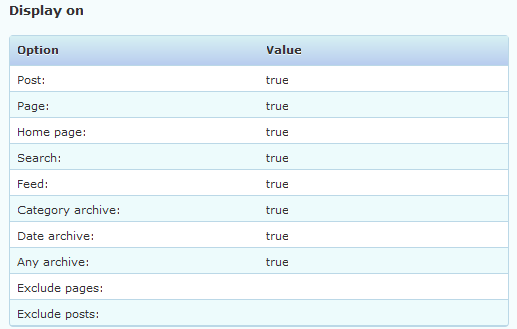
An other part of Plugin summarypage
Part of Plugin settingspage
An other part of Plugin settingspage
Also a part of Plugin settingspage
Установка
- Upload folder
tiny-table-of-contents-tinytocto your/wp-content/pluginsdirectory - Activate the plugin through the
Pluginsmenu in WordPress
Часто задаваемые вопросы
- Now do I use this plugin?
-
When you go to your post editor you will see drop down menu «TOC Levels». Select you chapter and then chose one of the levels. Or you can manualy wrap your chapter in [tinytoc level=»lv»]cont[/tinytoc] tags where
lvis your level (number) andcontis you chapter. - How to use image as «Back to top» button?
-
You have to add
<img />tag to your text with path to that image assrcattribute value. - Can I add text before TOC?
-
If you add
[tinytoc]after that text, yes. - Can I chose TOC position?
-
Yes, by placing
[tinytoc]in your text. - How can I remove `Header` and still be able to use `Back to top` feature?
-
In order to use
Backt to topyou need to have some tag with some ID. Just addstyle="display: none;"to yourHtml before titlefield in tag. If you have default example<h3 id="tyinTOC">then you would have<h3 id="tyinTOC" style="display: none;">. That will remove Title before table of contents and still allow you to useBack to topfeature. - How do I know what each of these fields mean?
-
Visit documentation.
Отзывы
Нет отзывов об этом плагине.
Участники и разработчики
«Tiny Table Of Contents — TinyTOC» — проект с открытым исходным кодом. В развитие плагина внесли свой вклад следующие участники:
Участники
Перевести «Tiny Table Of Contents — TinyTOC» на ваш язык.
Заинтересованы в разработке?
Посмотрите код, проверьте SVN репозиторий, или подпишитесь на журнал разработки по RSS.