

Описание
Easily control the order of Categories and any hierarchical taxonomy with a simple drag-and-drop interface. Reorder parent and child terms visually in the admin and choose whether the plugin automatically applies your custom term order to front-end queries.
Key features
- Intuitive drag-and-drop reordering for Categories and all hierarchical taxonomies.
- Option to auto-apply the custom term order to front-end queries (no theme/plugin edits required).
- Keep the admin term lists in your new order (makes management and editorial workflows consistent).
- Works with multiple taxonomies per post type — switch between taxonomies from the same interface.
- Multisite aware and regularly updated for modern WordPress and PHP versions (see changelog for compatibility notes).
How it works
After activating the plugin, a new Taxonomy Order page becomes available under the Taxonomy menu. Simply open it and drag terms into the exact order you want — including parent/child hierarchy.
Use the plugin’s Taxonomy Order screen to drag terms into the order you want. To apply the custom order automatically across your site, enable the Autosort option — the plugin will adjust term queries on the fly so your chosen order shows without template changes. If you prefer to control ordering in code, include orderby => ‘term_order’ when calling get_terms() to use the plugin’s order programmatically.
This plugin is developed by Nsp-Code
Дополнительные функции приведены в разделе Расширенный порядок терминов таксономии.
Локализация
Доступно на каталонском, китайском (Китай), китайском (Тайвань), чешском, голландском (Бельгия), английском (Австралия), английском (Канада), английском (Новая Зеландия), английском (Великобритания), английском (США), французском (Франция), галисийском, немецком, итальянском, японском, норвежском (Бокмоль), польском, португальском (Португалия), русском, Испанском (Чили), испанском (Испания), испанском (Венесуэла), шведском и турецком языках.
Хотите внести свой вклад в перевод на свой язык? Идите на https://translate.wordpress.org/projects/wp-plugins/taxonomy-terms-order
Нет редакторов вашего языка в пользователях плагина? Вы можете немного помочь! https://translate.wordpress.org/projects/wp-plugins/taxonomy-terms-order/contributors
Скриншоты
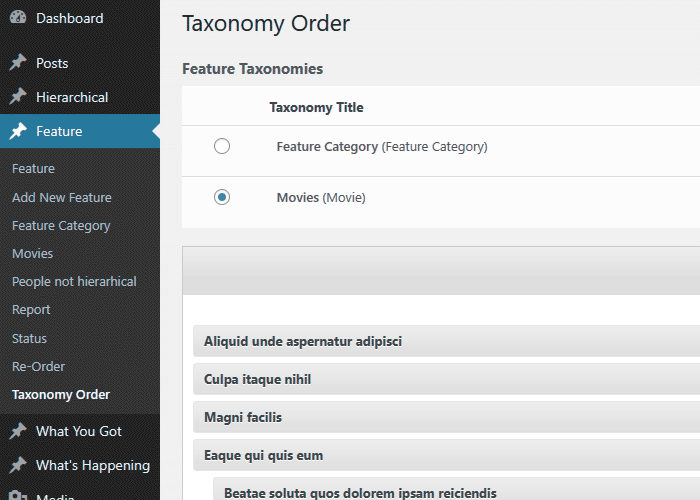
Интерфейс списка категорий. 
Интерфейс множественных иерархий.
Установка
- Загрузите папку
taxonomy-terms-orderв каталог/wp-content/plugins/. - Активируйте плагин из Админ консоль > Плагины.
- После активации проверьте Настройки > Сортировка списка элементов
- Используйте ссылку «Заказная сортировка», которая появляется в каждом разделе типовых сообщений, чтобы сделать свою сортировку.
Часто задаваемые вопросы
Не стесняйтесь обращаться ко мне по электронной почте: [email protected]
-
Если я совсем не разбираюсь в PHP, подходит ли мне этот плагин?
-
Безусловно, можете!
В отличие от многих других плагинов, вам не нужно вносить какие-либо изменения в код, чтобы вручную изменить порядок записей. Есть возможность автоматически обновлять запросы WordPress, чтобы записи выводились в заданном порядке. Это можно отключить (автосортировка), чтобы разрешить использование произвольного кода. -
Я предпочитаю применять сортировку через код, как это можно сделать?
-
Включить ‘orderby’ => ‘term_order’ в ваших аргументах get_terms().
-
Какие иерархические структуры я смогу сортировать?
-
Вы можете отсортировать ВСЕ таксономии (иерархически активные), включая категории по умолчанию.
-
Есть ли способ заставить мою консоль использовать пользовательскую сортировку элементов?
-
Абсолютно, плагин может это сделать. На самом деле вы можете настроить так, чтобы только администратор обновлялся, и снаружи шаблона элементы будут отображаться как и раньше.
-
Есть функция, которую я хочу реализовать, можно что-то с этим сделать?
-
Все идеи приветствуются, и я помещаю их в свой список для внедрения в новые версии. В любом случае это может занять некоторое время, но если вы спешите, подумайте о небольшом пожертвовании, и мы сможем что-нибудь организовать.
-
Мне все еще нужно больше функций
-
Рассмотрите возможность перехода на расширенную версию плагина по приемлемой цене Расширенный порядок терминов таксономии
Отзывы


Участники и разработчики
«Category Order and Taxonomy Terms Order» — проект с открытым исходным кодом. В развитие плагина внесли свой вклад следующие участники:
Участники
«Category Order and Taxonomy Terms Order» переведён на 25 языков. Благодарим переводчиков за их работу.
Перевести «Category Order and Taxonomy Terms Order» на ваш язык.
Заинтересованы в разработке?
Посмотрите код, проверьте SVN репозиторий, или подпишитесь на журнал разработки по RSS.
Журнал изменений
1.9.3
- Improved plugin page description
- Use sanitize_text_field and wp_unslash for the options form
- Include FALSE argument in the wp_register_script
- WordPress 6.9 compatibility check
- WordPress 6.9 tag update
1.9.1
- Replace all _e with escaping function esc_html_e
- Use esc_url when output an image url
- Use esc_attr when output html attribute value
- Use isset before using an array argument.
- Minor CSS enhancements
- Other Minor code changes
1.9
- Style and layout updates for the re-order interface.
- Add version to the CSS/JavaScript files to ensure latest data is loaded instead cached.
- WordPress 6.8.2 compatibility tag
1.8.8
- PHP 8.3.4 compatibility check
- Slight CSS and layout adjustments.
- WordPress 6.8 compatibility tag
1.8.7
- CSS adjustments for span action section.
- Option for term edit link.
- Include the term edit link on the ReOrder interface.
- WordPress 6.7 compatibility check and tag update.
1.8.6
- Fix: TTO_addons class not loaded which makes the compatibility routines not triggering.
1.8.5
- Temporary placeholder function to prevent fatal errors when using the Uncode theme.
1.8.4
- Code structure improvements.
- New option «Show / Hide re-order interface» — Display the Taxonomy Order interface for the specified post types
- WordPress 6.6.1 compatibility check and tag update
1.8.2
- Polylang fix — Ignore the ‘language’ to avoid unnecessarily sorting.
- Set-up the Live Preview for the plugin.
- WordPress 6.5.4 compatibility check and tag update
1.8.1
- WordPress 6.5 compatibility check and tag update
1.8
- Check if the terms table still includ the custom column, to avoid errors ( mainly when upgrading WordPress )
- Code improvements
- WordPress 6.4.2 compatibility check and tag update
1.7.9
- Trigger wp_cache_flush when saving the order to clear the internal caches
- WordPress 6.3 compatibility tag
1.7.7
- Use term name for admin queries, when the admin sort is active, to avoid «random» returns on certain servers, when term order are empty.
- WordPress 6.2.2 compatibility tag
1.7.5
- New filter tto/admin/plugin_options/capability to add custom roles and capabilities.
- Compatibility tag update for WordPress 6.2
1.7.4
- Compatibility tag update for WordPress 6.1.1
1.7.3
- Use esc_html to escape the ajax response message, to avoid single quotes which will break the code.
1.7.1
- Add the required column when create a new site, when running under MultiSite environment.
1.7
- Create the required columns for all sites, when running under MultiSite environment.
- Compatibility tag update for WordPress 6.0.1
1.6.1
- Compatibility tag update for WordPress 6.0
1.6
- Readme file updates, typos fixes.
- Compatibility tag update for WordPress 5.9.1
1.5.9
- Удалить кнопку Twitter
- Compatibility tag update for WordPress 5.8.2
1.5.7.7
- Minor code updates
- Code cleanup
- Compatibility tag update for WordPress 5.8.1
1.5.7.6
- Clear the term cache to ensure the updated order reflect for certain caches
1.5.7.5
- Apply the order within admin if ignore_term_order argument is set and not true
- Compatibility tag update for WordPress 5.7
1.5.7.4
- Fix: Call to undefined function wc_get_attribute_taxonomies()
- Compatibility tag update for WordPress 5.6
1.5.7.3
- Compatibility tag update for WordPress 5.5
1.5.7.2
- Compatibility tag update for WordPress 5.4
1.5.7.1
- Compatibility tag update for WordPress 5.3
1.5.7
- Ignore WooCOmmerce Attributes order as being changed through default interface
1.5.6
- Rely on ‘terms_clauses’ filter than ‘get_terms_orderby’ as producing issues with the $maybe_orderby_meta backward compatibility.
- Fix WooCommerce category order apply
1.5.5
- Ignore admin sort when using columns order within Taxonomy interface
1.5.4
- Replaced serialize with JSON when saving terms order
- New filter to/get_terms_orderby/ignore to allow sort ignore when Autosort is turned On
- Addon code to ignore term_order sorting when Co-Authors plugin term query
1.5.3.2
- Add nonce field for AJAX sort update
1.5.3.1
- Removed Google Plus share button which triggered some JavaScript errors
1.5.3
- Use JSON instead serialize method when sending order through AJAX
- Updated PO language file
1.5.2.2
- Default admin capability changed from install_plugins to manage_options to prevent DISALLOW_FILE_MODS issue. https://wordpress.org/support/topic/plugin-breaks-when-disallow_file_mods-is-set-to-true/
- Prepare plugin for Composer package
- Interface table th elements titles left align
- Interface Taxonomy terms count fix
1.5
- Включено ‘ignore_term_order’, чтобы заставить игнорировать menu_order при активной автосортировке.
- Обновление переводов
1.4.9
- Удалить перевод из пакета
- Удален баннер пожертвований
- PHP 7 исправлений
- Неиспользуемое действие удалить
1.4.8
- исправлена папка textdomain
- Исправлен перевод для ролей пользователя
- фильтр the_title заменен на terms_walker
- Добавить отметку времени для настроек администратора
1.4.7
- Texdomain изменит taxonomy-terms-order, чтобы разрешить переводы через translate.wordpress.org
- Обновление совместимости с WordPress 4.4
- Обновления Css
1.4.6.1
- Исправлена ошибка безопасности
1.4.5
- Исправлен перевод textdomain — спасибо Pedro Mendonça
- Обновление Португальской локализации — Pedro Mendonça
1.4.4
- Переключение роли пользователя от порицания user_level до способный
- Сортировка иерархии для медиа
- Обновление настроек администратора
1.4.2
- Иранский язык ([email protected])
- Обновления администраторского css
1.4.1
- Польский язык (Pozdrawiam — www.difreo.pl/ ; Mateusz — www.czar-net.com )
1.4.0
- Венгерский язык (Adam Laki — http://codeguide.hu/)
- Украинский перевод (Michael Yunat — http://getvoip.com)
- Чешская локализация
1.3.7
- Бразильский португальский (Rafael Forcadell — www.rafaelforcadell.com.br)
1.3.6
- Традиционное китайское письмо (Danny — http://sofree.cc)
- Немного стилизован администратор
1.3.4
- Обновлено перемещение по меню
- Исправлено подключение переводов
- Японский язык
1.3.0
- Исправлена ошибка в Заголовках
- Словацкий язык (Branco Slovak http://webhostinggeeks.com/user-reviews/)
1.2.9
- Небольшие обновления
- Немецкий и французский языки.
1.2.7
- Осуществлена локализация на голландский и румынский.
- Большое спасибо Anja Fokker http://www.werkgroepen.net/