
Описание
This plugin will show google map in your post or pages with the help of short code then will plugin will place a link and your google
map will be view in a lightbox [map_link suburb=»suburb name» state=»state name» country=»country name» description=»description «]
Скриншоты

Screenshot of the admin panel menu.
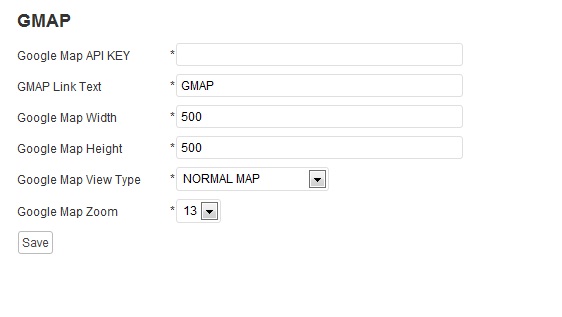
Screenshot of the add google map key and map link .

Screenshot of the map link in the post.

Screenshot of the google map in light box.
Установка
1.Upload the sukhjot-google-map.zip plugin to your wordpress plugin directory «wp-content/plugins/».
2.Then go to your wp-admin panel and under the plugins list activate the Auto Poster plugin.
3.After activation in the admin panel you will see a new menu called «GMAP».
4.Here you can add the google map key and name for link which will viewes by users .
.
5.Done
Часто задаваемые вопросы
- How do I use it?
-
Simple install
Отзывы
Нет отзывов об этом плагине.
Участники и разработчики
«Google Map With Short Code» — проект с открытым исходным кодом. В развитие плагина внесли свой вклад следующие участники:
Участники

Перевести «Google Map With Short Code» на ваш язык.
Заинтересованы в разработке?
Посмотрите код, проверьте SVN репозиторий, или подпишитесь на журнал разработки по RSS.
Журнал изменений
1.0
- Initial release
1.1
- New Version Available