

Описание
Redirection Manager is a powerful redirect management plugin designed for both classic WordPress sites and Headless WordPress setups, perfect for developers building modern frontends with Next.js, Nuxt.js, React, and other JavaScript frameworks.
Note: The plugin WPGraphQL (https://wordpress.org/plugins/wp-graphql/) is required for GraphQL functionality.
Key Features
Global Redirect Management:
— Intuitive admin interface to add, edit, and delete redirects
— Support for 301 (Moved Permanently), 308 (Permanent Redirect), and 410 (Gone) status codes
— Advanced search and filtering by status code
— Pagination support for large redirect lists
— CSV export functionality for backup and migration
— Automatic URL normalization for consistency
Post-Level Redirects:
— Meta box on all public post types (posts, pages, custom post types)
— Set redirects directly from the post editor
— Supports 301, 308, and 410 redirects at the post level
— Automatic handling during template_redirect
Content Management:
— Related content detection — automatically identifies posts/pages/terms associated with redirect URLs
— Quick access to edit or view related content
— Option to trash content when creating redirects
— Support for WooCommerce products
GraphQL Integration:
— Fetch all global redirects via GraphQL query
— Post-level redirect fields (redirectType, redirectUrl) on all post types
— Perfect for headless CMS implementations
— Optimized for frontend frameworks
Developer-Friendly:
— Clean, well-documented code following WordPress coding standards
— Custom database table for optimal performance
— AJAX-powered admin interface
— Full security with nonce verification and capability checks
— Extensible architecture
Supported Redirect Types
- 301 — Moved Permanently: Traditional permanent redirect with destination URL
- 308 — Permanent Redirect: Modern permanent redirect that preserves HTTP method
- 410 — Gone: Indicates content is permanently deleted (no destination URL needed)
Скриншоты
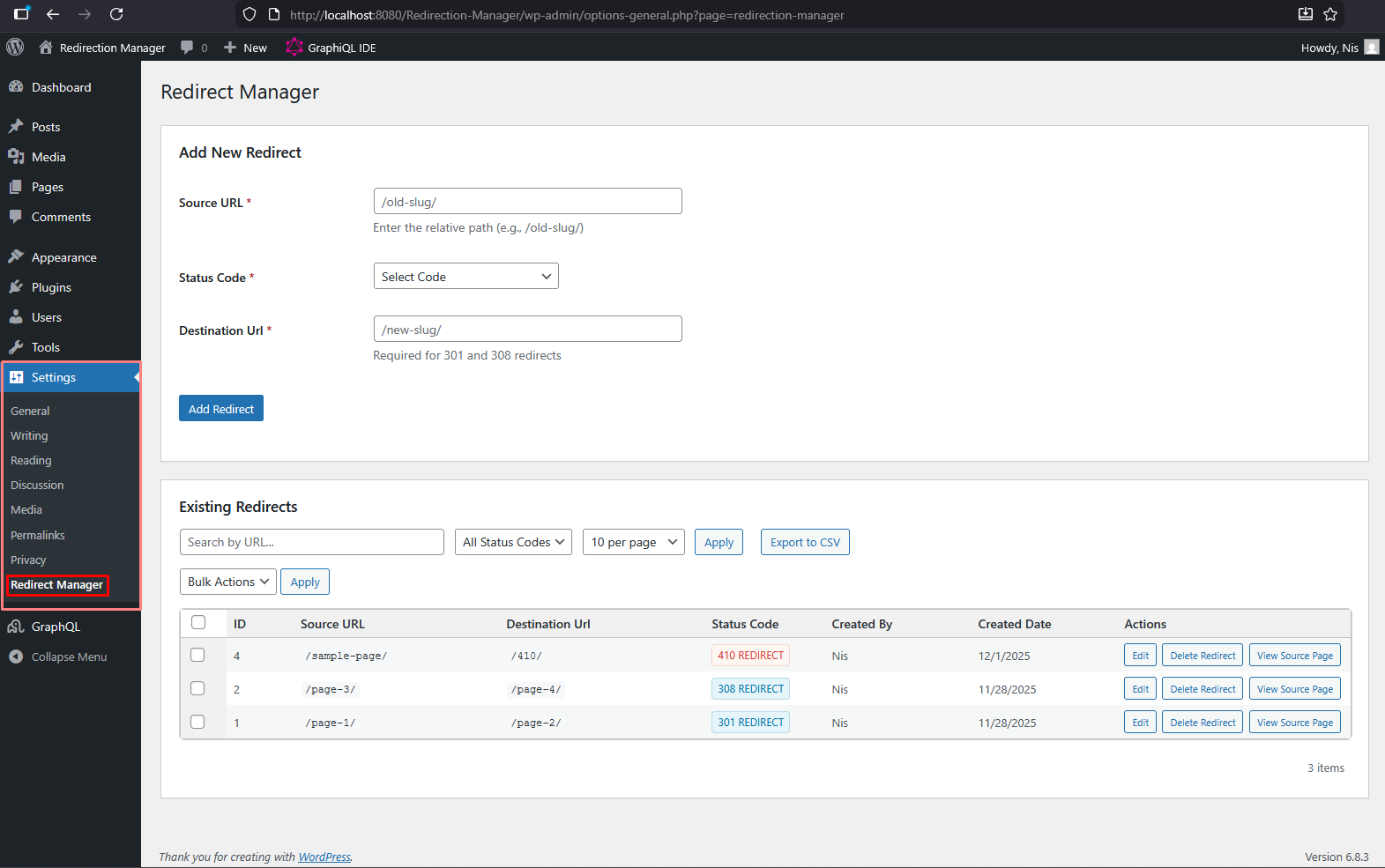
Settings Page: Manage global redirects with search, filtering, and pagination 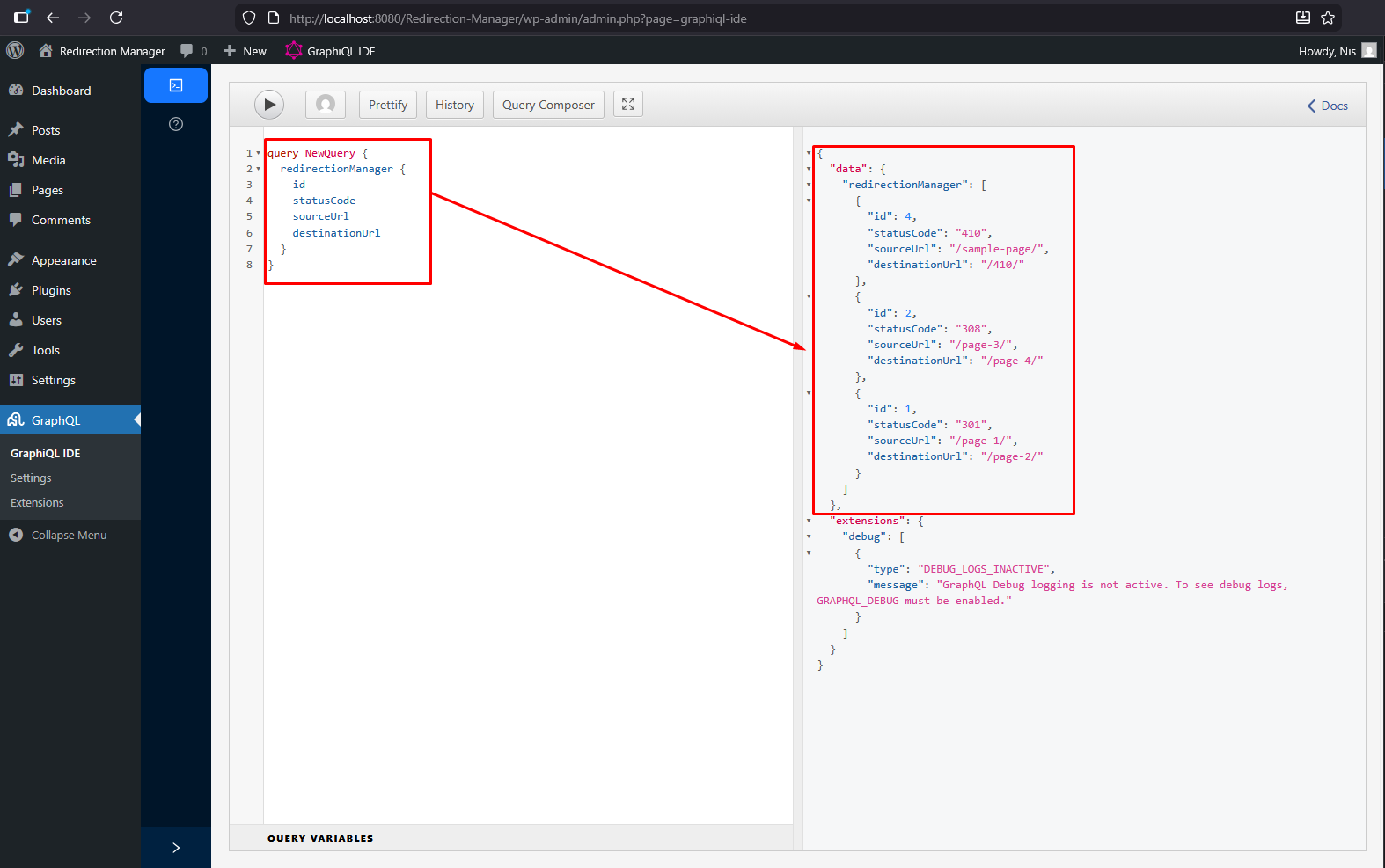
GraphQL Query: Fetch redirects via GraphQL for your headless frontend
Установка
- Upload the plugin files to the
/wp-content/plugins/redirection-managerdirectory, or install the plugin through the WordPress plugins screen directly. - Activate the plugin through the ‘Plugins’ screen in WordPress.
- Install and activate the WPGraphQL plugin (required for GraphQL functionality).
- Navigate to Settings > Redirect Manager to manage your redirects.
- Optionally, set post-level redirects using the «Redirect Settings» meta box in the post editor.
Часто задаваемые вопросы
-
How do I use the redirects on my headless frontend?
-
Use GraphQL to fetch the redirects from WordPress. Query the
redirectionManagerfield to get all global redirects, or query individual posts withredirectTypeandredirectUrlfields. -
What’s the difference between 301 and 308 redirects?
-
Both are permanent redirects. 301 is the traditional redirect that may change POST to GET. 308 is the modern alternative that preserves the HTTP method and request body.
-
Can I export my redirects?
-
Yes! Use the «Export CSV» button on the Redirect Manager settings page to download all your redirects as a CSV file.
-
Does this work with WooCommerce?
-
Yes! The plugin detects and supports WooCommerce products, allowing you to manage redirects for product URLs.
-
Can I set redirects for individual posts?
-
Yes! Version 2.0.0 introduces post-level redirects. You’ll find a «Redirect Settings» meta box in the post editor for all public post types.
Отзывы
Нет отзывов об этом плагине.
Участники и разработчики
«Redirection Manager» — проект с открытым исходным кодом. В развитие плагина внесли свой вклад следующие участники:
Участники
Перевести «Redirection Manager» на ваш язык.
Заинтересованы в разработке?
Посмотрите код, проверьте SVN репозиторий, или подпишитесь на журнал разработки по RSS.
Журнал изменений
2.0.1
- Resolved an issue affecting the filter options.
2.0.0
- Major Update: Complete rewrite with enhanced features
- Added support for 301 (Moved Permanently) redirects
- Added support for 308 (Permanent Redirect) redirects
- Added support for 410 (Gone) status code
- Introduced post-level redirect meta boxes for all public post types
- Added CSV export functionality for backup and migration
- Implemented advanced URL normalization system
- Added related content detection (posts, pages, terms, WooCommerce products)
- Added content trash management feature
- Enhanced GraphQL integration with post-level fields
- Improved admin interface with search and filtering
- Added pagination support for large redirect lists
- Implemented comprehensive security with WordPress coding standards
- Added creator tracking for redirects
- Improved database schema with indexes for better performance
- Added custom 410 error page template
- Enhanced AJAX handling with better error messages
- Fixed destination URL field visibility for 301 redirects
- Improved code documentation and inline comments
1.0.0
- Initial release
- Basic redirect manager in WordPress admin
- Save redirects in custom database table
- AJAX handling for adding and deleting redirects
- Support for 302 redirects and 404 closures