

Описание
Легкий, быстрый и мощный вирусный сканер для WordPress.
NinjaScanner is a lightweight, fast and powerful virus scanner for WordPress which includes many features to help you scan your blog for malware and virus.
Функции
- Средство проверки целостности файлов.
- Средство просмотра сравнения файлов.
- Фильтры исключения.
- Снимок файла.
- Снимок базы данных.
- Защита от вредоносных программ/антивирусов.
- Sandbox for quarantined files.
- Ignored files list.
- API поиска безопасного просмотра Google.
- Фоновое сканирование.
- Сканирование по расписанию (Premium).
- Интеграция WP-CLI (Premium).
- Журнал отладки.
- Email-отчёт.
- Интеграция с NinjaFirewall (WP и WP+ Edition).
- Поддержка нескольких сайтов.
- Контекстная помощь.
- И многое другое…
Средство проверки целостности файлов
Средство проверки целостности файлов сравнит файлы ядра WordPress, а также файлы плагинов и тем с их исходным пакетом. Средство просмотра сравнения файлов покажет вам различия между любым изменённым файлом и оригиналом. Вы также можете добавить свои премиум-темы и плагины»notranslate»> в средство проверки целостности файлов. Заражённые или повреждённые файлы можно легко восстановить одним щелчком мыши.
Снимок файла
The File Snapshot will show you which files were changed, added or deleted since the previous scan.
Снимки базы данных
NinjaScanner will compare all published posts and pages in the database with the previous scan and will report if any of them were changed, added or deleted.
Сигнатуры для защиты от вредоносного ПО
You can scan your blog for potential malware and virus using the built-in signatures. The scanning engine is compatible with Linux Malware Detect LMD (whose anti-malware signatures are included) and with some ClamAV signatures as well. You can even write your own anti-malware signatures.
Интеграция NinjaFirewall
If you are running our NinjaFirewall (WP or WP+ Edition) web application firewall plugin, you can use this option to integrate NinjaScanner into its menu.
Быстрый и легкий сканер
NinjaScanner has strictly no impact on your database. It only uses it to store its configuration (less than 1Kb). It saves the scan data, report, logs etc on disk only, makes use of caching to save bandwidth and server resources. It also includes a Garbage Collector that will clean up its cache on a regular basis.
Фоновое сканирование
Another great NinjaScanner feature is that it runs in the background: start a scan, let it run and keep working on your blog as usual. You can even log out of the WordPress dashboard while a scanning process is running! You don’t have to wait patiently until the scan has finished. Additionally, a scan report can be sent to one or more email addresses.
Sandbox for quarantined files
When moving a file to the quarantine folder, NinjaScanner can use a testing environment (a.k.a. sandbox) to make sure that this action does not crash your blog with a fatal error. If it does, it will warn you and will not quarantine the file. It is possible (but not recommended) to disable the sandbox.
Расширенные настройки
NinjaScanner offers many advanced settings to finely tune it, such as exclusion filters, selection of the algorithm to use, a debugging log etc.
Политика конфиденциальности
Your website can run NinjaScanner and be 100% compliant with the General Data Protection Regulation (GDPR):
We, the authors, do not collect, share or sell personal information. We don’t track or profile you. Our software does not collect any private data from you or your visitors.
Премиум-функции
Check out our NinjaScanner Premium Edition
- Scheduled Scans: Don’t leave your blog at risk. With the scheduled scan option, NinjaScanner will run automatically hourly, twice daily or daily.
- WP-CLI Integration: Do you own several blogs and prefer to manage them from the command line? NinjaScanner can nicely integrate with WP-CLI, using the
ninjascannercommand. You can use it to start or stop a scanning process, view its status, its report or log from your favourite terminal, without having to log in to the WordPress Admin Dashboard. - Dedicated Help Desk with Priority Support
Скриншоты
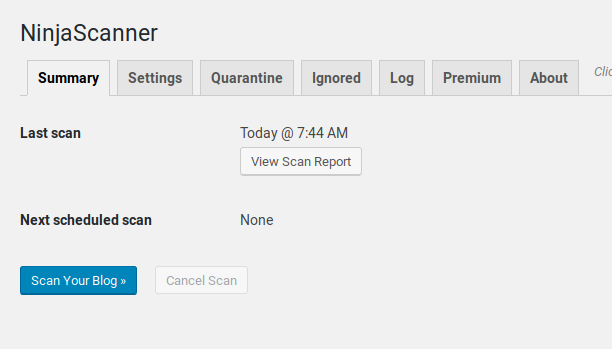
Краткое содержание страницы. 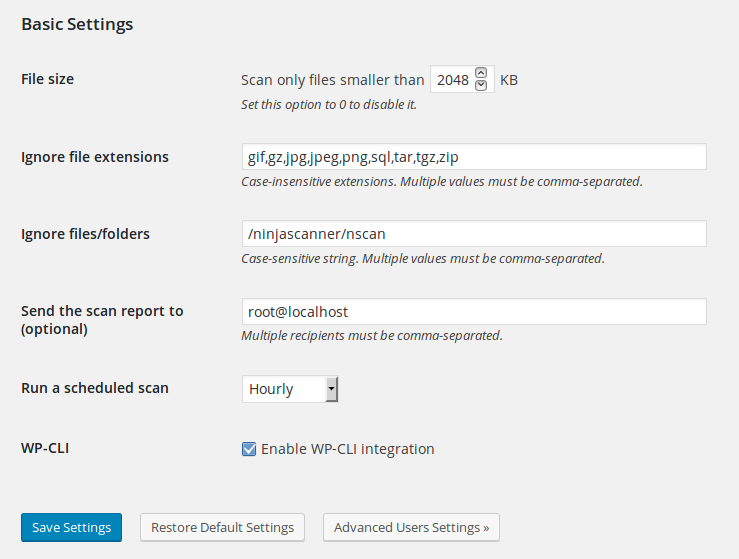
Базовые настройки. 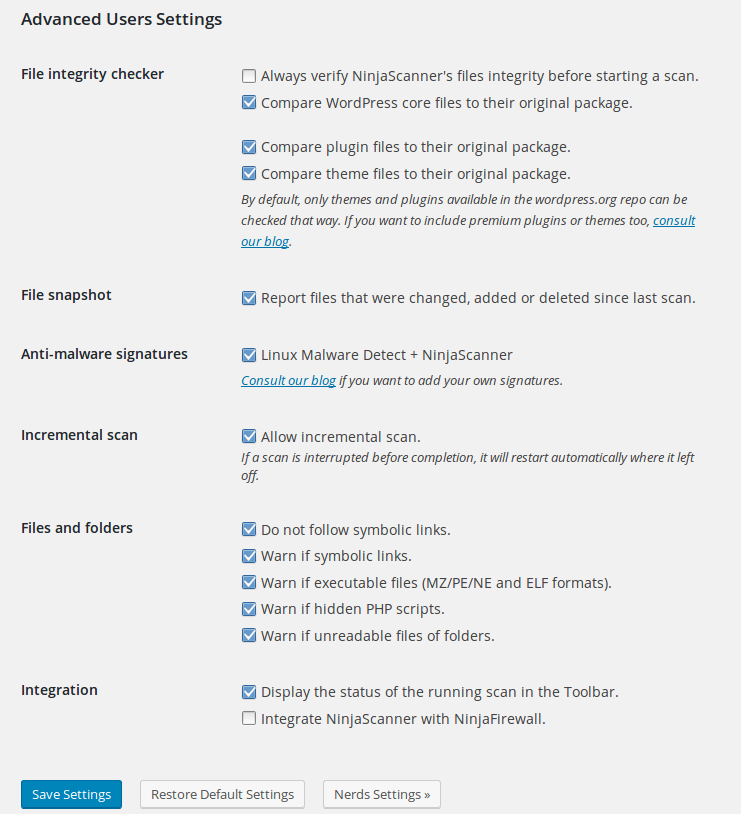
Расширенные настройки. 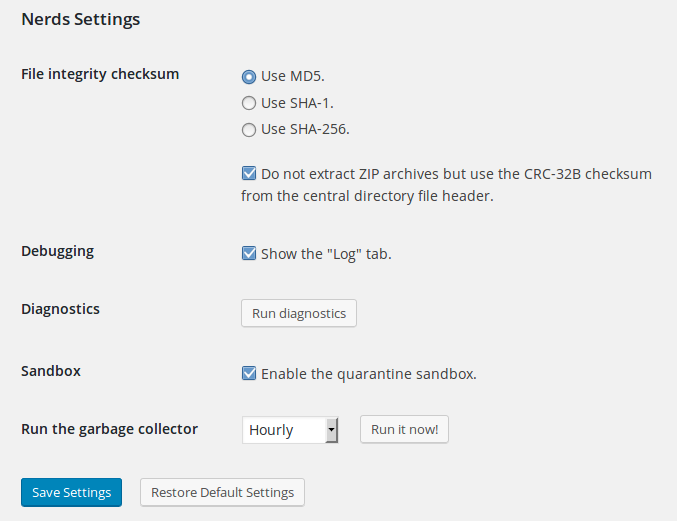
Настройки для ботаников. 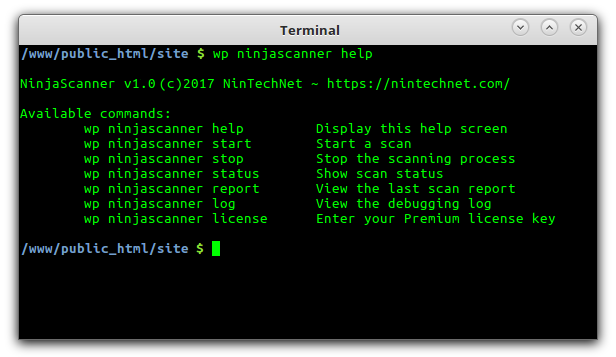
Интеграция с WP-CLI. 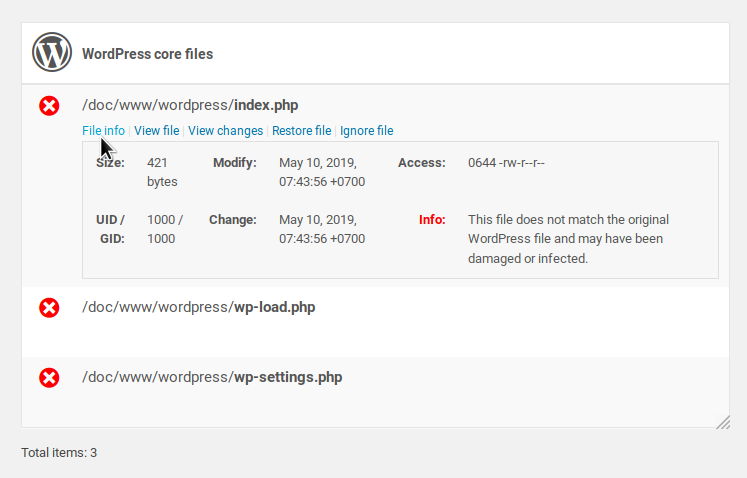
Образец отчета. 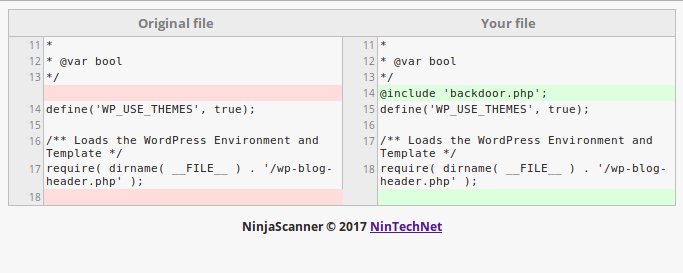
Просмотр различий между модифицированными и оригинальными файлами. 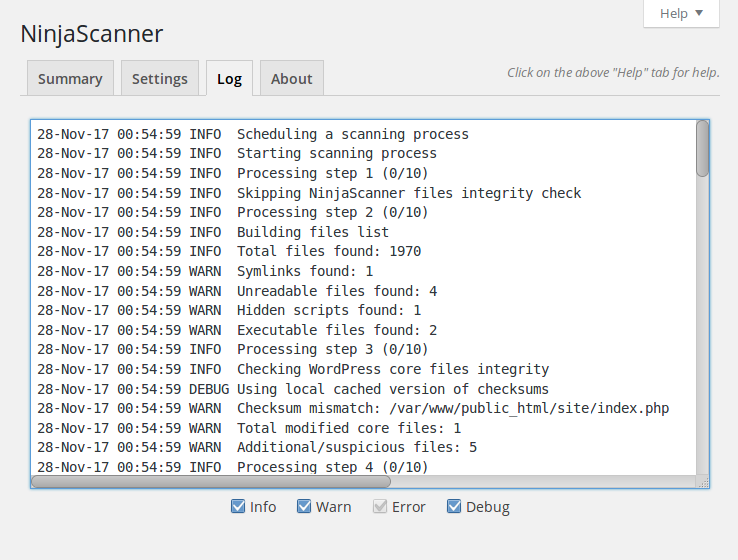
Журнал отладки. 
Интеграция с NinjaFirewall.
Установка
- Upload the
ninjascannerfolder to the/wp-content/plugins/directory. - Activate the plugin through the ‘Plugins’ page in WordPress.
- Plugin settings are located in the ‘Tools > NinjaScanner’ sub-menu.
Отзывы


Участники и разработчики
«NinjaScanner — сканирование на вирусы и вредоносные программы» — проект с открытым исходным кодом. В развитие плагина внесли свой вклад следующие участники:
Участники

«NinjaScanner — сканирование на вирусы и вредоносные программы» переведён на 2 языка. Благодарим переводчиков за их работу.
Перевести «NinjaScanner — сканирование на вирусы и вредоносные программы» на ваш язык.
Заинтересованы в разработке?
Посмотрите код, проверьте SVN репозиторий, или подпишитесь на журнал разработки по RSS.
Журнал изменений
3.2.8
- Fixed a bug where it was not possible to compare two files.
3.2.7
- Fixed a potential «stat failed» PHP warning when viewing a report.
3.2.6
- Administrators can only move to the quarantine folder a file that was flagged as suspicious by the scanner (props Jonas Benjamin Friedli).
3.2.5
- The scanner will display an error if it can’t decode the list of malware signatures.
- Обновлены библиотеки Prism.js.
- Small fixes and adjustments.
3.2.4
- Fixed a potential «Function _load_textdomain_just_in_time was called incorrectly» PHP notice that can occurred with WordPress >=6.7.
3.2.3
- We have a new API: api.nintechnet.com. Make sure to whitelist this subdomain if you are filtering outgoing connections.
3.2.2
- Fixed a bug where MU plugins added to the list of ignored files were still displaying a warning in the report sent by email.
3.2.1
- Fixed a potential «Undefined constant NFW_ENGINE_VERSION» fatal error.
- Adjusted PHP max_execution_time and memory limit during a scan.
3.2
- The «Apply the exclusion list to the file integrity checker» feature from the «Ignore files/folders» option will now apply to WordPress core files as well, not only to the themes and plugins files.
3.1
- Fixed a potential «File is not in the ABSPATH or DOCUMENT_ROOT» error message when trying to view a file.
- Fixed an issue where it was not possible to activate or deactivate NinjaScanner from WP CLI.
- The scanner will attempt to disable the PHP display_errors directive so that notice, warning and error messages won’t show up in the AJAX response.
- Small fixes and adjustments.
- Minimum PHP Version updated to 7.1.
3.0.12
- Fixed a potential «Cannot use object of type WP_Error as array» fatal error.
- Updated «Tested up to» to match WordPress 6.2.
3.0.11
- Fix compatibility issue with PHP 8.2.
- Fix compatibility issue with older PHP version (<7.3).
- Обновлены библиотеки Prism.js.
- Small fixes and adjustments.
3.0.10
- On websites running PHP 7.3 or above, NinjaScanner will use the hrtime() function instead of microtime() for its metrics, because it is more reliable as it is not based on the internal system clock.
- Fixed an issue where it was not possible to quarantine a file when running NinjaScanner on localhost over TLS because cURL rejected the self-signed certificate.
- Fixed a bug with right-to-left (RTL) WordPress sites where the checkboxes below the log were all messed up.
- Обновлены библиотеки Prism.js.
- Small fixes and adjustments.
3.0.9
- Fixed a potential PHP «sprintf» fatal error that could occur if there were an error during the scanning process.
- Исправлена ошибка regex при проверке абсолютного пути в Linux или Windows.
- Обновлены библиотеки Prism.js.
- Added more details to the scanner’s log when a scan is cancelled because of an error.
3.0.8
- If the PHP ZIP extension, which provides the ZipArchive class, is missing on the server, NinjaScanner will fall back to the built-in PclZip library instead of refusing to run.
- When catching a PHP fatal error (E_ERROR), the scanner will write to the log the full path to the file where the error occured.
- Small fixes and adjustments.
3.0.7
- Fixed an issue during the anti-malware scan where the number of scanned items appeared to be higher than the total of files to be scanned, and returned an «Unknown Error» message.
- Fixed an issue where corrupted ZIP files downloaded from wordpress.org were not deleted.
- The anti-malware signatures file used during the scan will be temporarily saved to the database and no longer to disk because some antivirus used on Microsoft-IIS are still flagging the file as malware and delete it.
3.0.6
- Fixed a potential «Missing Lock File» error that may occur on slow servers.
- Added streaming to the wp_remote_get function to lower the amount of memory used during downloads (props Daniel Ruf).
3.0.5
- Fixed error introduced in 3.0.3 affecting PHP versions 7.1 and below.
- Replaced the «install_plugins» capability with «manage_options», to allow administrators to run the scanner even if the WordPress built-in «DISALLOW_FILE_MODS» constant is defined.
- Fixed a potential «Undefined variable: snapshot» PHP notice.
- Better detection of any potential error during the scanner initialization by using a blocking socket.
- The temporary file used to saved malware signatures during the scanning process is now base64-encoded to prevent it form being flagged as malware by some hosting companies.
- Updated PrismJS to the latest version.
- Added missing description to the WP-CLI script (props Daniel Ruf).
- Small fixes and adjustments.
3.0.2
- Fixed a potential issue where the scan could not start.
3.0.1
- Fixed a potential syntax error introduced in v3.0.
- The whole scanner engine was rewritten from scratch, so that it can work on very low resource servers.
- The scan report can be displayed on multiple pages instead of one only. This can be selected from the «Settings > Advanced Users Settings > Display report» option.
- It is possible to select which folders to scan in the blog directory («Settings > Blog directory»).
- HTTP basic authentication is now supported by the WP-CRON fork method.
- Корректировки для совместимости с PHP 8.0.
- Updated PrismJS libraries.
- Many small fixes and improvements.